Skip to content
  • Recent
  • Tags
  • Popular
  • Users
  • Search
Skins
  • Light
  • Brite
  • Cerulean
  • Cosmo
  • Flatly
  • Journal
  • Litera
  • Lumen
  • Lux
  • Materia
  • Minty
  • Morph
  • Pulse
  • Sandstone
  • Simplex
  • Sketchy
  • Spacelab
  • United
  • Yeti
  • Zephyr
  • Dark
  • Cyborg
  • Darkly
  • Quartz
  • Slate
  • Solar
  • Superhero
  • Vapor

  • Default (No Skin)
  • No Skin
Collapse

Lay Theme Forum

  1. Home
  2. General Discussion
  3. different secondary menus
different secondary menus

Scheduled Pinned Locked Moved General Discussion
25 Posts 3 Posters 4.6k Views 1 Watching
  • Oldest to Newest
  • Newest to Oldest
  • Most Votes
Reply
  • Reply as topic
Log in to reply
This topic has been deleted. Only users with topic management privileges can see it.
  • C cschm.tz

    @alasdair17

    Hey hope you are well! I applied some css to the captions, see if this helps you? :)

    .lay-carousel-sink {
    position: fixed !important;
    bottom: -24px !important;
    left: 12px !important;
    z-index: 999 !important; }

    A
    A
    alasdair17
    Global Moderator
    wrote on last edited by
    #10

    @cschm-tz awesome, thanks man!

    1 Reply Last reply
    0
    • arminunruhA
      arminunruhA
      arminunruh
      Global Moderator
      wrote on last edited by
      #11

      @cschm-tz

      is everything resolved?

      C 1 Reply Last reply
      0
      • arminunruhA arminunruh

        @cschm-tz

        is everything resolved?

        C
        C
        cschm.tz
        wrote on last edited by
        #12

        @arminunruh

        Hi Armin,

        Thanks for getting back to me.

        Not yet unfortunately. Captions seem to work individually in desktop version and mobile version, they are ultimately in the right position. However, when shrinking the page on desktop, the caption on bottom left jumps up leaving a gap underneath.

        http://s955093523.mialojamiento.es/info-copy/

        I would really like to avoid this if possible. Would you be able to help me assuring this? I have reached out for help but they weren't able to crack this..

        Thanks a lot and hope all is well!

        1 Reply Last reply
        0
        • arminunruhA
          arminunruhA
          arminunruh
          Global Moderator
          wrote on last edited by
          #13

          do u have a video or screenshot of this, i cant reproduce this

          C 1 Reply Last reply
          0
          • arminunruhA arminunruh

            do u have a video or screenshot of this, i cant reproduce this

            C
            C
            cschm.tz
            wrote on last edited by
            #14

            @arminunruh sure thing please find attached!Captura-de-pantalla-2023-06-13-a-las-14.55.30.jpg Captura-de-pantalla-2023-06-13-a-las-14.54.30.jpg

            1 Reply Last reply
            0
            • arminunruhA
              arminunruhA
              arminunruh
              Global Moderator
              wrote on last edited by
              #15

              oh i see! its only on the phone version!

              u are using this css for the desktop version:

              .lay-carousel-sink {
              position: fixed !important;
              bottom: -24px !important;
              left: 12px !important;
              z-index: 999 !important;
              }

              you have to use that css for the phone version too!

              in lay options → custom css & html → css for phone

              C 1 Reply Last reply
              0
              • arminunruhA arminunruh

                oh i see! its only on the phone version!

                u are using this css for the desktop version:

                .lay-carousel-sink {
                position: fixed !important;
                bottom: -24px !important;
                left: 12px !important;
                z-index: 999 !important;
                }

                you have to use that css for the phone version too!

                in lay options → custom css & html → css for phone

                C
                C
                cschm.tz
                wrote on last edited by
                #16

                @arminunruh thanks so much! feel like i had been here before and had issues but it's working now which is what counts! have a lovely week :)

                C 1 Reply Last reply
                1
                • C cschm.tz

                  @arminunruh thanks so much! feel like i had been here before and had issues but it's working now which is what counts! have a lovely week :)

                  C
                  C
                  cschm.tz
                  wrote on last edited by
                  #17

                  @cschm-tz

                  hi @arminunruh after cleaning my cache on mobile I have now found what the issue was, the last time I copied the css from the desktop version into the mobile version.

                  What you suggested does fix things when shrinking the browser on desktop. However, on mobile it moves the caption to a different position (bigger bottom and left margins). Please see attached — seems like going in a vicious cycle! :(

                  What do you think this could be?
                  Thanks again!

                  IMG_82D37D6953C5-1.jpeg

                  1 Reply Last reply
                  0
                  • arminunruhA
                    arminunruhA
                    arminunruh
                    Global Moderator
                    wrote on last edited by
                    #18

                    this happens because some of your captions span multiple lines because they are longer.

                    use this css instead:

                    .lay-carousel-sink .single-caption{
                    vertical-align: bottom!important;
                    }
                    

                    and

                    .lay-carousel-sink {
                        position: fixed !important;
                        bottom: 12px!important;
                        left: 12px !important;
                        z-index: 999 !important;
                    }


                    the difference is we align the texts to the bottom and we change "bottom: -24px;" to "bottom: 12px;" for the wrap

                    C 1 Reply Last reply
                    0
                    • arminunruhA arminunruh

                      this happens because some of your captions span multiple lines because they are longer.

                      use this css instead:

                      .lay-carousel-sink .single-caption{
                      vertical-align: bottom!important;
                      }
                      

                      and

                      .lay-carousel-sink {
                          position: fixed !important;
                          bottom: 12px!important;
                          left: 12px !important;
                          z-index: 999 !important;
                      }


                      the difference is we align the texts to the bottom and we change "bottom: -24px;" to "bottom: 12px;" for the wrap

                      C
                      C
                      cschm.tz
                      wrote on last edited by
                      #19

                      @arminunruh said in different secondary menus:

                      .lay-carousel-sink {
                      position: fixed !important;
                      bottom: 12px!important;
                      left: 12px !important;
                      z-index: 999 !important;
                      }

                      Hi @arminunruh

                      Sorry but that only seems to be working for chrome but not for safari or mobile, screenshots attached...I worry that we're going in circles, is there any chance you understand what is happening, I am asked to share final site before the weekend?

                      Thank you!
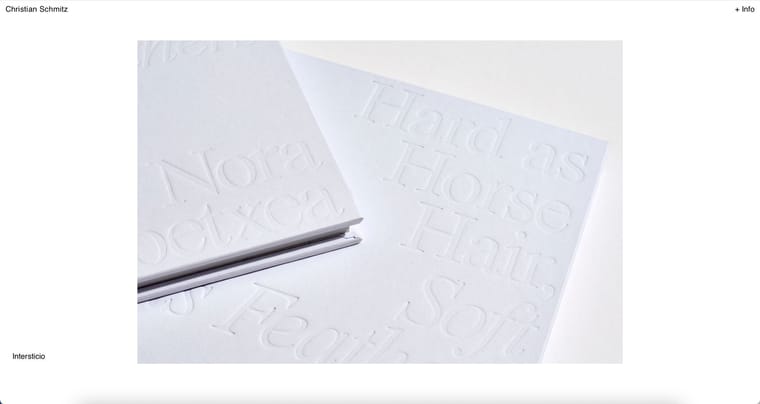
                      Captura-de-pantalla-2023-08-24-a-las-9.26.4/Users/christianschmitz/Downloads/IMG_5456.PNG6.jpg

                      arminunruhA 1 Reply Last reply
                      0
                      • arminunruhA
                        arminunruhA
                        arminunruh
                        Global Moderator
                        wrote on last edited by
                        #20

                        @arminunruh said in different secondary menus:

                        .lay-carousel-sink .single-caption{
                        vertical-align: bottom!important;
                        }

                        this is the important part of the css

                        1 Reply Last reply
                        0
                        • arminunruhA
                          arminunruhA
                          arminunruh
                          Global Moderator
                          wrote on last edited by
                          #21

                          here you have an empty <p> </p> tag, causing your caption to be positioned differently
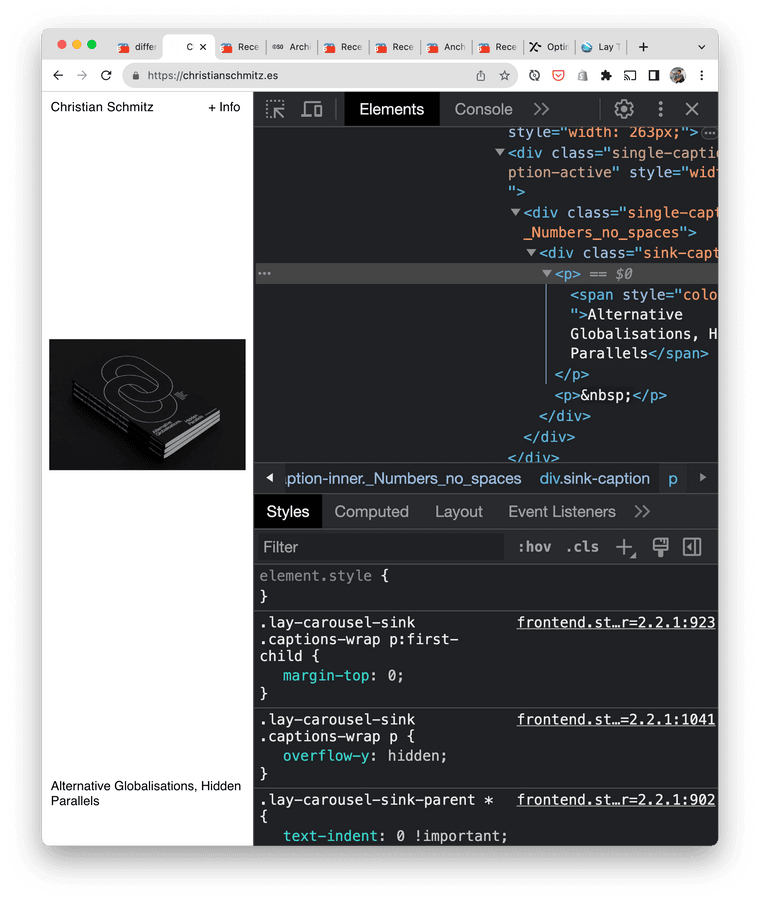
                          Screenshot 2023-08-24 at 11.30.49.png

                          1 Reply Last reply
                          0
                          • C cschm.tz

                            @arminunruh said in different secondary menus:

                            .lay-carousel-sink {
                            position: fixed !important;
                            bottom: 12px!important;
                            left: 12px !important;
                            z-index: 999 !important;
                            }

                            Hi @arminunruh

                            Sorry but that only seems to be working for chrome but not for safari or mobile, screenshots attached...I worry that we're going in circles, is there any chance you understand what is happening, I am asked to share final site before the weekend?

                            Thank you!

                            Captura-de-pantalla-2023-08-24-a-las-9.26.4/Users/christianschmitz/Downloads/IMG_5456.PNG6.jpg

                            arminunruhA
                            arminunruhA
                            arminunruh
                            Global Moderator
                            wrote on last edited by
                            #22

                            i will release an update today that will fix it

                            1 Reply Last reply
                            0
                            • arminunruhA
                              arminunruhA
                              arminunruh
                              Global Moderator
                              wrote on last edited by
                              #23

                              ok u can update now, then it should work

                              C 1 Reply Last reply
                              0
                              • arminunruhA arminunruh

                                ok u can update now, then it should work

                                C
                                C
                                cschm.tz
                                wrote on last edited by
                                #24

                                @arminunruh thanks Armin, just to clarify, what do I need to update on my side? The css you share has been applied both for Desktop CSS and Mobile CSS?

                                1 Reply Last reply
                                0
                                • arminunruhA
                                  arminunruhA
                                  arminunruh
                                  Global Moderator
                                  wrote on last edited by
                                  #25

                                  just update your lay theme and remove the empty <p></p>
                                  tag

                                  the css is correct already it seems

                                  if it doesnt work:

                                  can you send your website address, /wp-admin/ username and password and a link to this topic to info@laytheme.com?

                                  1 Reply Last reply
                                  0

                                  Hello! It looks like you're interested in this conversation, but you don't have an account yet.

                                  Getting fed up of having to scroll through the same posts each visit? When you register for an account, you'll always come back to exactly where you were before, and choose to be notified of new replies (either via email, or push notification). You'll also be able to save bookmarks and upvote posts to show your appreciation to other community members.

                                  With your input, this post could be even better 💗

                                  Register Login
                                  Reply
                                  • Reply as topic
                                  Log in to reply
                                  • Oldest to Newest
                                  • Newest to Oldest
                                  • Most Votes


                                  Online Users
                                  Forgot your key, lost your files, need a previous Lay Theme or Addon version? Go to www.laykeymanager.com
                                  laytheme.com
                                  • Login

                                  • Don't have an account? Register

                                  • Login or register to search.
                                  • First post
                                    Last post
                                  0
                                  • Recent
                                  • Tags
                                  • Popular
                                  • Users
                                  • Search