font is blurry in a custom menu bar
-
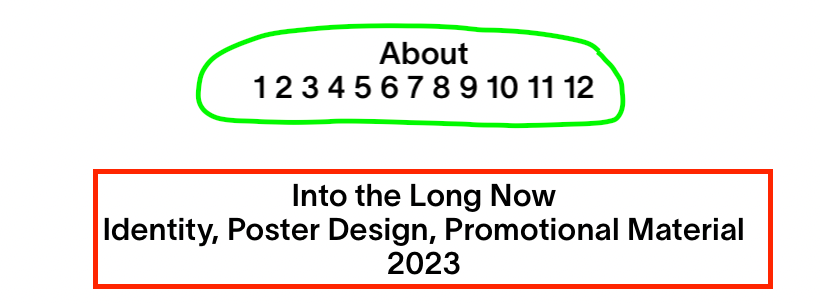
Hi, I noticed that the font in my custom menu bar is a little blurry in comparison to other (static) typography on my website. Please have a look at the image and compare. "Green area" is menu bar, "red area" is normal sharp typography. If you look carefully you will see that the "green area" renders the font not as sharp as the "red area" does. Pay attention to the differences in letters "o", "t" or the numbers "2".
Do you you know how to fix it and make them both sharp?
PS. they both are the same font, same weight, same size, same color.Also I added these settings in my custom code:
html, body {
-webkit-font-smoothing: antialiased !important;
text-rendering: optimizeLegibility !important;
-webkit-font-kerning: auto !important;
font-kerning: auto !important;
-moz-osx-font-smoothing: grayscale;I think they are only being applied to the "red area" on the website and not on the "green area".
Thank you
-
do u have a link
-
do u have a link
@arminunruh yes sure, pavloradich.com
-
when you center the navigation, it uses css that places the text in the middle, and the perfect middle-point is most-often a subpixel coordinate like: 800.4px
so thats why it looks a little blurry
you might find success with setting the position to top left and then somehow using css to center the nav in a different way.you can try any of those css settings:
https://copyprogramming.com/howto/center-a-position-fixed-elementi don't have time to work on this :/
-
when you center the navigation, it uses css that places the text in the middle, and the perfect middle-point is most-often a subpixel coordinate like: 800.4px
so thats why it looks a little blurry
you might find success with setting the position to top left and then somehow using css to center the nav in a different way.you can try any of those css settings:
https://copyprogramming.com/howto/center-a-position-fixed-elementi don't have time to work on this :/
@arminunruh thank you. Is there still a way to center it and keep the elements sharp? Perhaps I can center it on 800 or 801 px?
-
you could align it left and then write javascript to center it ^^
i think i wont work on this though as its barely visible i think :O

Hello! It looks like you're interested in this conversation, but you don't have an account yet.
Getting fed up of having to scroll through the same posts each visit? When you register for an account, you'll always come back to exactly where you were before, and choose to be notified of new replies (either via email, or push notification). You'll also be able to save bookmarks and upvote posts to show your appreciation to other community members.
With your input, this post could be even better 💗
Register Login