Google noindex problem
-
yes its a setting in wordpress, you set it to:
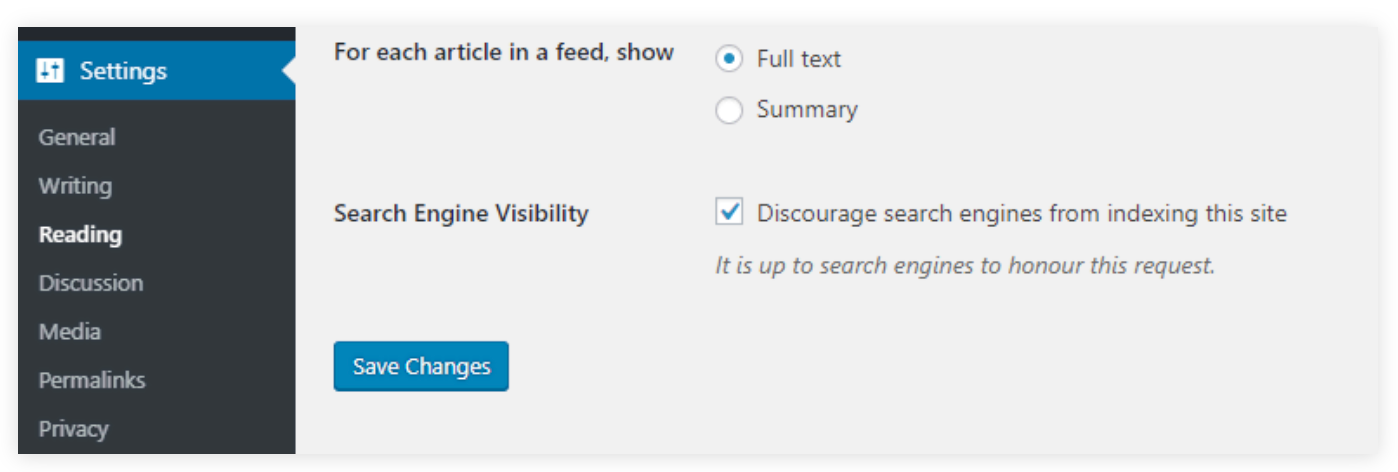
some people set this during installation
yes @Monamos was correct
-
yes its a setting in wordpress, you set it to:
some people set this during installation
yes @Monamos was correct
@arminunruh i have unchecked this box 1-2 months ago, but nothing happened, still not searchable on google. Am I missing something?
-
@arminunruh i have unchecked this box 1-2 months ago, but nothing happened, still not searchable on google. Am I missing something?
-
yea i think i heard somewhere it can take ages for google to index your site if you had this setting enabled previously
maybe you can submit your website here somehow
https://search.google.com/search-console/ -
@Nzagamba do you have a robotics.txt file on the server and also a sitemap.xml file? They will both help too. The robots file specifies if the site is allowed to be crawled.
@Monamos My website, after months, is still not indexed by google. I checked, somehow I do have a robots.txt. When I open tobiasgutmann.com/robots.txt it says:
User-agent: *
Disallow: /wp-admin/
Allow: /wp-admin/admin-ajax.php

Sitemap: https://tobiasgutmann.com/wp-sitemap.xml
Can I delete this somewhere, or change it? Is it a different reason, why google can't find my website?
Glad for any help!Best,
Tobias -
yea i think i heard somewhere it can take ages for google to index your site if you had this setting enabled previously
maybe you can submit your website here somehow
https://search.google.com/search-console/@arminunruh I did submit it on google console, and after months it still says, it does not find the page. I have no idea what else to do. any idea?
-
@Nzagamba it really depends what the specific errors are that you are getting. Is it saying the page is set not to crawl, or something else? Also have you generated a proper xml sitemap file? I found that made a difference on my end. This is a good one below. Just enter your url and it will generate an XML map you can put on your server: https://octopus.do/sitemap/resource/generator
-

/wp-admin/
go to settings -> reading. is this activated?i heard if you ever activated it, google will take ages to index your website
i just added your website to laytheme.com
maybe that will index your website, as layteme.com is indexed and then it might follow that link to your site
-
@Nzagamba it really depends what the specific errors are that you are getting. Is it saying the page is set not to crawl, or something else? Also have you generated a proper xml sitemap file? I found that made a difference on my end. This is a good one below. Just enter your url and it will generate an XML map you can put on your server: https://octopus.do/sitemap/resource/generator
@Monamos Thanks for your hints. I now made a sitemap with octopus. I've never done it before. Did I do it correctly?
https://tobiasgutmann.com/sitemap.xmlQuestion: If I go to tobiasgutmann.com/robots.txt the sitemap links to wp-sitemap.xml, but I don't see this file in my ftp. It is somehow hidden and generated by wordpress. Do I need to change my robots.txt somehow?
Do you recommend working with a SEO plugin, to generate a proper sitemap?
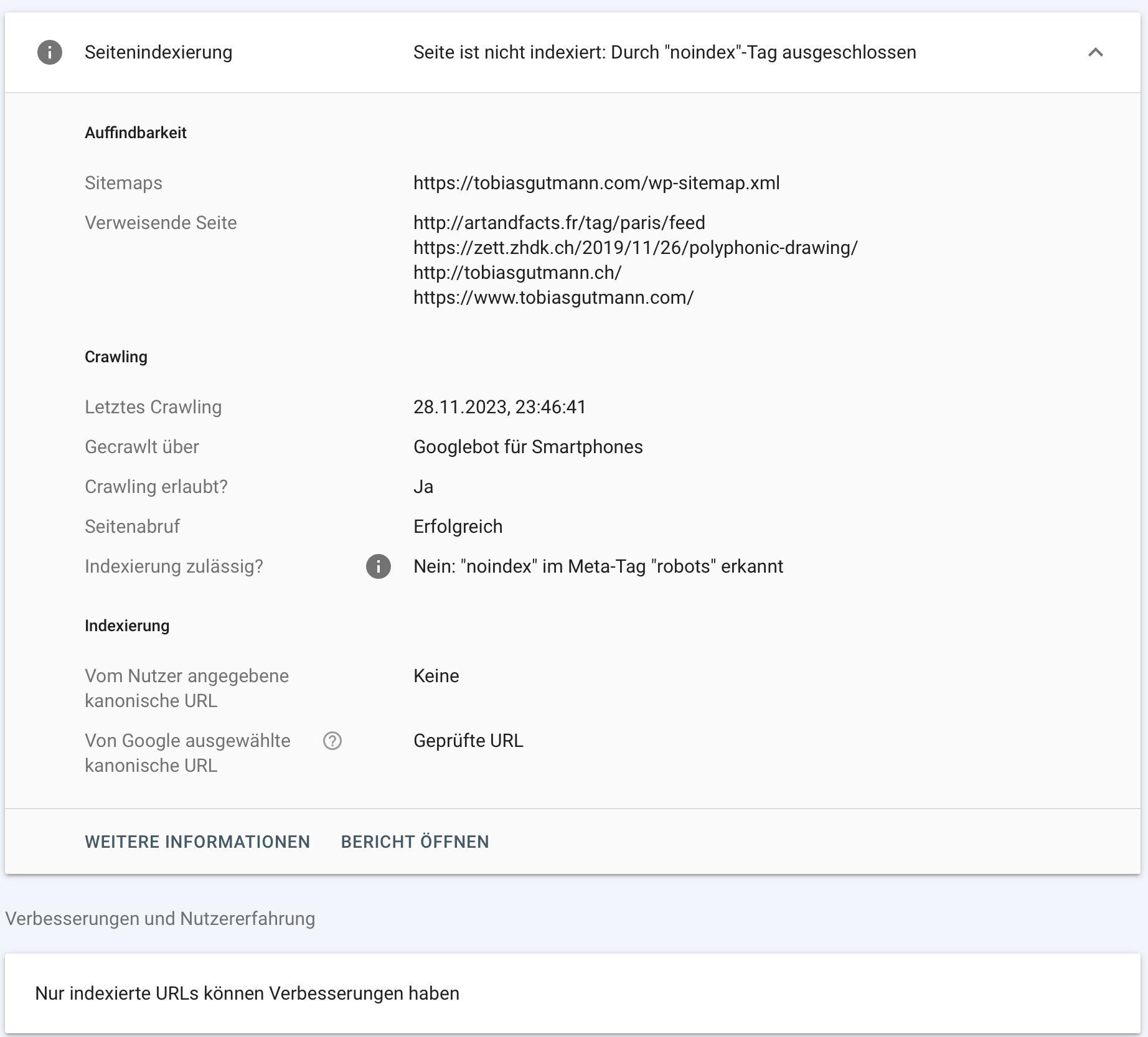
Google console tells me Excluded by “noindex” tag detected in robots.txt: I don't know where to check if I have a noindex tag on my wordpress sites, or how to change it. any hints?
Thanks in advance for your advice!
-
/wp-admin/
go to settings -> reading. is this activated?i heard if you ever activated it, google will take ages to index your website
i just added your website to laytheme.com
maybe that will index your website, as layteme.com is indexed and then it might follow that link to your site@arminunruh
I have search engine visibility deactivated for months now, so this shouldn't be the issue. I just described the situation in detail to @Monamos in the above post.I really hope I can figure this out soon with the sitemap and robots txt... I appreciate any further advice since this whole SEO topic is very unfamiliar to me.
Many thanks for adding my site to your laytheme.com! I feel honoured and hopefully google will see it too. :-)
-
@Nzagamba A few thoughts:
- I think you need to update your sitemap url in the robots file, to the new one you made on Octopus and ensure it's uploaded to your server.
- I would suggest checking all your site pages and make sure there are none that have a no-index. You can do this by viewing the source and looking in the header. Make sure that nowhere in any of your page headers is a setting stating <meta name="robots" content="noindex,nofollow">. As I understand, if Google spots this, it will flag it as noindex even if you have other pages that don't have it.

Hello! It looks like you're interested in this conversation, but you don't have an account yet.
Getting fed up of having to scroll through the same posts each visit? When you register for an account, you'll always come back to exactly where you were before, and choose to be notified of new replies (either via email, or push notification). You'll also be able to save bookmarks and upvote posts to show your appreciation to other community members.
With your input, this post could be even better 💗
Register Login