Skip to content
  • Recent
  • Tags
  • Popular
  • Users
  • Search
Skins
  • Light
  • Brite
  • Cerulean
  • Cosmo
  • Flatly
  • Journal
  • Litera
  • Lumen
  • Lux
  • Materia
  • Minty
  • Morph
  • Pulse
  • Sandstone
  • Simplex
  • Sketchy
  • Spacelab
  • United
  • Yeti
  • Zephyr
  • Dark
  • Cyborg
  • Darkly
  • Quartz
  • Slate
  • Solar
  • Superhero
  • Vapor

  • Default (No Skin)
  • No Skin
Collapse

Lay Theme Forum

  1. Home
  2. General Discussion
  3. Custom row height + row image background
Custom row height + row image background

Scheduled Pinned Locked Moved General Discussion
14 Posts 4 Posters 2.2k Views 2 Watching
  • Oldest to Newest
  • Newest to Oldest
  • Most Votes
Reply
  • Reply as topic
Log in to reply
This topic has been deleted. Only users with topic management privileges can see it.
  • arminunruhA
    arminunruhA
    arminunruh
    Global Moderator
    wrote on last edited by
    #2

    In the gridder, right click on the row and choose "set html class and id". For "html class" enter:

    mysmallrowbackground

    Enter the custom css in "lay options" -> "custom css & html":

    .mysmallrowbackground .background-image{
        left: 20px;
        right: 20px;
        width: auto;
    }
    

    or

    .mysmallrowbackground .background-image{
        left: 5%;
        right: 5%;
        width: auto;
    }
    
    1 Reply Last reply
    0
    • M
      M
      minutes
      wrote on last edited by
      #3

      @arminunruh wonderful, thanks a lot!

      1 Reply Last reply
      0
      • O
        O
        oxfir
        wrote on last edited by
        #4

        how can i change this properties, what should i add, to always fit my image height into the row, without cropping the height or streching the image. (width can be cropped).

        thank you in andvance!

        P 1 Reply Last reply
        0
        • O oxfir

          how can i change this properties, what should i add, to always fit my image height into the row, without cropping the height or streching the image. (width can be cropped).

          thank you in andvance!

          P
          P
          pavloradich
          wrote on last edited by
          #5

          @oxfir +1
          Would like to know the same exact thing!

          1 Reply Last reply
          0
          • P
            P
            pavloradich
            wrote on last edited by
            #6

            @arminunruh please, just let us place the image in the row that is taking full browser height (without cropping the height) and stays proportional to the width.

            1 Reply Last reply
            0
            • arminunruhA
              arminunruhA
              arminunruh
              Global Moderator
              wrote on last edited by
              #7

              in gridder: right click on row - enter html class/id → as class enter: "contain"
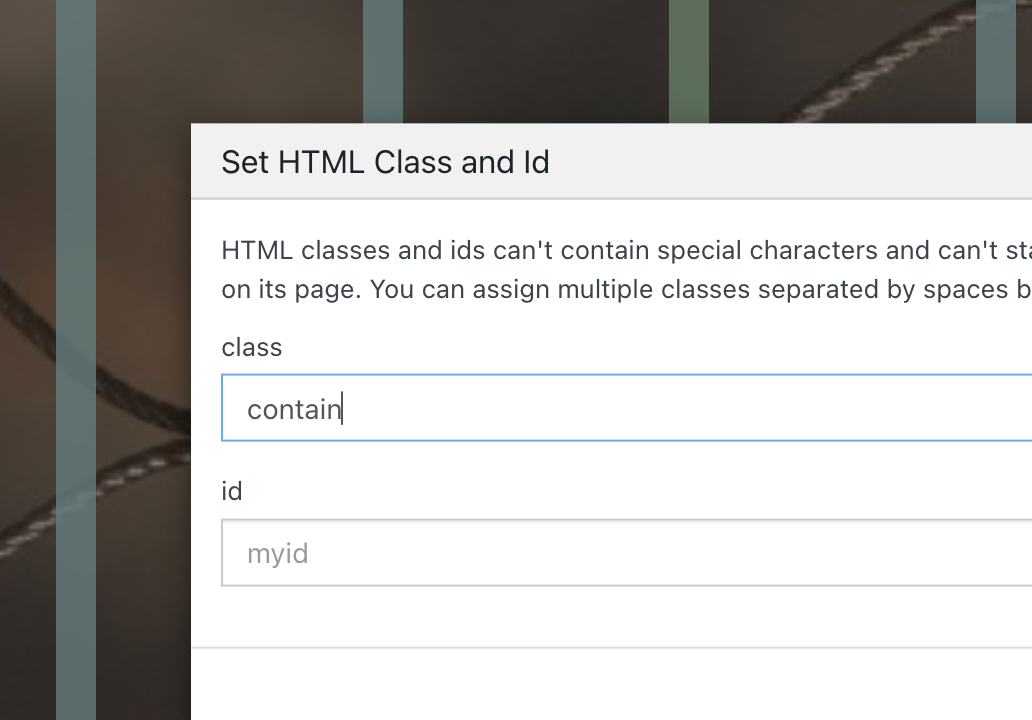
              Screenshot 2024-07-23 at 12.26.02.png

              Enter the custom css in "lay options" -> "custom css & html"

              .contain img{
              object-fit: contain!important;
              }
              

              this will result in the background image not getting cut off, but the image will be shown like this:
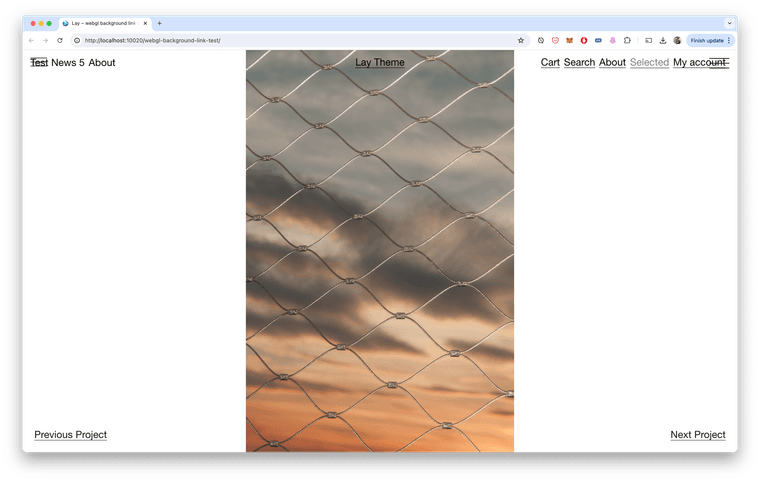
              Screenshot 2024-07-23 at 12.28.58.png

              1 Reply Last reply
              0
              • arminunruhA
                arminunruhA
                arminunruh
                Global Moderator
                wrote on last edited by arminunruh
                #8

                but after i think about it more, thats probably not what you want. :O

                enter the class "full-height" in gridder: right click on row - enter html class/id
                (without " ")

                then css:

                .full-height img{
                width: auto!important;
                height: 100%!important;
                object-fit: none!important;
                left: 50%!important;
                transform: translateX(-50%)!important;
                }
                
                P 1 Reply Last reply
                0
                • arminunruhA
                  arminunruhA
                  arminunruh
                  Global Moderator
                  wrote on last edited by
                  #9

                  this will not fill out the whole row in some cases

                  1 Reply Last reply
                  0
                  • arminunruhA arminunruh referenced this topic on
                  • arminunruhA arminunruh

                    but after i think about it more, thats probably not what you want. :O

                    enter the class "full-height" in gridder: right click on row - enter html class/id
                    (without " ")

                    then css:

                    .full-height img{
                    width: auto!important;
                    height: 100%!important;
                    object-fit: none!important;
                    left: 50%!important;
                    transform: translateX(-50%)!important;
                    }
                    
                    P
                    P
                    pavloradich
                    wrote on last edited by
                    #10

                    @arminunruh thank you!!! what makes you think that "contain" option is not what we want? I think it works perfectly and looks exactly how we wanted.

                    1 Reply Last reply
                    0
                    • arminunruhA
                      arminunruhA
                      arminunruh
                      Global Moderator
                      wrote on last edited by
                      #11

                      oh ok!

                      with contain, there can also be gaps at the top and bottom.
                      i thought you only wanted gaps at the left and right

                      P 1 Reply Last reply
                      0
                      • arminunruhA arminunruh

                        oh ok!

                        with contain, there can also be gaps at the top and bottom.
                        i thought you only wanted gaps at the left and right

                        P
                        P
                        pavloradich
                        wrote on last edited by
                        #12

                        @arminunruh thank you, any idea how to contain two or three images in one "browser height" row as well?

                        When they're like this: ■ ■ ■

                        1 Reply Last reply
                        0
                        • arminunruhA
                          arminunruhA
                          arminunruh
                          Global Moderator
                          wrote on last edited by
                          #13

                          +more → +html

                          in the gridder.
                          then insert:

                          <div style="display: flex; gap: 10px; position: absolute; width: 100%; height: 100svh; justify-content: center;">
                              <img style="height: 100svh;" src="https://upload.wikimedia.org/wikipedia/commons/9/90/Sanborn_Fire_Insurance_Map_from_Salem%2C_Essex_County%2C_Massachusetts%2C_1957%2C_Plate_0060.jpg" lazy/>
                              <img style="height: 100svh;" src="https://upload.wikimedia.org/wikipedia/commons/9/90/Sanborn_Fire_Insurance_Map_from_Salem%2C_Essex_County%2C_Massachusetts%2C_1957%2C_Plate_0060.jpg" lazy/>
                              <img style="height: 100svh;" src="https://upload.wikimedia.org/wikipedia/commons/9/90/Sanborn_Fire_Insurance_Map_from_Salem%2C_Essex_County%2C_Massachusetts%2C_1957%2C_Plate_0060.jpg" lazy/>
                          </div>
                          

                          make sure you size that html element to span the whole width like here:

                          Screenshot 2024-07-25 at 19.25.04.png

                          and make sure you use "right click -> browser height" on that row

                          1 Reply Last reply
                          0
                          • arminunruhA
                            arminunruhA
                            arminunruh
                            Global Moderator
                            wrote on last edited by
                            #14

                            this will probably cut off the left and right image a lot!

                            this is what it looks like for me with 3 portrait images:
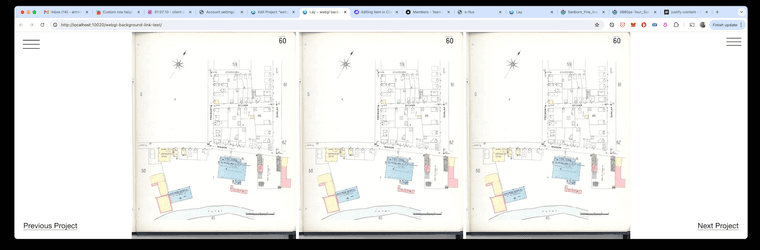
                            Screenshot 2024-07-25 at 19.29.03.png

                            1 Reply Last reply
                            0

                            Hello! It looks like you're interested in this conversation, but you don't have an account yet.

                            Getting fed up of having to scroll through the same posts each visit? When you register for an account, you'll always come back to exactly where you were before, and choose to be notified of new replies (either via email, or push notification). You'll also be able to save bookmarks and upvote posts to show your appreciation to other community members.

                            With your input, this post could be even better 💗

                            Register Login
                            Reply
                            • Reply as topic
                            Log in to reply
                            • Oldest to Newest
                            • Newest to Oldest
                            • Most Votes


                            Online Users
                            Forgot your key, lost your files, need a previous Lay Theme or Addon version? Go to www.laykeymanager.com
                            laytheme.com
                            • Login

                            • Don't have an account? Register

                            • Login or register to search.
                            • First post
                              Last post
                            0
                            • Recent
                            • Tags
                            • Popular
                            • Users
                            • Search
