carousel addon is blank on the front page
-
hey i think there was one version, like last week or 2 weeks ago maybe
where i implemented "script defer" loading
and then quickly disabled it again for the next update after realizing the site doesn't load properly sometimes
your lay theme version is up-to-date, so i think it won't happen again
@arminunruh Hey it happened again.
here's a video https://we.tl/t-6DtFwJYRQo
it happened twice today. -
can you send your website address, /wp-admin/ username and password and a link to this topic to info@laytheme.com?
-
can you send your website address, /wp-admin/ username and password and a link to this topic to info@laytheme.com?
@arminunruh just email you everything. thank you!
-
ok the issue was "lay options" -> "carousel addon" -> "do less sizing by javascript" was enabled
and another plugin was active that created a js error
-
hi @arminunruh,
I'm having the same issue. I've disabled all my existing plugins + code to see if it was something creating an error, but it wasn't. I also went to check if "do less sizing by javascript" was enabled" like similar issues above, however I don't have that option. I checked to update my plugin (currently using version 1.3.3 of the carousel add-on). However, for some reason the plug-in panel won't update it.
Is this the most recent update for the plugin? If not, is there a way I can manually auto-update the plugin?
This is the page where the carousel isn't working:
https://www.anniehall.co/work/Thanks!
-
you can get the latest version on laykeymanager.com
the version you have is very old and doesn't update anymore :/ because i switched the updating service
-
you can get the latest version on laykeymanager.com
the version you have is very old and doesn't update anymore :/ because i switched the updating service
@arminunruh got it and it's fixed. Thank you!!
-
Hey there @arminunruh,
I am unfortunately experiencing similar problems. My front page (https://tobiashollender.de) is a carousel slideshow which is not showing anymore. Instead, it loads a white page (happens in both Safari and Chrome) – Mobile is not affected since I don’t use a Carousel there.
I did all the normal steps, cleared the cache, disabled all plug-ins, updated LT, turned off custom code et cetera... (Everything else is working fine. You can mouseover the logo and the menu in the upper most right and left corners.)
A small pointer in the right direction would be greatly appreciated. Thank you very much! <3
-
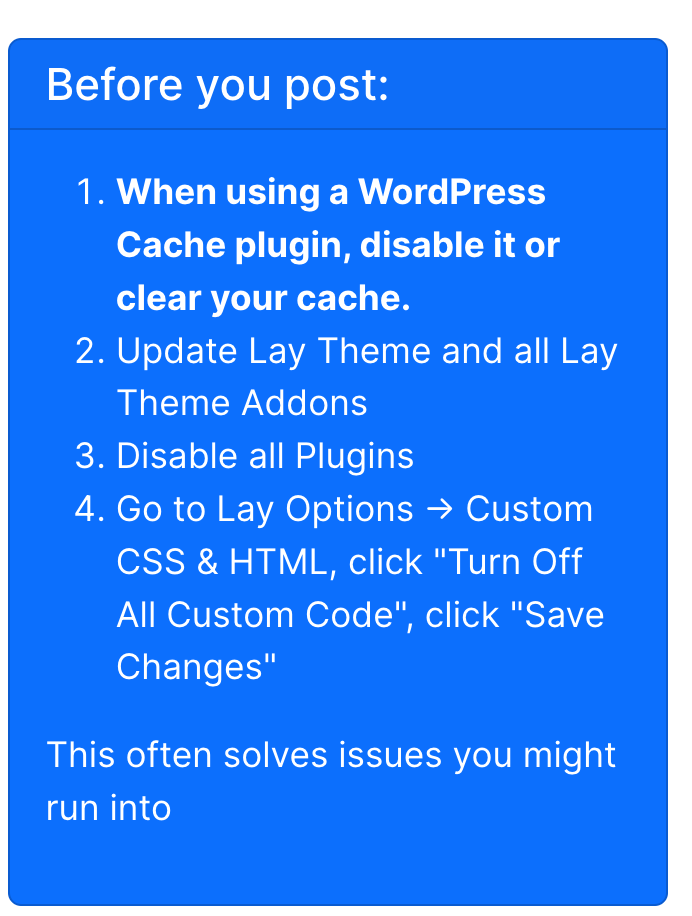
can u do these steps please
-
Hello @arminunruh, thank you for your response!
... and of course, I already did those steps in advance, but without any change...
Is there anything else I can try? It worked flawlessly the weeks before...🤷♂️By the way: If I click “preview changes“, I can see everything working fine...
-
Hello @arminunruh, thank you for your response!
... and of course, I already did those steps in advance, but without any change...
Is there anything else I can try? It worked flawlessly the weeks before...🤷♂️By the way: If I click “preview changes“, I can see everything working fine...
@Schmojima it looks like there are some carousel errors in the chrome inspector console, maybe you could use an older version of the carousel from laykeymanager.com?
-
YESSSSS, it worked! Thank you so much! I had 2.5.4 installed and downgraded to 2.5.3 and it worked instantly.
You made my day! :D

Hello! It looks like you're interested in this conversation, but you don't have an account yet.
Getting fed up of having to scroll through the same posts each visit? When you register for an account, you'll always come back to exactly where you were before, and choose to be notified of new replies (either via email, or push notification). You'll also be able to save bookmarks and upvote posts to show your appreciation to other community members.
With your input, this post could be even better 💗
Register Login