close overlay by pressing burger again mobile
-
Hello!
I am currently working on a diy mobile-menu. Why?: I wanted to have a burger menu that gives me more freedom of what to place where, collaps rows etc.
Maybe there is another function for this? jasonkittner.comPlan is to use the overlay function of a page and use the burger. I managed that the burger swaps to an X the second you press it. But I cannot figure out how to address the now X to close the menu. I tried to use the close button function of the overlay but didn't like that it doesn't replace the burger. this is the code i have right now:
document.addEventListener("DOMContentLoaded", function() {
    var burgerIcon = document.querySelector('.overlay-burger.custom-overlay-burger.burger-overlay-id-73 img');
    var originalSrc = burgerIcon.src; // og burger icon
    var toggleSrc = 'https://www.jasonkittner.com/wp-content/uploads/2024/10/Burger2.png'; // url of x icon

    burgerIcon.addEventListener('click', function() {
        burgerIcon.src = (burgerIcon.src.includes(originalSrc)) ? toggleSrc : originalSrc;
    });
});
I tried this to make the burger close the overlay:
<script>
jQuery(document).on('click', '.overlay-burger.custom-overlay-burger.burger-overlay-id-73', function(){
    jQuery('.lay-overlay .overlay-close.custom-overlay-close-icon').click();
});
</script>
Happy to hear from you!
-
nice website!
if your button has a class of "overlay-close"
(without the "")
then clicking it should close a page overlay -
so after opening the overlay you can add this class i guess!
-
Hi Armin! I appreciate you like the website and thanks for the reply. Just found time to try and fix the error, but it just wont work.
this is the code i came up with now:
document.addEventListener("DOMContentLoaded", function() { var burgerContainer = document.querySelector('.overlay-burger.custom-overlay-burger.burger-overlay-id-73'); var burgerIcon = burgerContainer.querySelector('img'); var originalSrc = burgerIcon.src; // Original burger icon var toggleSrc = 'https://www.jasonkittner.com/wp-content/uploads/2024/10/Burger2.png'; // URL of the 'X' icon // Image toggle functionality and adding classes to the container burgerContainer.addEventListener('click', function() { if (burgerIcon.src.includes(originalSrc)) { burgerIcon.src = toggleSrc; burgerContainer.classList.add('overlay-close'); // Add the classes to the container } else { burgerIcon.src = originalSrc; burgerContainer.classList.remove('overlay-close'); // Remove the classes from the container } }); }); -
hey jason really nice website
using your javascript, the click event doesn't even get triggered for me
but if i bind the click event so it does get triggered by using:jQuery(document).on('click', '.burger-overlay-id-3043', function(event){ })somehow the overlay doesnt even show up
how about you just use the normal X close icon without replacing anything
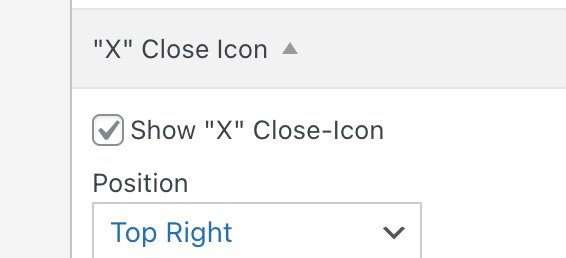
i cant make it work the way you want unfortunately :/

Hello! It looks like you're interested in this conversation, but you don't have an account yet.
Getting fed up of having to scroll through the same posts each visit? When you register for an account, you'll always come back to exactly where you were before, and choose to be notified of new replies (either via email, or push notification). You'll also be able to save bookmarks and upvote posts to show your appreciation to other community members.
With your input, this post could be even better 💗
Register Login