thumbnail categories/tags as menu + z-index issue
-
hi!
i have a fixed primary menu and on my "archive" page, i have a thumbnail grid with categories and tag filter displayed as a sort of "menu" on the same height as the primary menu .
now, when i activate the banner that's behind the primary menu, it lays itself over my tags and categories – how can i make sure they are also displayed on top of the banner?
secondly, i want the thumbnail images to scroll behind the banner – is this possible, while having the categories and tags on top?
--> the website i'm talking about: johannagratzer.site/archive
thanks!
-
i dont understand what u mean with banner
you mean menubar?
nice website
-
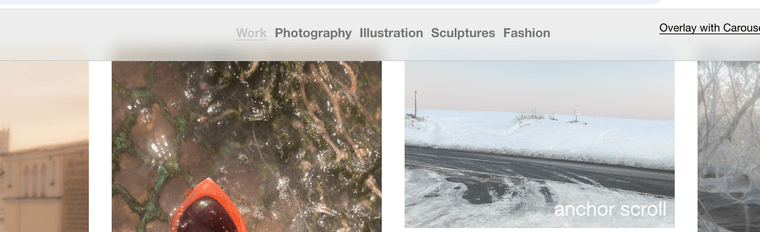
so if you show your menubar in
customize → menu style → menu barand then you want your thumbnailgrid filter on top of the menu bar,
use this css:.lay-content{ position: static!important; } .row{ position: static!important; } .col{ position: static!important; } .lay-thumbnailgrid-filter-wrap{ position: relative; z-index: 11; }will result in:

in the middle, thats my thumbnailgrid filter
this css may result in some other things not working correctly, like row background images

Hello! It looks like you're interested in this conversation, but you don't have an account yet.
Getting fed up of having to scroll through the same posts each visit? When you register for an account, you'll always come back to exactly where you were before, and choose to be notified of new replies (either via email, or push notification). You'll also be able to save bookmarks and upvote posts to show your appreciation to other community members.
With your input, this post could be even better 💗
Register Login