text position wrong after update
-
Hi!
After i updated laytheme the position of the caption is wrong?!
before i manged it to appear centered on the image when hovering?!
any ideas what happened? @arminunruh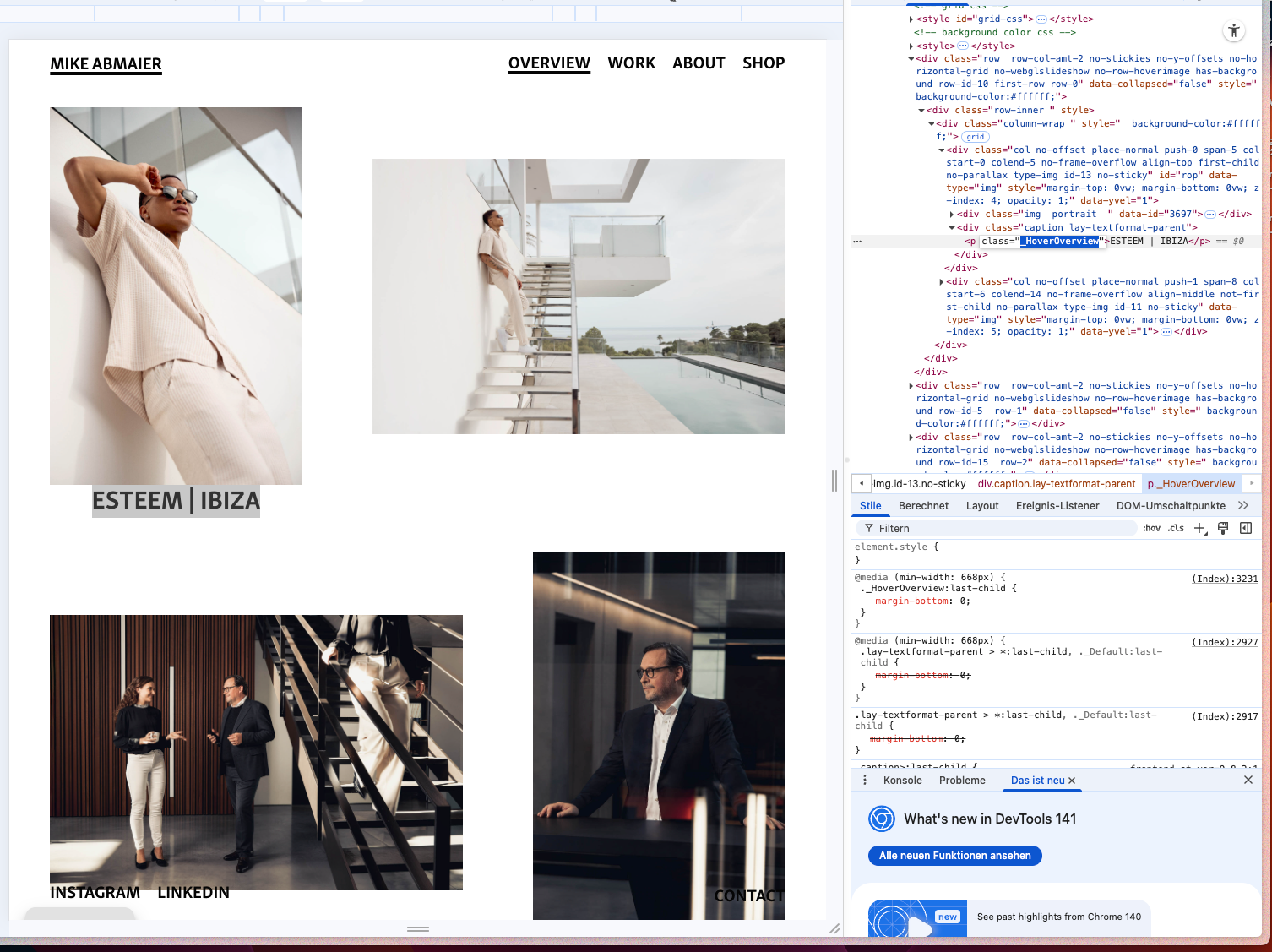
-
hm anything in html-structure changed with the update?
i asked chatgpt and now it seems to work with this long code?!/* Bezugspunkt für die absolute Position herstellen */
body.home .img-id-13-no-sticky,
body.home .lay-image,
body.home .thumb {
position: relative;
}/* Dein bekanntes Overlay-CSS */
body.home ._HoverOverview {
position: absolute;
top: 50%;
left: 50%;
transform: translate(-50%, -50%);
text-align: center;
margin: 0;
z-index: 2;
pointer-events: none;
}/* --- Nur bei Hover sichtbar (Startseite) --- */
body.home ._HoverOverview {
opacity: 0 !important;
transition: opacity 0.35s ease;
will-change: opacity;
}/* Variante A: modern & treffsicher mit :has()
→ zeigt NUR die Caption innerhalb genau des Elements, über dem du bist */
body.home .grid__col:has(._HoverOverview):hover ._HoverOverview,
body.home .col:has(._HoverOverview):hover ._HoverOverview,
body.home .thumb:has(._HoverOverview):hover ._HoverOverview,
body.home .img-id-13-no-sticky:has(._HoverOverview):hover ._HoverOverview,
body.home .lay-image:has(._HoverOverview):hover ._HoverOverview,
body.home .lay-gallery-image-wrap:has(._HoverOverview):hover ._HoverOverview,
body.home .frame:has(._HoverOverview):hover ._HoverOverview {
opacity: 1 !important;
}/* Variante B: Fallback ohne :has() (für ältere Browser)
→ deckt typische Lay-Container ab, ohne bis zur .row hochzugehen /
body.home .grid__col:hover ._HoverOverview,
body.home .col:hover ._HoverOverview,
body.home .thumb:hover ._HoverOverview,
body.home .img-id-13-no-sticky:hover ._HoverOverview,
body.home .lay-image:hover ._HoverOverview,
body.home .lay-gallery-image-wrap:hover ._HoverOverview,
body.home .frame:hover ._HoverOverview,
body.home .thumb a:hover ._HoverOverview, / falls das Bild im <a> liegt /
body.home .grid__col a:hover ._HoverOverview { / und die Caption daneben */
opacity: 1 !important;
}/* Safety: Bleibt sichtbar, wenn du direkt über dem Text bist */
body.home ._HoverOverview:hover {
opacity: 1 !important;
} -
yea i may have changed the html structure there

Hello! It looks like you're interested in this conversation, but you don't have an account yet.
Getting fed up of having to scroll through the same posts each visit? When you register for an account, you'll always come back to exactly where you were before, and choose to be notified of new replies (either via email, or push notification). You'll also be able to save bookmarks and upvote posts to show your appreciation to other community members.
With your input, this post could be even better 💗
Register Login