Skip to content
  • Recent
  • Tags
  • Popular
  • Users
  • Search
Skins
  • Light
  • Brite
  • Cerulean
  • Cosmo
  • Flatly
  • Journal
  • Litera
  • Lumen
  • Lux
  • Materia
  • Minty
  • Morph
  • Pulse
  • Sandstone
  • Simplex
  • Sketchy
  • Spacelab
  • United
  • Yeti
  • Zephyr
  • Dark
  • Cyborg
  • Darkly
  • Quartz
  • Slate
  • Solar
  • Superhero
  • Vapor

  • Default (No Skin)
  • No Skin
Collapse

Lay Theme Forum

  1. Home
  2. General Discussion
  3. splitt screen / scroll position

splitt screen / scroll position

Scheduled Pinned Locked Moved General Discussion
10 Posts 2 Posters 225 Views 2 Watching
  • Oldest to Newest
  • Newest to Oldest
  • Most Votes
Reply
  • Reply as topic
Log in to reply
This topic has been deleted. Only users with topic management privileges can see it.
  • C Offline
    C Offline
    carlweiss
    wrote on last edited by
    #1

    Re: How to return to the exact same scroll position when going back to homepage

    Hello,
    I've got the same problem with my split screen website (built using the following tutorial: https://laytheme.com/tutorials/create-a-splitscreen-website.html). Is it possible to save the scroll position, or does this conflict with something else? Does anyone have the same problem? Thanks for the help!

    1 Reply Last reply
    0
    • arminunruhA Offline
      arminunruhA Offline
      arminunruh
      Global Moderator
      wrote on last edited by
      #2

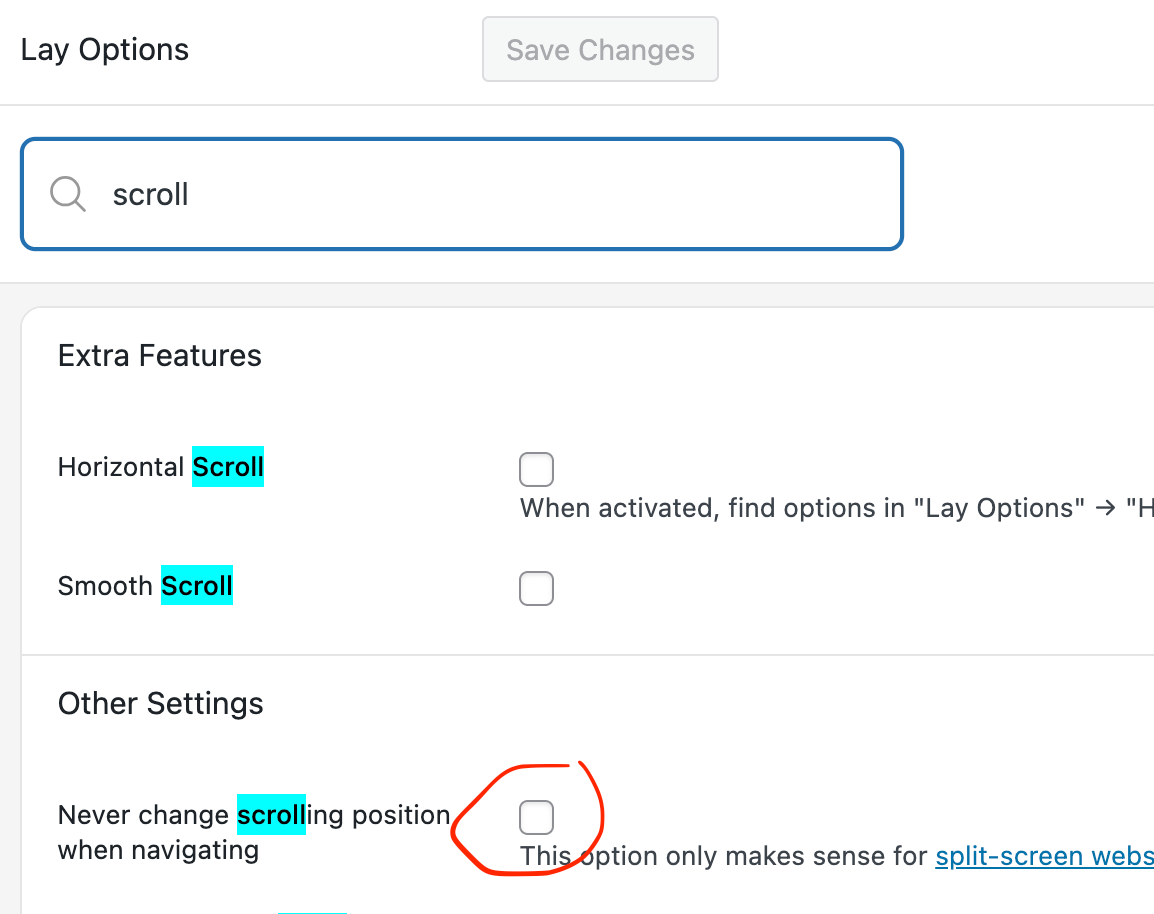
      Screenshot 2025-12-28 at 09.20.35.png

      did you enable this setting? please enable it.

      do you have a link?

      1 Reply Last reply
      0
      • C Offline
        C Offline
        carlweiss
        wrote on last edited by
        #3

        Hello Armin, thank you very much for your response.

        Yes, I did enable this setting.
        I don't have a link because I'm running the site on a local server (MAMP).
        I think it has something to do with the custom codes; when I turn them off, it works. (Of course, the website is no longer split-screen.)
        Here is the code I used:
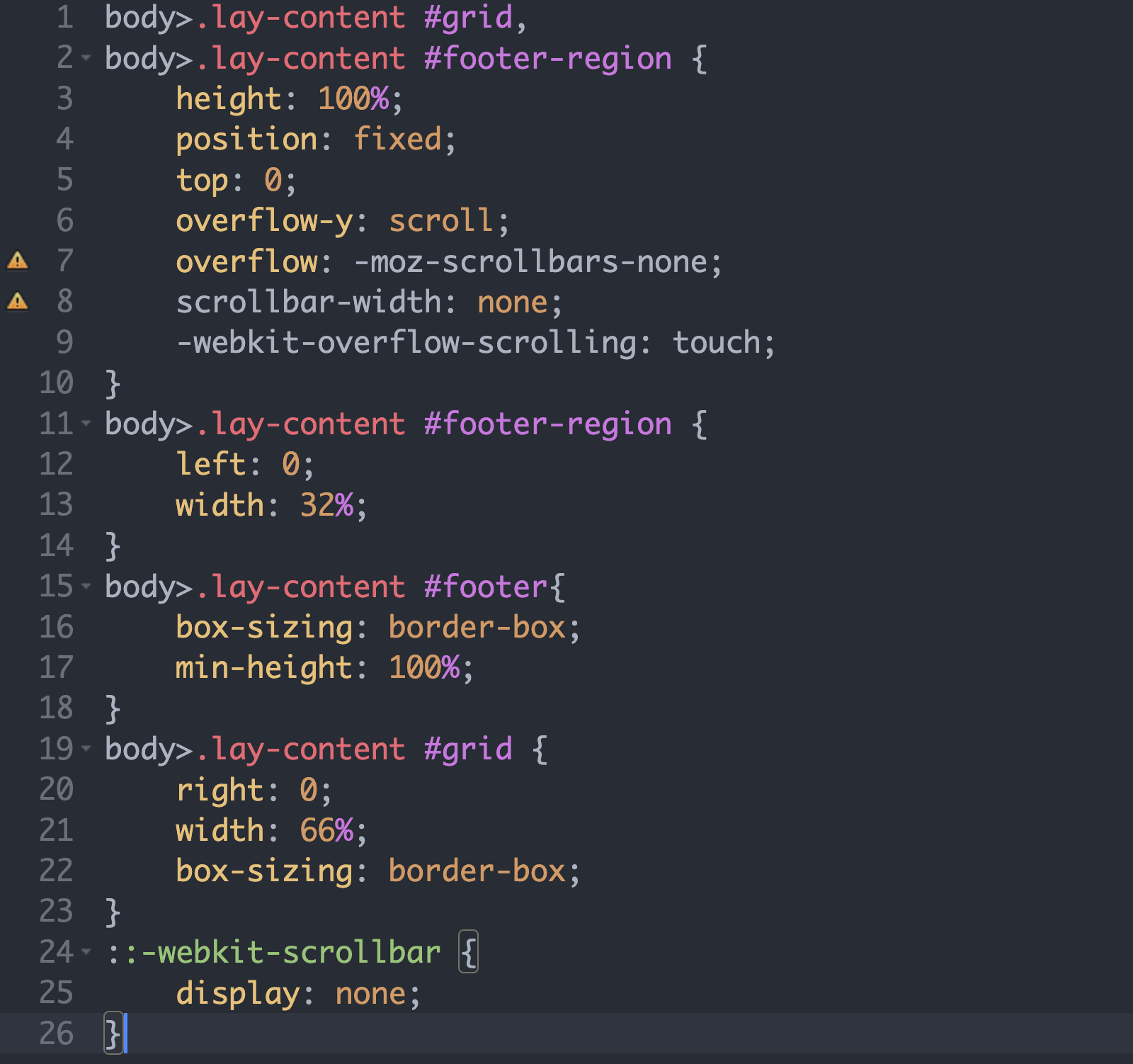
        Bildschirmfoto 2025-12-28 um 13.03.53.png

        My web research gave the following result: it may not be possible to create a split with a footer.

        • Grid and footer regions are recreated each time a page is loaded.
        • The browser only stores the window scroll position, not the scroll position of custom scroll containers.
          What do you think?
        1 Reply Last reply
        0
        • arminunruhA Offline
          arminunruhA Offline
          arminunruh
          Global Moderator
          wrote on last edited by
          #4

          hey its hard to help with this if i cant see it on a example page

          :(

          maybe a screen recording so i can see exactly what u mean?

          1 Reply Last reply
          0
          • C Offline
            C Offline
            carlweiss
            wrote on last edited by
            #5

            Hello Armin, thank you.
            Yes, I thought it would be difficult to solve with them.
            Here is a screen recording of my site under construction.

            https://drive.google.com/file/d/1KG5kXlfL2cRGBWeKtBMLeABHtAqjcdnc/view?usp=drive_link

            When I scroll down on my overview page and click on a project thumbnail, and then return to the overview page, it jumps to the top (the page reloads).

            The second problem is that my accordion collapses every time I return (I made it with row expand/collapse because I like placing images there), but that's another issue.

            Thank you very much for your time!

            1 Reply Last reply
            0
            • arminunruhA Offline
              arminunruhA Offline
              arminunruh
              Global Moderator
              wrote on last edited by
              #6

              hello, i cannot access the video

              1 Reply Last reply
              0
              • arminunruhA Offline
                arminunruhA Offline
                arminunruh
                Global Moderator
                wrote on last edited by
                #7

                Screenshot 2025-12-30 at 10.36.22.png

                but i clicked this button to request access now

                1 Reply Last reply
                0
                • C Offline
                  C Offline
                  carlweiss
                  wrote on last edited by
                  #8

                  Oops, yes, now it should go.

                  1 Reply Last reply
                  0
                  • C Offline
                    C Offline
                    carlweiss
                    wrote last edited by
                    #9

                    Hello Armin,
                    Could you watch the video to help you understand what I mean? Thank you for your time!

                    1 Reply Last reply
                    0
                    • arminunruhA Offline
                      arminunruhA Offline
                      arminunruh
                      Global Moderator
                      wrote last edited by
                      #10

                      ah interesting

                      so you're using different content on the left side (footer)
                      on every page

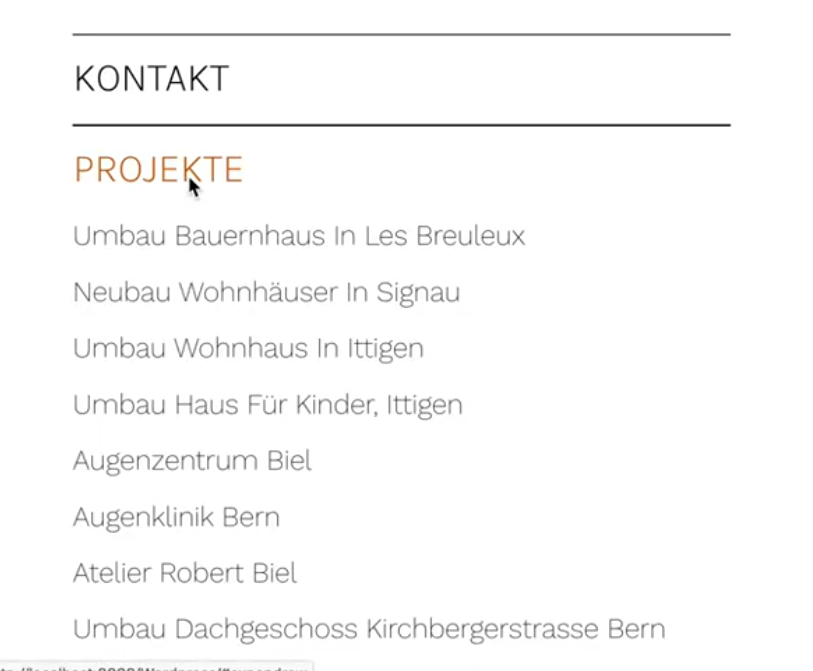
                      on the left side:

                      image.png

                      is this an accordion element?
                      or is this done with expand/collapse rows?

                      Can you try this:
                      in Lay Options -> Footers

                      make sure, the footer you choose here is the same for every page, the one that displays your menu:

                      in this example you see we set the project footer and the page footer to the same footer page "Footer".
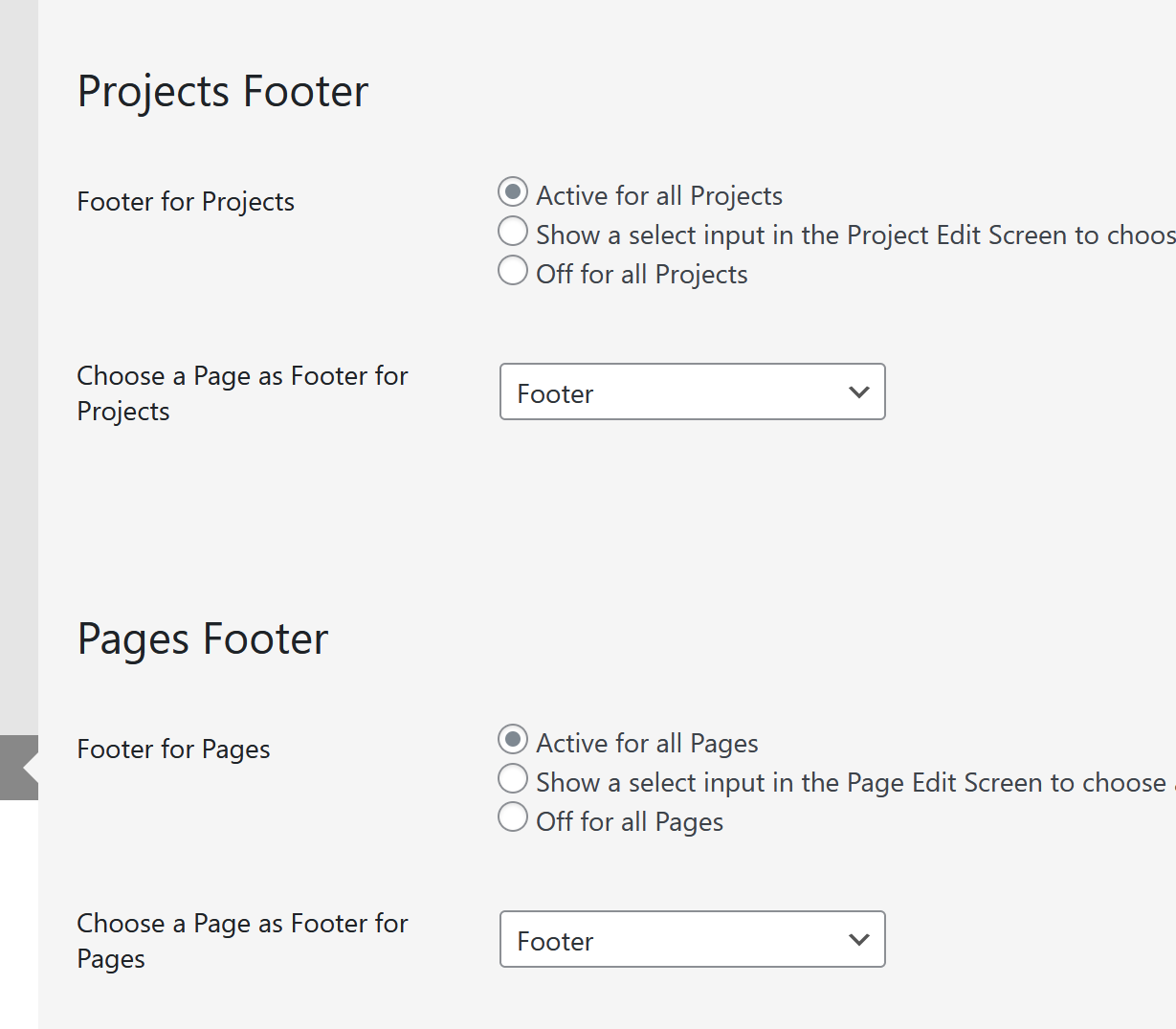
                      e1d0b510-511d-4e29-ac97-18a6d104fe6c-image.png

                      your menu page should be the footer you set above for all page types:

                      71688f6d-15ed-40b5-9736-6cdf4536b327-image.png

                      Now, when you click on a project, on the left side, the menu should stay the same

                      A different approach:
                      Instead of using the splitscreen tutorial,
                      you could simply create page that overlaps all other pages:
                      In Lay Options -> Extra features,
                      enable Fixed Header.
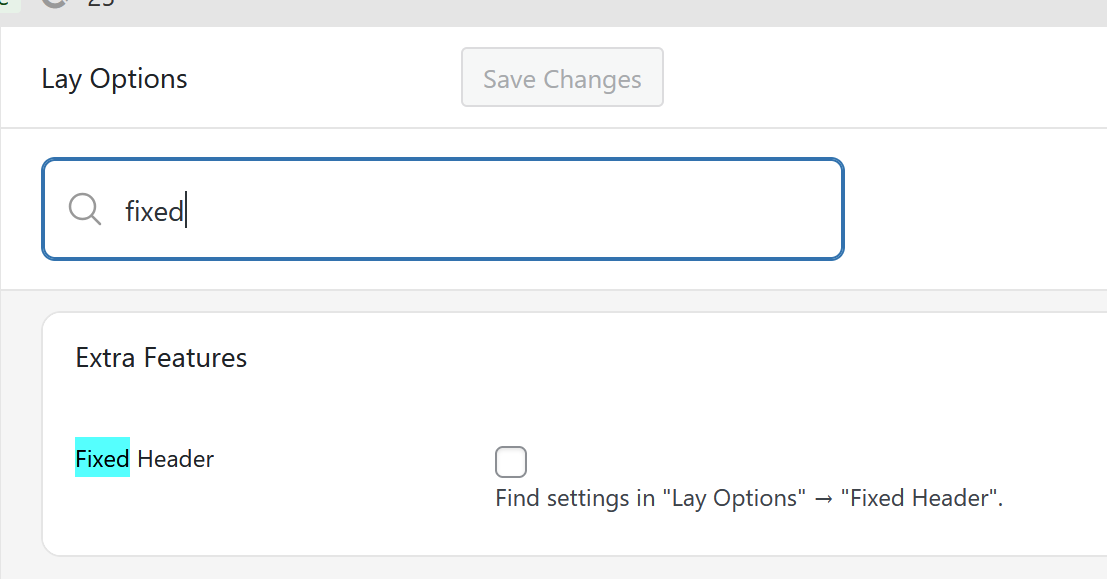
                      e046adb4-947c-40ee-bea2-233b1dc24f77-image.png

                      A new menupoint will show up:
                      Lay Options -> Fixed Header

                      here you can choose a page to overlay all other content of your website.
                      This page can then include your menu with the accordion and more.

                      A second different approach: (the one i would suggest)
                      Instead of using the splitscreen approach, simply create a menu with submenus.
                      In the customizer you can find submenu settings!
                      here is some info about submenus:
                      https://laytheme.com/documentation/menus.html#submenus

                      1 Reply Last reply
                      0
                      Reply
                      • Reply as topic
                      Log in to reply
                      • Oldest to Newest
                      • Newest to Oldest
                      • Most Votes


                      I also code custom websites or custom Lay features.
                      šŸ’æ Email me here: šŸ’æ
                      info@laytheme.com

                      Our Web Development company: 100k.studio

                      Want to tip me? https://www.paypal.com/paypalme/arminunruh

                      Before you post:
                      1. When using a WordPress Cache plugin, disable it or clear your cache.
                      2. Update Lay Theme and all Lay Theme Addons
                      3. Disable all Plugins
                      4. Go to Lay Options → Custom CSS & HTML, click "Turn Off All Custom Code", click "Save Changes"

                      This often solves issues you might run into

                      When you post:
                      1. Post a link to where the problem is
                      2. Does the problem happen on Chrome, Firefox, Safari or iPhone or Android?
                      3. If the problem is difficult to explain, post screenshots / link to a video to explain it
                      Online Users
                      S
                      SPO
                      C
                      craigfeldspar
                      Forgot your key, lost your files, need a previous Lay Theme or Addon version? Go to www.laykeymanager.com
                      laytheme.com
                      • Login

                      • Don't have an account? Register

                      • Login or register to search.
                      • First post
                        Last post
                      0
                      • Recent
                      • Tags
                      • Popular
                      • Users
                      • Search