Skip to content
  • Recent
  • Tags
  • Popular
  • Users
  • Search
Skins
  • Light
  • Brite
  • Cerulean
  • Cosmo
  • Flatly
  • Journal
  • Litera
  • Lumen
  • Lux
  • Materia
  • Minty
  • Morph
  • Pulse
  • Sandstone
  • Simplex
  • Sketchy
  • Spacelab
  • United
  • Yeti
  • Zephyr
  • Dark
  • Cyborg
  • Darkly
  • Quartz
  • Slate
  • Solar
  • Superhero
  • Vapor

  • Default (No Skin)
  • No Skin
Collapse

Lay Theme Forum

  1. Home
  2. Bug Reports
  3. News element 'load more' bugged in new update

News element 'load more' bugged in new update

Scheduled Pinned Locked Moved Bug Reports
6 Posts 2 Posters 115 Views 2 Watching
  • Oldest to Newest
  • Newest to Oldest
  • Most Votes
Reply
  • Reply as topic
Log in to reply
This topic has been deleted. Only users with topic management privileges can see it.
  • S Offline
    S Offline
    sds
    wrote on last edited by
    #1

    I updated my client's lay site yesterday to add the "smooth scroll" feature, but now I notice that the News Element's 'Load More' function is bugged.

    If you click on the Load More button, the extra news elements will be permanently displayed, even if you refresh the site. Basically, the function won't reset once you've clicked the button. And the button will also be visible even though it's unfolded all the elements.

    1 Reply Last reply
    0
    • arminunruhA Offline
      arminunruhA Offline
      arminunruh
      Global Moderator
      wrote on last edited by arminunruh
      #2

      yea i introduced this because, imagine this:

      you are on the news overview page.
      you click load more a couple times
      and then click on a news

      then you look at the news single page.

      now you click "back"

      now you would have to click "load more" again multiple times to come back to where you were before

      it only remembers how many times you already clicked "load more" in a tab
      if you open the page in a new tab, it is reset

      1 Reply Last reply
      0
      • arminunruhA Offline
        arminunruhA Offline
        arminunruh
        Global Moderator
        wrote on last edited by
        #3

        but why would you want it not to remember how often you click on load more?

        1 Reply Last reply
        0
        • S Offline
          S Offline
          sds
          wrote last edited by
          #4

          Hi Armin

          Thanks for clarifying. In my case, this page is designed as a landing page module, where the goal is a clean, short layout that highlights only the newest 3 items.

          When the expanded state persists, the landing page effectively becomes an endlessly long archive, which undermines the layout and makes the page feel excessive.

          It's great to be able to hide content, when it's not necessary to have it constantly displayed. Almost like having an accordion that would be permanently expanded.

          I think both your and my case of use is valid. Super useful on an archive page, maybe more harmful on a landing page. Any way it would be possible to make the “load more” state persistence configurable (on/off)?

          1 Reply Last reply
          0
          • arminunruhA Offline
            arminunruhA Offline
            arminunruh
            Global Moderator
            wrote last edited by
            #5

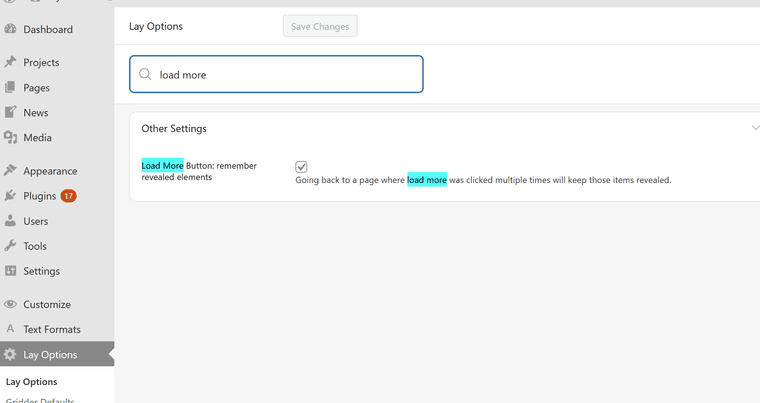
            yes sure!

            image.png

            in lay options,
            you will get this setting with the next lay theme update.
            you can disable the checkbox and then it shouldn't remember the state anymore

            1 Reply Last reply
            0
            • S Offline
              S Offline
              sds
              wrote last edited by
              #6

              Amazing, thank you so much!

              1 Reply Last reply
              0
              Reply
              • Reply as topic
              Log in to reply
              • Oldest to Newest
              • Newest to Oldest
              • Most Votes


              I also code custom websites or custom Lay features.
              💿 Email me here: 💿
              info@laytheme.com

              Our Web Development company: 100k.studio

              Want to tip me? https://www.paypal.com/paypalme/arminunruh

              Before you post:
              1. When using a WordPress Cache plugin, disable it or clear your cache.
              2. Update Lay Theme and all Lay Theme Addons
              3. Disable all Plugins
              4. Go to Lay Options → Custom CSS & HTML, click "Turn Off All Custom Code", click "Save Changes"

              This often solves issues you might run into

              When you post:
              1. Post a link to where the problem is
              2. Does the problem happen on Chrome, Firefox, Safari or iPhone or Android?
              3. If the problem is difficult to explain, post screenshots / link to a video to explain it
              Online Users
              D
              Dani_MB
              J
              jayjay123
              Forgot your key, lost your files, need a previous Lay Theme or Addon version? Go to www.laykeymanager.com
              laytheme.com
              • Login

              • Don't have an account? Register

              • Login or register to search.
              • First post
                Last post
              0
              • Recent
              • Tags
              • Popular
              • Users
              • Search