vimeo embedded in element grid - slow on mobile and scroll issue
-
I just tried to play with the caching settings, and found out the following:
In Lay Options I ticked:
✅ Enable Layout Cache
-> makes first video loading very slowly, rest of the videos loads correctly.
-> my beautifully customized filter menu on desktop with js features breaks, when this is active.✅ Disable Ajax / Compatibility Mode
-> makes first video not load at all, rest of the videos loads correctly
-> my beautifully customized filter menu works now.I'm wondering now, If my site gets slower, if I don't activate caching? Should I then use a caching plugin like WP fastest cache? I can't tell if the site is faster using WP fastest cache...
and how do I get my first video to load?
PS:
scroll issue is solved after deactivating ❏ smooth scrolling -
hey!
every time you embed a vimeo video, it creates an iframe, basically a website in your website.
thats just how vimeo embeds work, it has nothing to do with lay theme.thats pretty slow
its ok if you have one vimeo video, but if you have many on one page, it gets too slow
thats not because of lay theme, its just that if you embed a vimeo iframe, the iframe itself loads a lot of js, css many html elements
if u have vimeo pro, you can get the vimeo streaming or download urls.
they look sth like that:
https://player.vimeo.com/progressive_redirect/playback/428023635/rendition/720p/file.mp4?loc=external&oauth2_token_id=1801537914&signature=c4c116e1e4c56de82bab48df8548deb2bfbaa21a1827856dd3fb3a3fe033668fyou can use those with +video -> +.mp4 video (check use external url)
this will load the video file directly instead of a iframe embed, thats faster
but it wont have the same vimeo UIyou cant really make it faster than it is already
if you have very short clips it may be faster to just use them as .mp4 video elements.
- video -> + .mp4 video
in the gridder
I'm wondering now, If my site gets slower, if I don't activate caching?
probably yea
Should I then use a caching plugin like WP fastest cache? I can't tell if the site is faster using WP fastest cache...
i think lay themes caching is probably faster
caching this wont cache the vimeo embeds though this wont make a difference for loading the vimeo videos. there are no caching plugins that will do that
cause a vimeo embed is a website that is loaded inside your website - video -> + .mp4 video
-
hey!
every time you embed a vimeo video, it creates an iframe, basically a website in your website.
thats just how vimeo embeds work, it has nothing to do with lay theme.thats pretty slow
its ok if you have one vimeo video, but if you have many on one page, it gets too slow
thats not because of lay theme, its just that if you embed a vimeo iframe, the iframe itself loads a lot of js, css many html elements
if u have vimeo pro, you can get the vimeo streaming or download urls.
they look sth like that:
https://player.vimeo.com/progressive_redirect/playback/428023635/rendition/720p/file.mp4?loc=external&oauth2_token_id=1801537914&signature=c4c116e1e4c56de82bab48df8548deb2bfbaa21a1827856dd3fb3a3fe033668fyou can use those with +video -> +.mp4 video (check use external url)
this will load the video file directly instead of a iframe embed, thats faster
but it wont have the same vimeo UIyou cant really make it faster than it is already
if you have very short clips it may be faster to just use them as .mp4 video elements.
- video -> + .mp4 video
in the gridder
I'm wondering now, If my site gets slower, if I don't activate caching?
probably yea
Should I then use a caching plugin like WP fastest cache? I can't tell if the site is faster using WP fastest cache...
i think lay themes caching is probably faster
caching this wont cache the vimeo embeds though this wont make a difference for loading the vimeo videos. there are no caching plugins that will do that
cause a vimeo embed is a website that is loaded inside your websiteThanks Armin for your reply!
you can use those with +video -> +.mp4 video (check use external url)
Does this also work with Cloudflare Stream, which also provides HSL direct video links for streaming? Vimeo Pro is extremely expensive and I only have vimeo plus?
i think lay themes caching is probably faster
I've tested the laytheme caching plugin, but it is not compatible with my js filtermenu on desktop. Is there anything I can do, to make my filter menu work and still use the laytheme caching?
- video -> + .mp4 video
-
Does this also work with Cloudflare Stream, which also provides HSL direct video links for streaming? Vimeo Pro is extremely expensive and I only have vimeo plus?
should work yea
if not let me know i can probably make it workmh your filter menu javascript only scrolls around?
the lay theme caching shouldnt interfere with any js. it only caches php generated content.
whats the code you used? -
So, in my case, when I turn on Laytheme's Chaching, the filter menu, does not hide when scrolling down, and the toggle button shows on all pages, always, instead of just the two pages with the filtermenu.
Currently I turned off lay themes caching and use the plugin "wp fastest cache"
Here's my CSS code:/* Filter Buttons hide when scrolling down on Desktop */ .mystickyrow { position: sticky; top: 0; z-index: 999; transition: transform 0.45s ease; will-change: transform; } /* slide up */ .mystickyrow.hide { transform: translateY(-120%); } /* Mini Toggle Button */ #filterToggle { position: fixed; top: 60px; left: 50%; transform: translateX(-50%); /* adjust for element width */ width: 45px; height: 45px; border-radius: 25px; background: #9574ff; z-index: 9999; cursor: pointer; opacity: 0; pointer-events: none; transition: opacity 0.25s ease; } #filterToggle.show { opacity: 1; pointer-events: auto; }And here's my js:
<!-- Desktop Filter Menu Logic --> <script type="text/javascript"> (function() { let lastScrollTop = 0, isAutoScrolling = false, autoScrollTimeout = null; let toggleBtn = null, scrollHandler = null; function destroy() { if (toggleBtn) toggleBtn.remove(); if (scrollHandler) window.removeEventListener('scroll', scrollHandler); lastScrollTop = isAutoScrolling = autoScrollTimeout = toggleBtn = scrollHandler = null; } function init() { const filterBar = document.querySelector('.mystickyrow'); if (!filterBar || window.innerWidth < 600) { destroy(); return; } destroy(); lastScrollTop = window.scrollY; // create toggle button toggleBtn = document.createElement('div'); toggleBtn.id = 'filterToggle'; document.body.appendChild(toggleBtn); const show = () => { filterBar.classList.remove('hide'); toggleBtn.classList.remove('show'); }; const hide = () => { filterBar.classList.add('hide'); toggleBtn.classList.add('show'); }; toggleBtn.addEventListener('click', show); toggleBtn.addEventListener('mouseenter', show); // scroll behaviour scrollHandler = () => { const st = window.scrollY; if (isAutoScrolling) { clearTimeout(autoScrollTimeout); autoScrollTimeout = setTimeout(() => isAutoScrolling = false, 100); lastScrollTop = st; return; } if (st > lastScrollTop + 10) hide(); else if (st < lastScrollTop - 5) show(); lastScrollTop = st; }; window.addEventListener('scroll', scrollHandler); // hide on filter link click filterBar.querySelectorAll('a').forEach(link => { link.addEventListener('click', () => { hide(); if (link.hash) isAutoScrolling = true; }); }); } document.addEventListener('DOMContentLoaded', init); document.addEventListener('laythemeAjaxContentLoaded', init); })(); </script> -
Does this also work with Cloudflare Stream, which also provides HSL direct video links for streaming? Vimeo Pro is extremely expensive and I only have vimeo plus?
should work yea
if not let me know i can probably make it workmh your filter menu javascript only scrolls around?
the lay theme caching shouldnt interfere with any js. it only caches php generated content.
whats the code you used?@arminunruh said in vimeo embedded in element grid - slow on mobile and scroll issue:
Does this also work with Cloudflare Stream, which also provides HSL direct video links for streaming? Vimeo Pro is extremely expensive and I only have vimeo plus?
should work yea
if not let me know i can probably make it workI'm back with a hls video direct link test (first videos are hls, towards the end a few videos are still vimeo iframe embeds)
- I used cloudflare to upload videos and create hls direct video links.
- I used laythemes video embed toll mp4 direct link. autoplay /muted.
- I added plyr.io to style my player
- I added a lot of js and css (thank you ChatGPT and Gemini), to style it and make it work.
On desktop it works quite smoothly, but on mobile (I use iPhone safari) I've had a hard time getting it to work smoothley.
Bugs noticed:
-
on mobile, the video starts playing, but sometimes when I pause and start again, it stops, gets stuck in endless loading, this also sometimes happens when scrolling away and scrolling back to the video.
-
fullscreen on mobile is a pain, it just doesn't display properly and also it sometimes stops and gets stuck loading. Do I really have to design this myself with even more custom code, or is there a standard that just works fullscreen and is responsive also to landscape mode?
-
when internet connection is not super fast, the video plays in very poor quality. this is probably due to hls compression, but on vim iframe it never shows that poor quality. anything I can do?
I think I got quite far with my tests, after sleepless nights of trial and error, but still it is quite fragile, especially on mobile using hls direct links. Any advice out there to make it work smoothly on mobile?
-
document.addEventListener('laythemeAjaxContentLoaded', init);
this event does not exist.
onlyhttps://laytheme.com/documentation/custom-javascript.html
window.laytheme.on("newpageshown", function(){
});fullscreen on mobile is a pain, it just doesn't display properly and also it sometimes stops and gets stuck loading. Do I really have to design this myself with even more custom code, or is there a standard that just works fullscreen and is responsive also to landscape mode?
you mean the fullscreen mode for displaying videos?
wellthe lay custom controls have a fullscreen button that should work
i dont really have time to help you with your custom code for your custom video player
-
why dont you remove all your custom code for videos.
then upload mp4 videos to your wordpress media library.
then add them using +more -> +videothen use the "Lay Custom Controls"
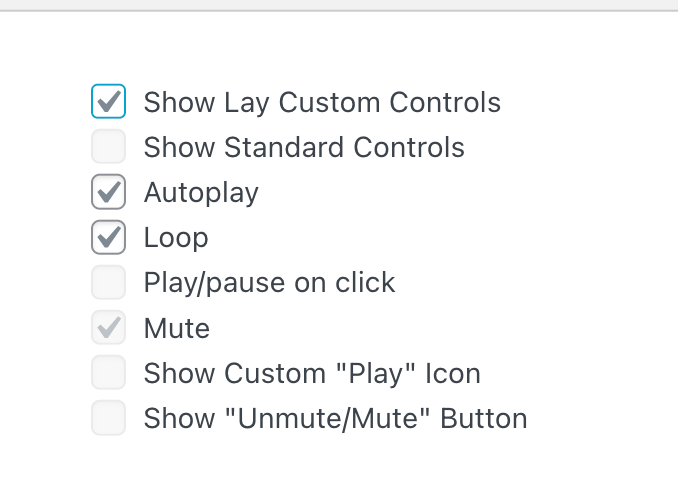
for better looking controls with a working fullscreen button
this way, you don't have vimeo embeds and you have a working video UI
-
Thanks Armin for your Help with the js script. My site now works with Laytheme-caching.
Regarding video embed, I tried everything:- mp4 embeds with laytheme brought other issues, since I had a lot of autoplay videos: Once umuted, the video just continued to play, even if I started a second video. ended up in chaos.
- hls direct links worked for a few videos, but not for 20 videos on the same page. Loading so many videos was an issue.
- Finally I came to the conclusion, simple vimeo iframe embed is still the most robust. I just had to remove autoplay, because that made it lag a lot on mobile.
Maybe in future, I find a better way, but for now I keep it simple with vimeo embeds.
But Thanks a lot for your help!
-
ah nice
mp4 embeds with laytheme brought other issues, since I had a lot of autoplay videos: Once umuted, the video just continued to play, even if I started a second video. ended up in chaos.
ok i will code a fix for this
-
ok with the next update, if you play back a html5video
and its unmuted, then any other playing unmuted html5 video will be paused

Hello! It looks like you're interested in this conversation, but you don't have an account yet.
Getting fed up of having to scroll through the same posts each visit? When you register for an account, you'll always come back to exactly where you were before, and choose to be notified of new replies (either via email, or push notification). You'll also be able to save bookmarks and upvote posts to show your appreciation to other community members.
With your input, this post could be even better 💗
Register Login