overlay page opening creates random position changes in Firefox
-
hi @arminunruh
I have noticed that when I open an overlay page in Firefox, there are some elements on the main page that change their position. For now, I’ve only seen position changes in movable elements such as:
- cover image with parallax (https://aaltar.com/edmond-catalogue/ — “Index” is the overlay page)
- sticky elements (https://inesbaptista.com/ — “About” is the overlay page)
I tested this in several browsers, and I can only see it happening in Firefox.
Do you have any idea why this happens and how to solve it?Here are some screen recordings of the issues:
https://www.swisstransfer.com/d/1541bad7-1fd9-41f8-b5de-6cace8a88036 -
ah i see.
can you try this:
when editing the page that is the overlay, in the overlay settings to the right, uncheck this box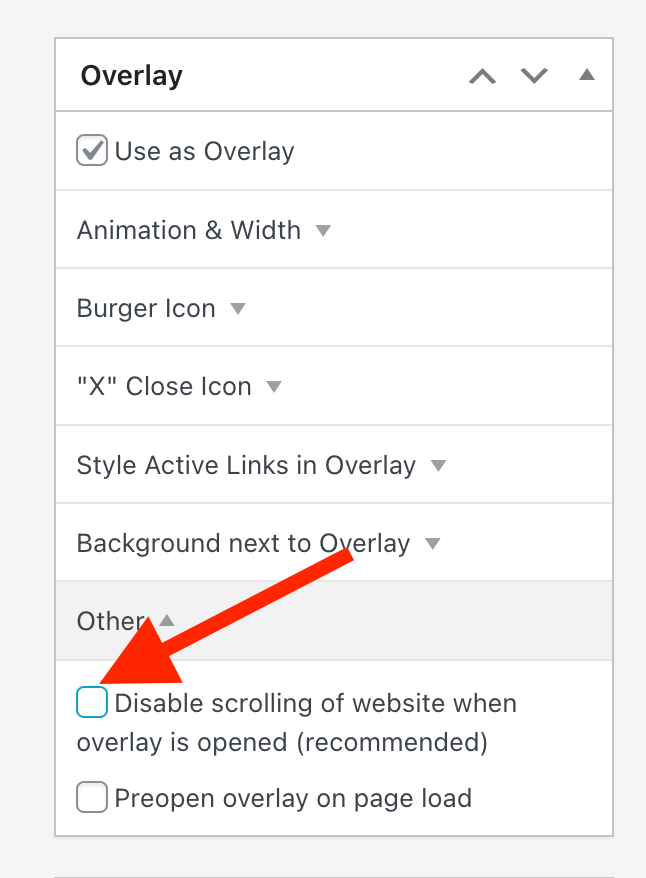
-
ah i see.
can you try this:
when editing the page that is the overlay, in the overlay settings to the right, uncheck this box@arminunruh I unchecked that box on both websites and the problem still persists.
Also, I cleared the cache (on browsers and websites), and even with that box unchecked, the scroll seems to be disabled by default, which is weird.PS: I just noticed that the cover image issue happens in other browsers as well (e.g. Safari and Chrome), and not only in Firefox.
-
it seems that some of the code for the new smooth scroll feature made it so page overlays are always "disable scroll",
even if you turned off that settingi will release an update later today.
then it will work with firefox if you have unchecked "disable scroll" for your page overlays
i tested that -
it seems that some of the code for the new smooth scroll feature made it so page overlays are always "disable scroll",
even if you turned off that settingi will release an update later today.
then it will work with firefox if you have unchecked "disable scroll" for your page overlays
i tested thathey @arminunruh, I tested it and now the “Disabled scrolling” toggle seems to be working perfectly. With that option unchecked, the previously mentioned position issue of the movable elements is fixed!
However, when that option is enabled, all of those issues still happen just like before :/
Do you have any idea on how to fix this (on both cover image and sticky elements)? -
its not really fixable with that setting enabled, because disabling scrolling has these side effects on firefox :/
-
ah okay. Thanks anyway @arminunruh


Hello! It looks like you're interested in this conversation, but you don't have an account yet.
Getting fed up of having to scroll through the same posts each visit? When you register for an account, you'll always come back to exactly where you were before, and choose to be notified of new replies (either via email, or push notification). You'll also be able to save bookmarks and upvote posts to show your appreciation to other community members.
With your input, this post could be even better 💗
Register Login