Skip to content
  • Recent
  • Tags
  • Popular
  • Users
  • Search
Skins
  • Light
  • Brite
  • Cerulean
  • Cosmo
  • Flatly
  • Journal
  • Litera
  • Lumen
  • Lux
  • Materia
  • Minty
  • Morph
  • Pulse
  • Sandstone
  • Simplex
  • Sketchy
  • Spacelab
  • United
  • Yeti
  • Zephyr
  • Dark
  • Cyborg
  • Darkly
  • Quartz
  • Slate
  • Solar
  • Superhero
  • Vapor

  • Default (No Skin)
  • No Skin
Collapse

Lay Theme Forum

  1. Home
  2. General Discussion
  3. Highlighting single words in a Text paragraph ?

Highlighting single words in a Text paragraph ?

Scheduled Pinned Locked Moved General Discussion
14 Posts 3 Posters 348 Views 2 Watching
  • Oldest to Newest
  • Newest to Oldest
  • Most Votes
Reply
  • Reply as topic
Log in to reply
This topic has been deleted. Only users with topic management privileges can see it.
  • arminunruhA Offline
    arminunruhA Offline
    arminunruh
    Global Moderator
    wrote on last edited by
    #4

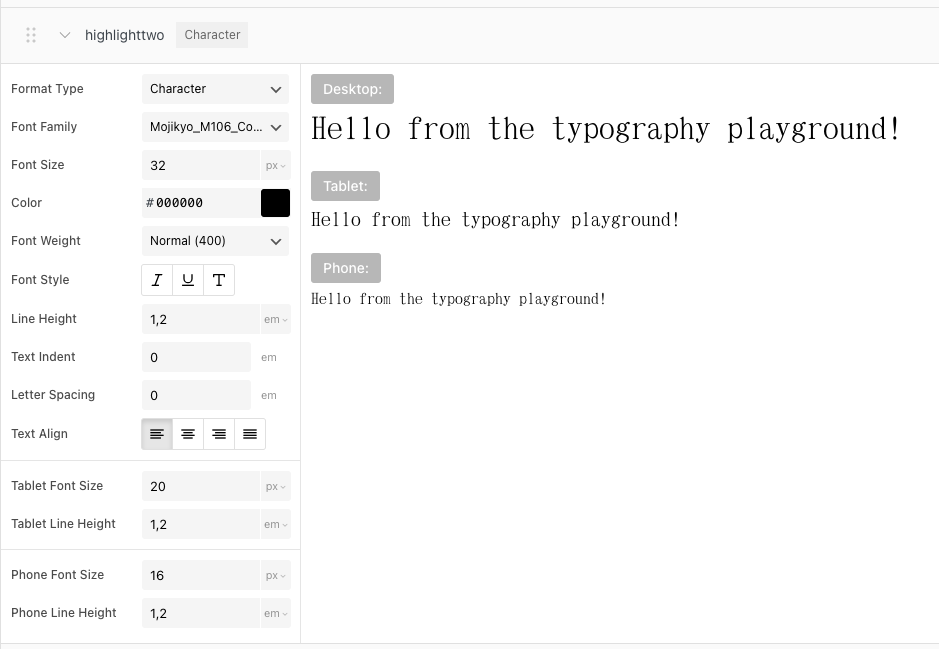
    you could create a character textformat.

    image.png

    in "textformats"

    call it:

    highlight

    then write this css

    ._highlight{
        background-color: red;
        color: white!important;
    }
    

    add this in:
    lay options -> custom css & html -> custom css

    1 Reply Last reply
    0
    • arminunruhA Offline
      arminunruhA Offline
      arminunruh
      Global Moderator
      wrote on last edited by
      #5

      image.png

      on the website itself it will look like this. in the gridder you wont see this style.

      im writing it down as an idea for adding bg color to character textformats

      1 Reply Last reply
      0
      • D Offline
        D Offline
        danny
        wrote on last edited by
        #6

        @arminunruh great, thanks so much! Is it possible to adjust the position of the background colour? with my font the background colour sits a bit too low. The height is great though.

        1 Reply Last reply
        0
        • arminunruhA Offline
          arminunruhA Offline
          arminunruh
          Global Moderator
          wrote on last edited by
          #7

          mmh do you have a link?

          1 Reply Last reply
          0
          • D Offline
            D Offline
            danny
            wrote on last edited by
            #8

            sure: https://axellestiefel.com/test/

            1 Reply Last reply
            0
            • arminunruhA Offline
              arminunruhA Offline
              arminunruh
              Global Moderator
              wrote on last edited by
              #9

              try this instead

              ._highlight{
              position: relative;
              }
              ._highlight::before{
              position: absolute;
              top: -3px;
              left: 0;
              right:0;
              bottom:0;
              background:red;
              }

              and then adjust top: -3px
              to for example -6px

              1 Reply Last reply
              0
              • arminunruhA Offline
                arminunruhA Offline
                arminunruh
                Global Moderator
                wrote on last edited by
                #10

                i cant see the page though cause its pw protected

                1 Reply Last reply
                0
                • D Offline
                  D Offline
                  danny
                  wrote last edited by
                  #11

                  Oh sorry! I took the pw away. Thanks so much for the code. I tried it but it does not seem to apply. Maybe you could have a look?

                  I called the new character format "highlighttwo" so I can work with the first character format "highlight" in the meantime.

                  1 Reply Last reply
                  0
                  • arminunruhA Offline
                    arminunruhA Offline
                    arminunruh
                    Global Moderator
                    wrote last edited by
                    #12

                    hey!!

                    when editing a textformat you can now apply padding-bottom
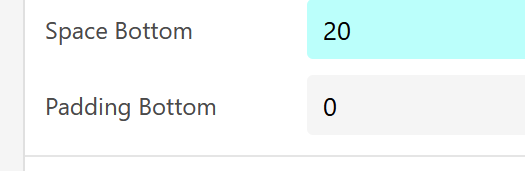
                    image.png

                    this should add extra space below

                    1 Reply Last reply
                    0
                    • D Offline
                      D Offline
                      danny
                      wrote last edited by
                      #13

                      hei !

                      thanks - in the character settings i don't see this option (I think this option is only available in paragraph settings). And when applying the character format "highlighttwo" I don't see any changes to the text.

                      Bildschirmfoto 2026-01-17 um 09.05.36.png

                      1 Reply Last reply
                      0
                      • arminunruhA Offline
                        arminunruhA Offline
                        arminunruh
                        Global Moderator
                        wrote last edited by arminunruh
                        #14

                        oh i forgot. above, you have "textformat settings"

                        and you need to enable this first:
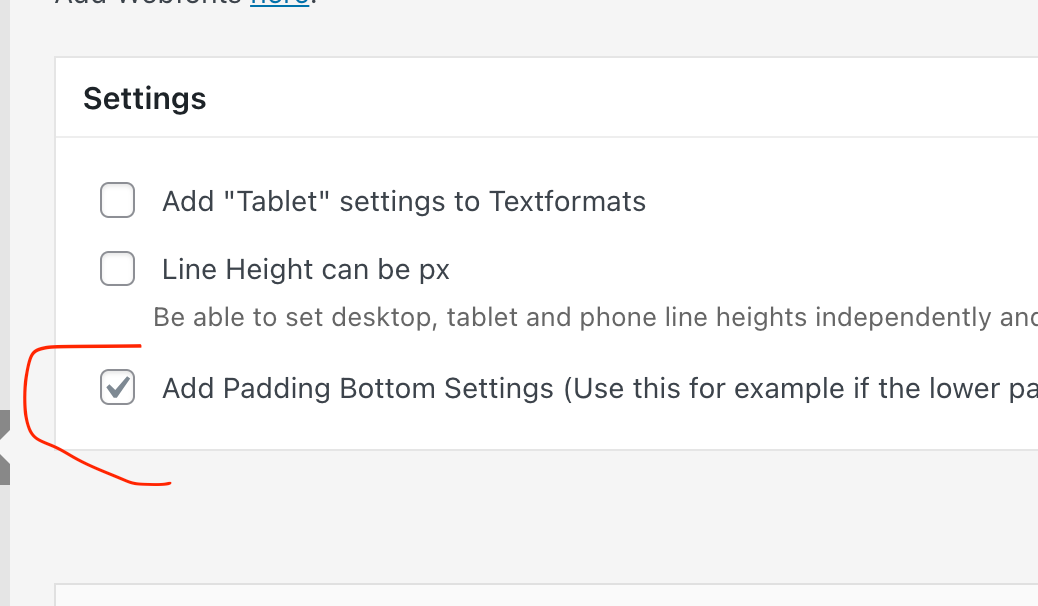
                        Screenshot 2026-01-18 at 14.29.50.png

                        (make sure youre using the latest lay theme version)

                        1 Reply Last reply
                        0
                        Reply
                        • Reply as topic
                        Log in to reply
                        • Oldest to Newest
                        • Newest to Oldest
                        • Most Votes


                        I also code custom websites or custom Lay features.
                        šŸ’æ Email me here: šŸ’æ
                        info@laytheme.com

                        Our Web Development company: 100k.studio

                        Want to tip me? https://www.paypal.com/paypalme/arminunruh

                        Before you post:
                        1. When using a WordPress Cache plugin, disable it or clear your cache.
                        2. Update Lay Theme and all Lay Theme Addons
                        3. Disable all Plugins
                        4. Go to Lay Options → Custom CSS & HTML, click "Turn Off All Custom Code", click "Save Changes"

                        This often solves issues you might run into

                        When you post:
                        1. Post a link to where the problem is
                        2. Does the problem happen on Chrome, Firefox, Safari or iPhone or Android?
                        3. If the problem is difficult to explain, post screenshots / link to a video to explain it
                        Online Users
                        S
                        SPO
                        C
                        craigfeldspar
                        Forgot your key, lost your files, need a previous Lay Theme or Addon version? Go to www.laykeymanager.com
                        laytheme.com
                        • Login

                        • Don't have an account? Register

                        • Login or register to search.
                        • First post
                          Last post
                        0
                        • Recent
                        • Tags
                        • Popular
                        • Users
                        • Search