Skip to content
  • Recent
  • Tags
  • Popular
  • Users
  • Search
Skins
  • Light
  • Brite
  • Cerulean
  • Cosmo
  • Flatly
  • Journal
  • Litera
  • Lumen
  • Lux
  • Materia
  • Minty
  • Morph
  • Pulse
  • Sandstone
  • Simplex
  • Sketchy
  • Spacelab
  • United
  • Yeti
  • Zephyr
  • Dark
  • Cyborg
  • Darkly
  • Quartz
  • Slate
  • Solar
  • Superhero
  • Vapor

  • Default (No Skin)
  • No Skin
Collapse

Lay Theme Forum

  1. Home
  2. Bug Reports
  3. Thumbnail grid + tags

Thumbnail grid + tags

Scheduled Pinned Locked Moved Bug Reports
24 Posts 4 Posters 560 Views 2 Watching
  • Oldest to Newest
  • Newest to Oldest
  • Most Votes
Reply
  • Reply as topic
Log in to reply
This topic has been deleted. Only users with topic management privileges can see it.
  • mppM Offline
    mppM Offline
    mpp
    wrote on last edited by
    #12

    10.1.0 fixed this, thank you!

    1 Reply Last reply
    1
    • mppM Offline
      mppM Offline
      mpp
      wrote on last edited by
      #13

      Hello!
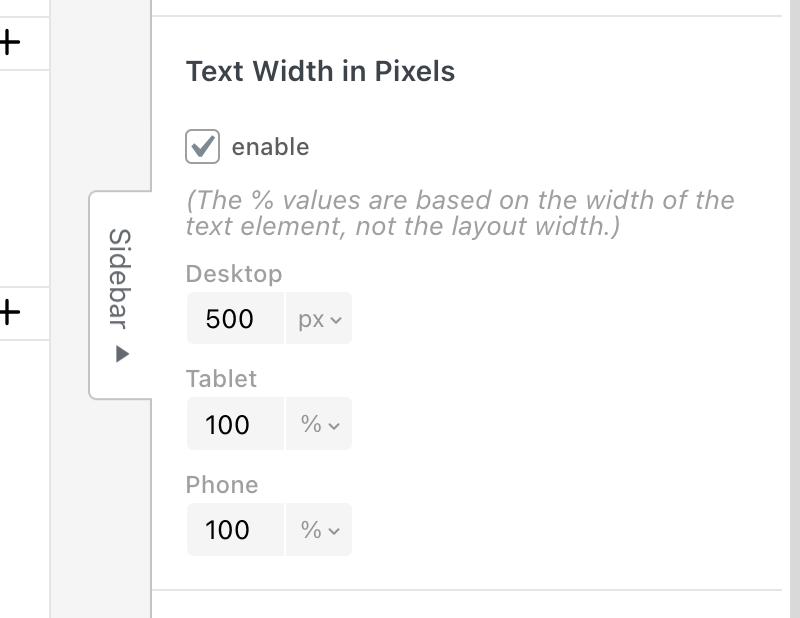
      Is it just here, or the "Set width in Pixels" not working?

      1 Reply Last reply
      0
      • arminunruhA Offline
        arminunruhA Offline
        arminunruh
        Global Moderator
        wrote on last edited by
        #14

        Screenshot 2025-12-23 at 08.22.46.png

        you can set it in the sidebar.
        when you select a text, click here:
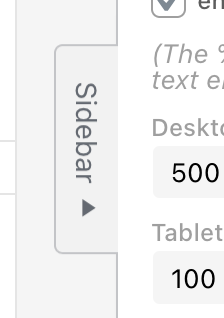
        Screenshot 2025-12-23 at 08.23.13.png

        yea seems like the context button does nothing, i will fix that

        1 Reply Last reply
        0
        • mppM Offline
          mppM Offline
          mpp
          wrote on last edited by
          #15

          Thank you!!!

          1 Reply Last reply
          0
          • mppM Offline
            mppM Offline
            mpp
            wrote last edited by
            #16

            Hello, I have a question regarding the Thumbnail Grid logic.

            I select a Thumbnail Grid and "Show Projects of Category"

            for example Paintings (among other projects categories like printmaking, posters). Then I add Filter, Show Tag Filter and pick just two – portraits and self-portraits.

            What it does is present all paintings (a selected category) and display tag filters above, but the initially it is showing the full category and not projects of selected category and filter.

            Should this be solved with using a different category, not filters?
            Displaying a category like Paintings > People with Tags Self-portraits, People portraits instead?

            Best regards!

            1 Reply Last reply
            0
            • arminunruhA Offline
              arminunruhA Offline
              arminunruh
              Global Moderator
              wrote last edited by
              #17

              hey!

              there is no setting for the default tag that is active by default.
              only for a default filter that is active by default.

              i think your idea with just putting everything you want shown first into one category, and selecting this as the default category is good

              if i understood correctly

              mppM 1 Reply Last reply
              0
              • arminunruhA arminunruh

                hey!

                there is no setting for the default tag that is active by default.
                only for a default filter that is active by default.

                i think your idea with just putting everything you want shown first into one category, and selecting this as the default category is good

                if i understood correctly

                mppM Offline
                mppM Offline
                mpp
                wrote last edited by
                #18

                @arminunruh

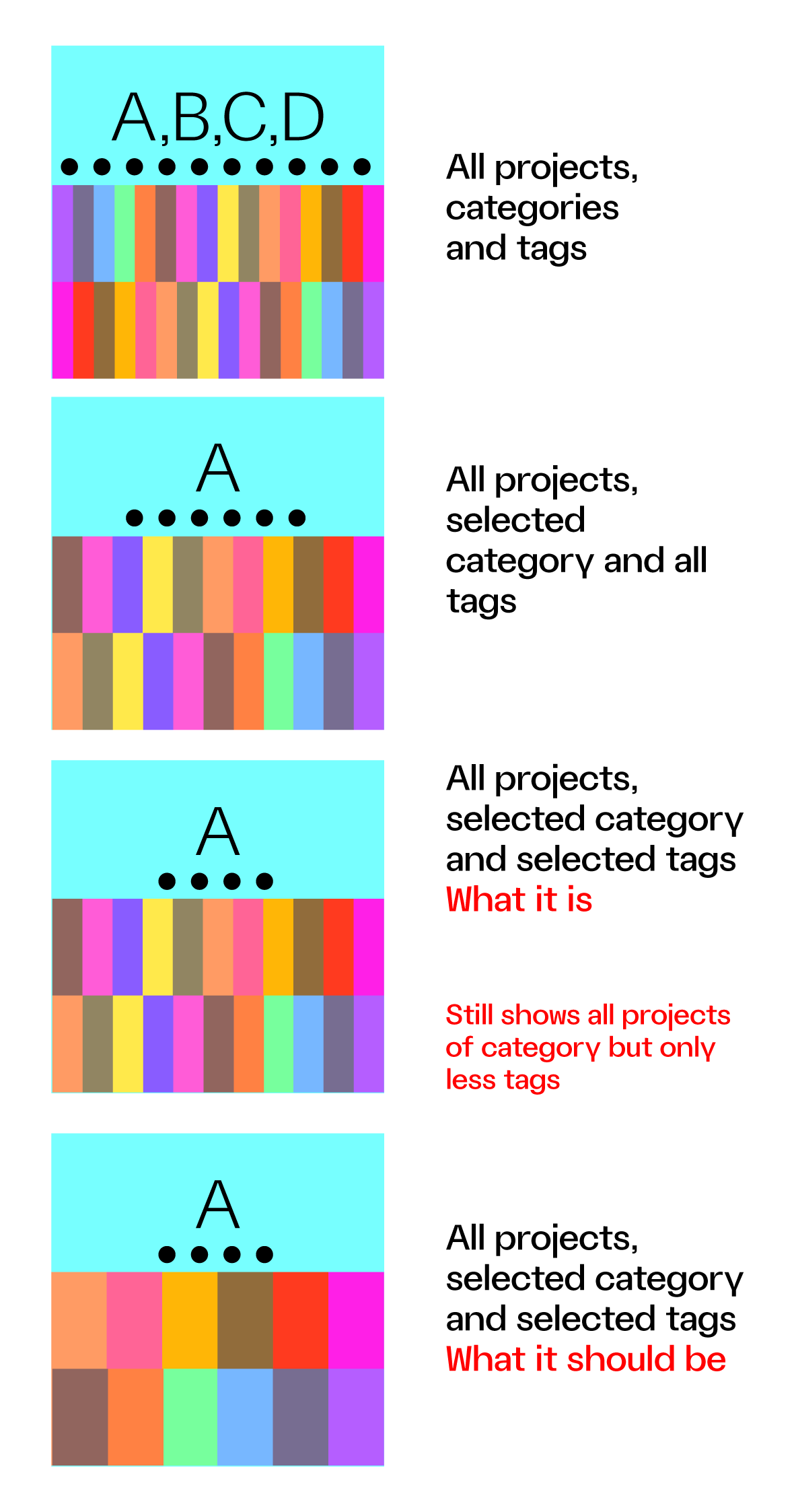
                What I would expect from a select category + select tags (as admin) is to see all projects of selected category but only within the selected tags and not all projects of category + selected TAG BUBBLES.

                Maybe this can show what I mean
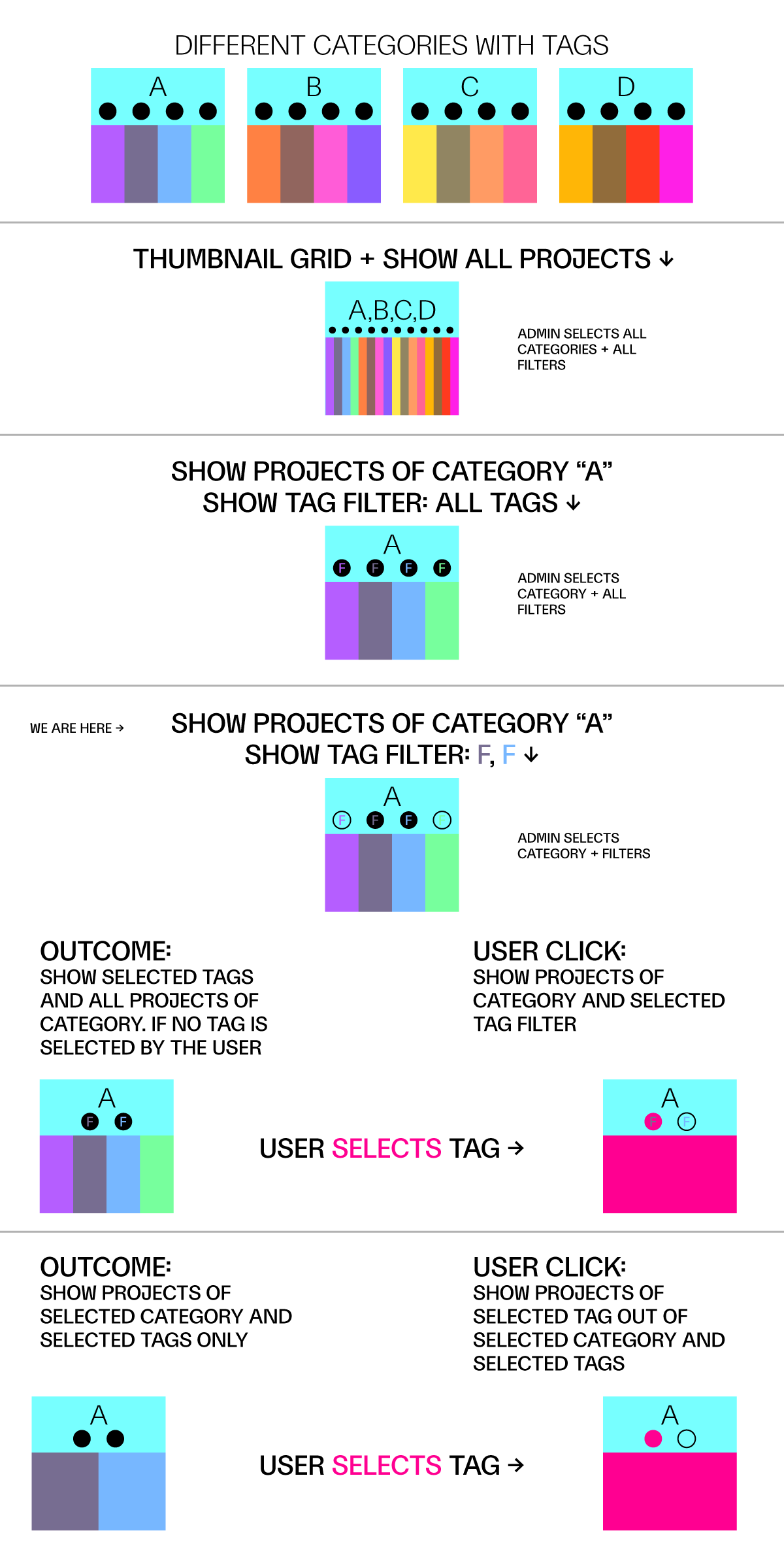
                category_tag_filter.png

                1 Reply Last reply
                0
                • mppM Offline
                  mppM Offline
                  mpp
                  wrote last edited by
                  #19

                  Selecting category + filter tags still shows all projects of category but just less tags unless user select a tag, but maybe it should show all projects of category within selected tags and the tags to filer out

                  cat_filter.png

                  1 Reply Last reply
                  0
                  • mppM Offline
                    mppM Offline
                    mpp
                    wrote last edited by
                    #20

                    Like – hiding a filter (clicking on the eye icon) only hides a bubble tag, not the project of a category with that tag, but maybe that is the idea.

                    1 Reply Last reply
                    0
                    • arminunruhA Offline
                      arminunruhA Offline
                      arminunruh
                      Global Moderator
                      wrote last edited by
                      #21

                      thanks a lot for creating the explaining graphics!

                      you can show and hide tags here:
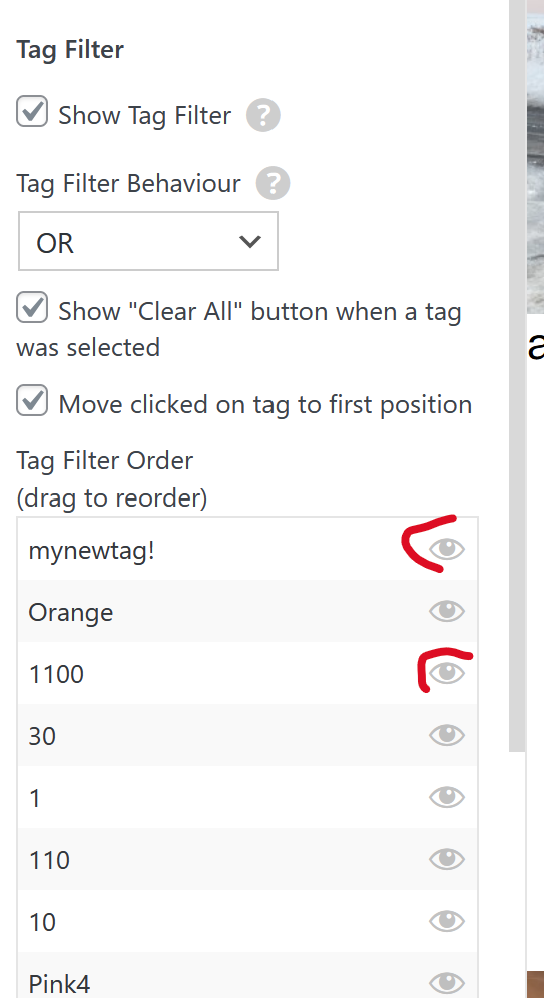
                      image.png

                      and when you hide a tag bubble here, then you want the projects of this tag to also not show. is that right?

                      i think it would be best to have a call about this so I can understand the issue better, i sent you an email

                      mppM 1 Reply Last reply
                      0
                      • arminunruhA arminunruh

                        thanks a lot for creating the explaining graphics!

                        you can show and hide tags here:

                        image.png

                        and when you hide a tag bubble here, then you want the projects of this tag to also not show. is that right?

                        i think it would be best to have a call about this so I can understand the issue better, i sent you an email

                        mppM Offline
                        mppM Offline
                        mpp
                        wrote last edited by mpp
                        #22

                        @arminunruh said in Thumbnail grid + tags:

                        then you want the projects of this tag to also not show. is that right?

                        yes, that is what I expected it will case – so that it is not only show or hide bubble tags, but also projects that are assigned to it – e-mailed you back!

                        1 Reply Last reply
                        0
                        • arminunruhA Offline
                          arminunruhA Offline
                          arminunruh
                          Global Moderator
                          wrote last edited by
                          #23

                          ok this is now included in the latest update:
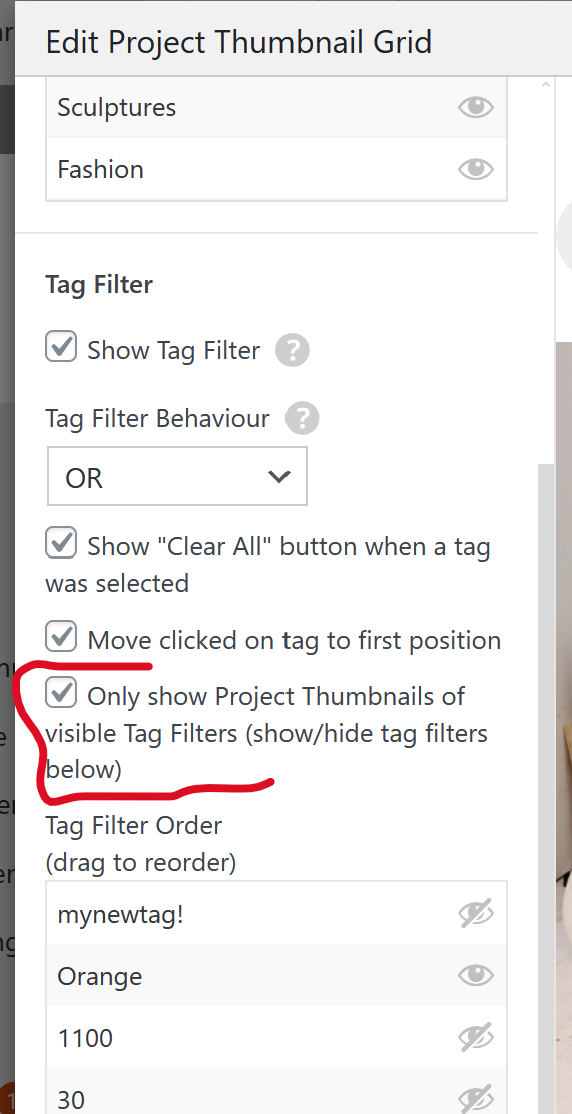
                          image.png

                          mppM 1 Reply Last reply
                          0
                          • arminunruhA arminunruh

                            ok this is now included in the latest update:

                            image.png

                            mppM Offline
                            mppM Offline
                            mpp
                            wrote last edited by
                            #24

                            @arminunruh
                            Incredible, thank you!

                            1 Reply Last reply
                            0
                            Reply
                            • Reply as topic
                            Log in to reply
                            • Oldest to Newest
                            • Newest to Oldest
                            • Most Votes


                            I also code custom websites or custom Lay features.
                            šŸ’æ Email me here: šŸ’æ
                            info@laytheme.com

                            Our Web Development company: 100k.studio

                            Want to tip me? https://www.paypal.com/paypalme/arminunruh

                            Before you post:
                            1. When using a WordPress Cache plugin, disable it or clear your cache.
                            2. Update Lay Theme and all Lay Theme Addons
                            3. Disable all Plugins
                            4. Go to Lay Options → Custom CSS & HTML, click "Turn Off All Custom Code", click "Save Changes"

                            This often solves issues you might run into

                            When you post:
                            1. Post a link to where the problem is
                            2. Does the problem happen on Chrome, Firefox, Safari or iPhone or Android?
                            3. If the problem is difficult to explain, post screenshots / link to a video to explain it
                            Online Users
                            Forgot your key, lost your files, need a previous Lay Theme or Addon version? Go to www.laykeymanager.com
                            laytheme.com
                            • Login

                            • Don't have an account? Register

                            • Login or register to search.
                            • First post
                              Last post
                            0
                            • Recent
                            • Tags
                            • Popular
                            • Users
                            • Search