Skip to content
  • Recent
  • Tags
  • Popular
  • Users
  • Search
Skins
  • Light
  • Brite
  • Cerulean
  • Cosmo
  • Flatly
  • Journal
  • Litera
  • Lumen
  • Lux
  • Materia
  • Minty
  • Morph
  • Pulse
  • Sandstone
  • Simplex
  • Sketchy
  • Spacelab
  • United
  • Yeti
  • Zephyr
  • Dark
  • Cyborg
  • Darkly
  • Quartz
  • Slate
  • Solar
  • Superhero
  • Vapor

  • Default (No Skin)
  • No Skin
Collapse

Lay Theme Forum

  1. Home
  2. Bug Reports
  3. typeface error in Pdf-upload

typeface error in Pdf-upload

Scheduled Pinned Locked Moved Bug Reports
7 Posts 2 Posters 139 Views 2 Watching
  • Oldest to Newest
  • Newest to Oldest
  • Most Votes
Reply
  • Reply as topic
Log in to reply
This topic has been deleted. Only users with topic management privileges can see it.
  • D Offline
    D Offline
    danny
    wrote last edited by
    #1

    @arminunruh

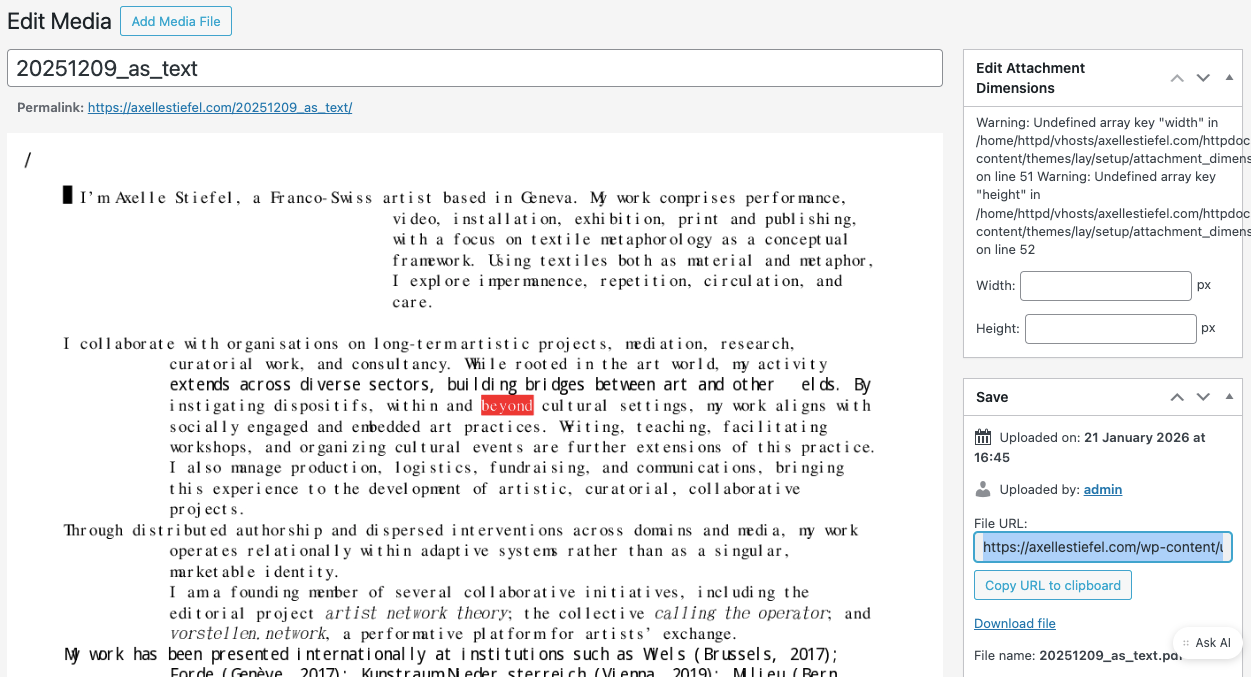
    when uploading a PDF in laytheme it messes up the font:
    https://axellestiefel.com/wp-content/uploads/2026/01/20251209_as_text.pdf

    I use the same font (by abc Dinamo) on the website and it works totally fine.

    This is how it looks in the media library in laytheme:
    Bildschirmfoto 2026-01-21 um 18.04.25.png

    Any idea what the issue might be?

    Thanks again !

    Daniel

    1 Reply Last reply
    0
    • arminunruhA Offline
      arminunruhA Offline
      arminunruh
      Global Moderator
      wrote last edited by
      #2

      Hello, have you tried downloading the pdf, or tried to view it directly in your browser, like when you open this URL? https://axellestiefel.com/wp-content/uploads/2026/01/20251209_as_text.pdf

      when i just open the URL, it looks fine no?
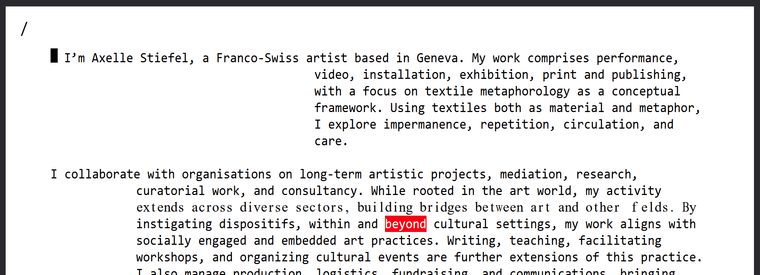
      image.png

      maybe its just the wordpress preview there.
      this is independent of lay theme. maybe wordpress' pdf preview here just cant handle the fonts right.

      1 Reply Last reply
      0
      • D Offline
        D Offline
        danny
        wrote last edited by
        #3

        Yes, that seems to be the case. When I download the file, it's fine. But in the URL it messes up the font (see screenshot attached).

        Is there a way in Laytheme to force the PDF to download immediately instead of an URL-preview?

        Bildschirmfoto 2026-01-22 um 15.59.16.png

        1 Reply Last reply
        0
        • D Offline
          D Offline
          danny
          wrote last edited by
          #4

          Actually forcing the PDF to download makes no sense in mobile applications.

          1 Reply Last reply
          0
          • D Offline
            D Offline
            danny
            wrote last edited by
            #5

            update: I downloaded the PDF from another IP address and it shows the same messy up then in the PDF. So it is not just the prewiew.

            Many thanks for helping out on this!

            1 Reply Last reply
            0
            • arminunruhA Offline
              arminunruhA Offline
              arminunruh
              Global Moderator
              wrote last edited by
              #6

              mhh probably its good to create the pdf and then open the pdf in different browsers to test if it looks properly.

              as far as i know, uploading a pdf in wordpress does not change the pdf itself, but yea the preview in the media library may not look correct.

              whats important is how the pdf looks in the browser itself. but im not sure why it looks like that :/

              1 Reply Last reply
              0
              • D Offline
                D Offline
                danny
                wrote last edited by
                #7

                thanks! I think you right: I just uploaded the same PDF here and it creates the same errors:

                https://excellent-amaranth-jtl2rmhrwn.edgeone.app/20251209_as_text.pdf

                1 Reply Last reply
                1
                Reply
                • Reply as topic
                Log in to reply
                • Oldest to Newest
                • Newest to Oldest
                • Most Votes


                I also code custom websites or custom Lay features.
                šŸ’æ Email me here: šŸ’æ
                info@laytheme.com

                Our Web Development company: 100k.studio

                Want to tip me? https://www.paypal.com/paypalme/arminunruh

                Before you post:
                1. When using a WordPress Cache plugin, disable it or clear your cache.
                2. Update Lay Theme and all Lay Theme Addons
                3. Disable all Plugins
                4. Go to Lay Options → Custom CSS & HTML, click "Turn Off All Custom Code", click "Save Changes"

                This often solves issues you might run into

                When you post:
                1. Post a link to where the problem is
                2. Does the problem happen on Chrome, Firefox, Safari or iPhone or Android?
                3. If the problem is difficult to explain, post screenshots / link to a video to explain it
                Online Users
                Forgot your key, lost your files, need a previous Lay Theme or Addon version? Go to www.laykeymanager.com
                laytheme.com
                • Login

                • Don't have an account? Register

                • Login or register to search.
                • First post
                  Last post
                0
                • Recent
                • Tags
                • Popular
                • Users
                • Search

