no option for auto-update
-
Hi there,
I've built multiple websites with laytheme but my ongoing problem is, that there appears to be no option for auto-updates in my case. I know that this option is supposed to appear like this:

But for me, there is no option like this at all:

This is a big problem for me because I never know when a new LayTheme version is available and when older versions don‘t work anymore. As I can see in the Version History, the updates are very frequent. On some occasions my websites had major bugs because the LayTheme version just seemed to be too old. I work for an institution and this always creates big workarouds because I can't update the LayTheme version myself and always have to contact other people to do it. Is there a solution for this?
Best,
Jana -
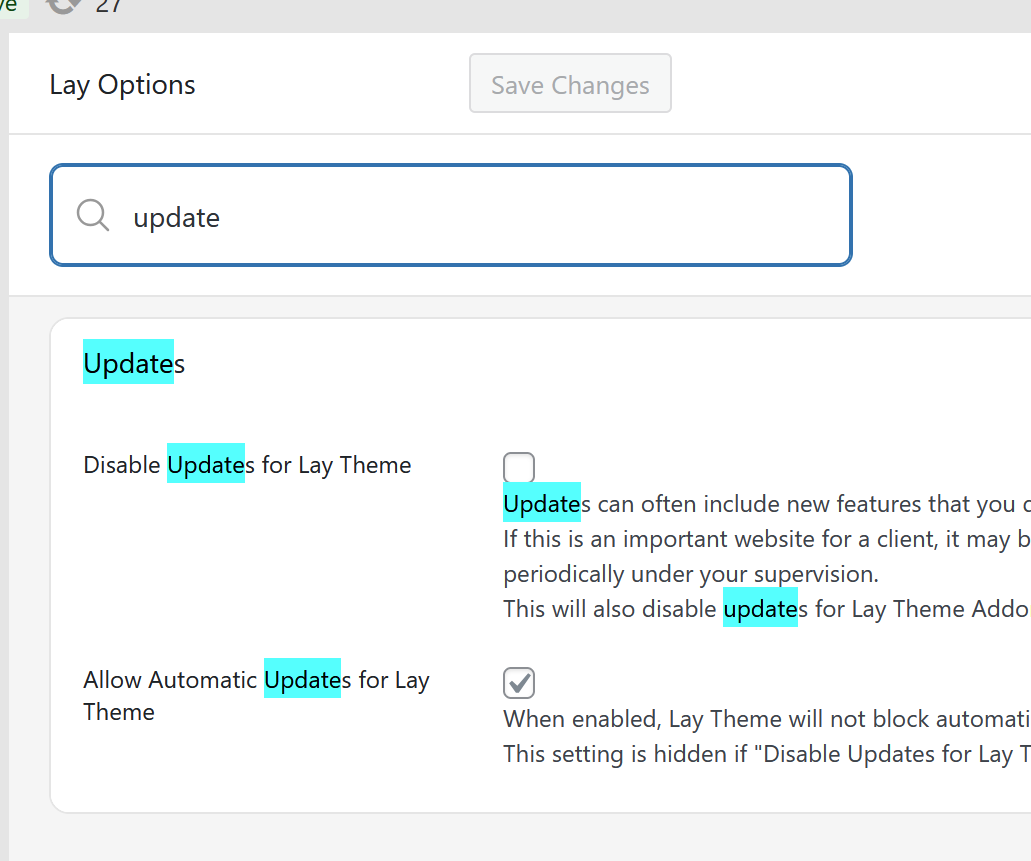
can u make sure the settings are set like this?
i had to disable automatic updates
because in the summertime, my update provider created a faulty update package that lead to hundreds of lay theme websites breaking after they were updated automaticallysince then, i manually test every lay update myself, but as a safety measure, i turned off automatic updates
-
I don't have any settings regarding updates under the menu item "Lay Options"...
But again, generally asking, is there a way to get a notification or something when a new update is available? What does the suggested workflow look like?
I would always have to use this link: https://lay-key-and-file-manager-clientdeploy-production.up.railway.app/, enter my License Keys regularly and check if there's updates?All the best,
Jana -
Can you please send:
- a link to this forum topic
- your website address
- /wp-admin/ username and password
to: info@laytheme.com
