Skip to content
  • Recent
  • Tags
  • Popular
  • Users
  • Search
Skins
  • Light
  • Brite
  • Cerulean
  • Cosmo
  • Flatly
  • Journal
  • Litera
  • Lumen
  • Lux
  • Materia
  • Minty
  • Morph
  • Pulse
  • Sandstone
  • Simplex
  • Sketchy
  • Spacelab
  • United
  • Yeti
  • Zephyr
  • Dark
  • Cyborg
  • Darkly
  • Quartz
  • Slate
  • Solar
  • Superhero
  • Vapor

  • Default (No Skin)
  • No Skin
Collapse

Lay Theme Forum

  1. Home
  2. General Discussion
  3. Setting row gutter background colours

Setting row gutter background colours

Scheduled Pinned Locked Moved General Discussion
5 Posts 2 Posters 52 Views 2 Watching
  • Oldest to Newest
  • Newest to Oldest
  • Most Votes
Reply
  • Reply as topic
Log in to reply
This topic has been deleted. Only users with topic management privileges can see it.
  • G Offline
    G Offline
    Glyph
    wrote last edited by
    #1

    We are building a site with sticky elements and content panels that scroll over one another. One issue is that even though row background colours are specified, the row gutters remain transparent. I'm having trouble targeting these to set a global background colour for them. The only fix I have found is to set grinder gutters to 0 (which then makes page editing look really crammed), and then add top/padding padding to rows, which inherits their row background colour.

    Is there an easier way to just globally target the row gutter background colour, so it doesn't show through the content underneath it on scroll?

    1 Reply Last reply
    0
    • arminunruhA Offline
      arminunruhA Offline
      arminunruh
      Global Moderator
      wrote last edited by
      #2

      ok i think it would be best if we could select a row and then be able to set the inner space (padding) for the row in the sidebar:
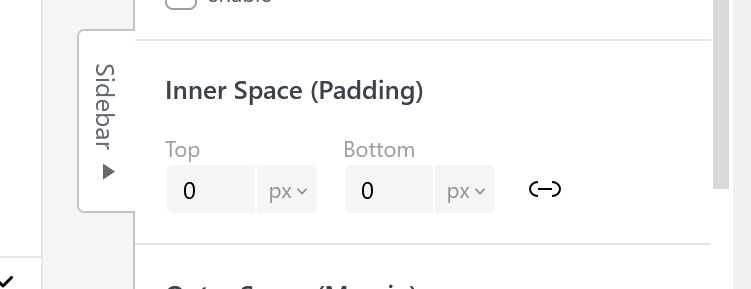
      image.png

      1 Reply Last reply
      0
      • arminunruhA Offline
        arminunruhA Offline
        arminunruh
        Global Moderator
        wrote last edited by
        #3

        going to work on this now

        1 Reply Last reply
        0
        • arminunruhA Offline
          arminunruhA Offline
          arminunruh
          Global Moderator
          wrote last edited by
          #4

          ok you will have this with the next update:
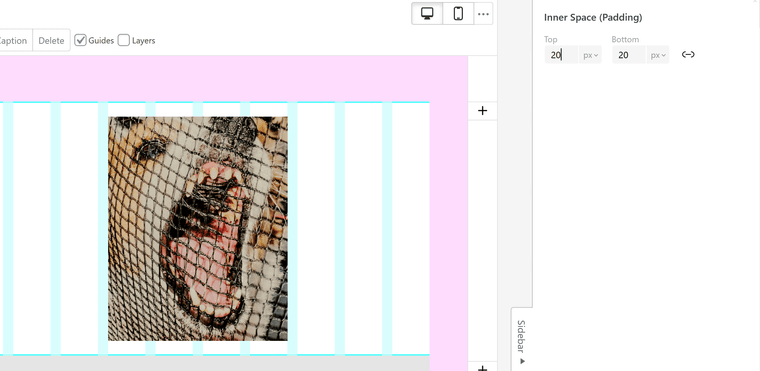
          image.png

          1 Reply Last reply
          0
          • G Offline
            G Offline
            Glyph
            wrote last edited by
            #5

            This is a nice little addition, but I would need to do it manually for every row. What I was trying to solve is a global way to set it.

            1 Reply Last reply
            0
            Reply
            • Reply as topic
            Log in to reply
            • Oldest to Newest
            • Newest to Oldest
            • Most Votes


            I also code custom websites or custom Lay features.
            šŸ’æ Email me here: šŸ’æ
            info@laytheme.com

            Our Web Development company: 100k.studio

            Want to tip me? https://www.paypal.com/paypalme/arminunruh

            Before you post:
            1. When using a WordPress Cache plugin, disable it or clear your cache.
            2. Update Lay Theme and all Lay Theme Addons
            3. Disable all Plugins
            4. Go to Lay Options → Custom CSS & HTML, click "Turn Off All Custom Code", click "Save Changes"

            This often solves issues you might run into

            When you post:
            1. Post a link to where the problem is
            2. Does the problem happen on Chrome, Firefox, Safari or iPhone or Android?
            3. If the problem is difficult to explain, post screenshots / link to a video to explain it
            Online Users
            W
            wakec
            Forgot your key, lost your files, need a previous Lay Theme or Addon version? Go to www.laykeymanager.com
            laytheme.com
            • Login

            • Don't have an account? Register

            • Login or register to search.
            • First post
              Last post
            0
            • Recent
            • Tags
            • Popular
            • Users
            • Search