URL does not update when navigating back from a project category
-
Hi,
I’m experiencing a strange navigation issue on my website.
I have a homepage called “bienvenue”, which contains different project categories like “reproduction”, “architecture”, etc.
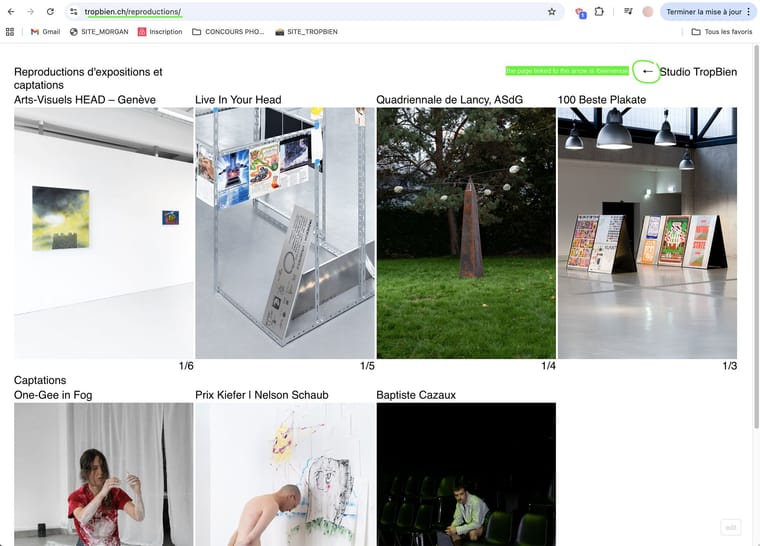
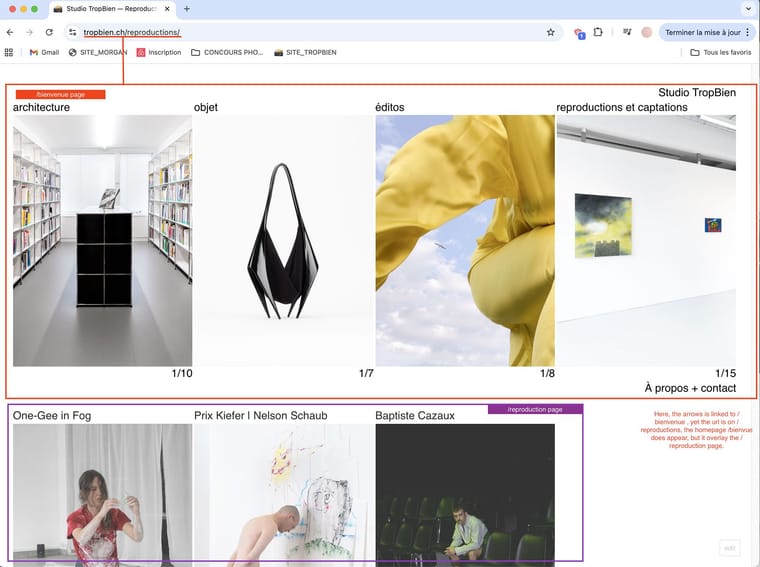
When I click on “reproduction”, I correctly see all the related projects.However, when I click the back arrow (which should lead to “bienvenue”), the content of “bienvenue” does appear, but the URL does not change. It looks like there is an overlap between “bienvenue” and “reproduction”, as if both pages are layered on top of each other.
So visually I am on “Bienvenue”, but technically I remain on “reproduction”.
How to fix this?
website: https://tropbien.ch
issue on safari and chrome -
i actually cant reproduce this
https://www.dropbox.com/scl/fi/u2zs5dhahp3ty55pq3aew/Screen-Recording-2026-04-16-at-09.48.04.mov?rlkey=d397yyzt7kstt3q54n71aywlv&st=ghuu7bil&dl=0am i doing it right?
-
the back button links to a page which is a page overlay
it happens because of this configuration, its not a bug
disable the page overlay feature for that page please
-
heres a better explanation:
hey, i reproduced it on your site — its not really a bug, its how overlay pages work.
your /bienvenue page is configured as an overlay in lay theme (in wp-admin you'll see "Overlay" settings for the page). any link pointing to an overlay page opens it as an overlay, which means the url stays where it was and both pages get layered on top of each other.
to fix: go to /bienvenue's page edit screen in wp-admin, find the "Overlay" metabox and turn off the overlay option. then links to bienvenue will navigate normally and update the url.
if you actually want bienvenue to stay as an overlay for some reason, thats a different setup discussion — let me know.