Skip to content
  • Recent
  • Tags
  • Popular
  • Users
  • Search
Skins
  • Light
  • Brite
  • Cerulean
  • Cosmo
  • Flatly
  • Journal
  • Litera
  • Lumen
  • Lux
  • Materia
  • Minty
  • Morph
  • Pulse
  • Sandstone
  • Simplex
  • Sketchy
  • Spacelab
  • United
  • Yeti
  • Zephyr
  • Dark
  • Cyborg
  • Darkly
  • Quartz
  • Slate
  • Solar
  • Superhero
  • Vapor

  • Default (No Skin)
  • No Skin
Collapse

Lay Theme Forum

  1. Home
  2. General Discussion
  3. Make project thumbnails unclickable or even use custom link.

Make project thumbnails unclickable or even use custom link.

Scheduled Pinned Locked Moved General Discussion
13 Posts 5 Posters 746 Views 2 Watching
  • Oldest to Newest
  • Newest to Oldest
  • Most Votes
Reply
  • Reply as topic
Log in to reply
This topic has been deleted. Only users with topic management privileges can see it.
  • mariusjopenM Offline
    mariusjopenM Offline
    mariusjopen
    Global Moderator
    wrote on last edited by
    #4

    Dear @l_s
    cool!

    We give our best to help. But when it goes into more deep problem solving – we cannot help everywhere.

    Thank you for sharing!

    Best!

    Marius

    www.mariusjopen.world

    1 Reply Last reply
    0
    • holy ghostH Offline
      holy ghostH Offline
      holy ghost
      wrote on last edited by
      #5
      This post is deleted!
      1 Reply Last reply
      0
      • arminunruhA Offline
        arminunruhA Offline
        arminunruh
        Global Moderator
        wrote on last edited by
        #6

        to answer the original question:
        every project now has this checkbox
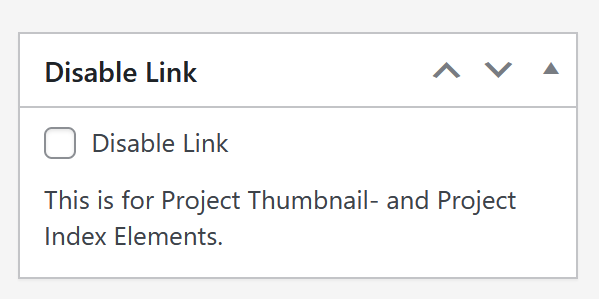
        image.png

        and news posts also have this checkbox
        and they also have a url input to have a different link
        https://laytheme.com/documentation/newssection.html

        1 Reply Last reply
        0
        • arminunruhA Offline
          arminunruhA Offline
          arminunruh
          Global Moderator
          wrote on last edited by
          #7

          is there a function where i can switch off or on the project to project arrows in the top header !?

          i think your question is unrelated to this topic?

          you can only turn on or off project arrows in lay options

          1 Reply Last reply
          0
          • S Offline
            S Offline
            sreibel
            wrote last edited by
            #8

            Hey @arminunruh dear @mariusjopen , thanks for much for this update, was super helpful on the site we are currently building! Unfortunately, on mobile, custom links that link to a page outside of the current website do not work. Any idea why? All other internal links do, and all external links work on desktop just fine.

            Please have a look at this section https://224.shortnotice.online/besuch/ all the way down.

            1 Reply Last reply
            0
            • arminunruhA Offline
              arminunruhA Offline
              arminunruh
              Global Moderator
              wrote last edited by arminunruh
              #9

              hey,

              for the mobile tap issue you might be hitting: there's a bug where external custom links don't open on touch devices when the thumbnail mouseover is set to "on touch, show mouseover state". i've found the cause and will fix it in the next theme update. for now, you can try changing the mobile behaviour in customize → project thumbnails → project thumbnail mouseover → "behaviour on mobile devices" — try "always show mouseover state" or "show mouseover state on touch or tap, tap again to enter project" and see if the external links work then.

              1 Reply Last reply
              0
              • S Offline
                S Offline
                sreibel
                wrote last edited by
                #10

                Hey Armin, thanks for the super swift response! The links work once "always show mouseover state" is selected, but unfortunately we can't use that option as the whole website is built on thumbnails with alternative images (and thus mobile would look completely different then). But thanks a bunch already for taking care of this issue in the next update, very much appreciated!

                1 Reply Last reply
                0
                • arminunruhA Offline
                  arminunruhA Offline
                  arminunruh
                  Global Moderator
                  wrote last edited by
                  #11

                  yeah, of course, no problem. It's going to be fixed with the next update.

                  1 Reply Last reply
                  0
                  • arminunruhA Offline
                    arminunruhA Offline
                    arminunruh
                    Global Moderator
                    wrote last edited by
                    #12

                    ok it should be fixed now

                    1 Reply Last reply
                    0
                    • S Offline
                      S Offline
                      sreibel
                      wrote last edited by
                      #13

                      Works, thanks again

                      1 Reply Last reply
                      0
                      Reply
                      • Reply as topic
                      Log in to reply
                      • Oldest to Newest
                      • Newest to Oldest
                      • Most Votes


                      For 1on1 paid Lay Theme Coaching, contact: audrey@cyberslayers.work.

                      We also code custom websites or custom Lay features.
                      💿 Email us here: 💿
                      info@laytheme.com

                      Our Web Development company: 100k.studio

                      Want to tip me? https://www.paypal.com/paypalme/arminunruh

                      Before you post:
                      1. When using a WordPress Cache plugin, disable it or clear your cache.
                      2. Update Lay Theme and all Lay Theme Addons
                      3. Disable all Plugins
                      4. Go to Lay Options → Custom CSS & HTML, click "Turn Off All Custom Code", click "Save Changes"

                      This often solves issues you might run into

                      When you post:
                      1. Post a link to where the problem is
                      2. Does the problem happen on Chrome, Firefox, Safari or iPhone or Android?
                      3. If the problem is difficult to explain, post screenshots / link to a video to explain it
                      Online Users
                      F
                      FOS
                      A
                      alasdair17
                      Forgot your key, lost your files, need a previous Lay Theme or Addon version? Go to www.laykeymanager.com
                      laytheme.com
                      • Login

                      • Don't have an account? Register

                      • Login or register to search.
                      • First post
                        Last post
                      0
                      • Recent
                      • Tags
                      • Popular
                      • Users
                      • Search