bar to separate menu elements

-
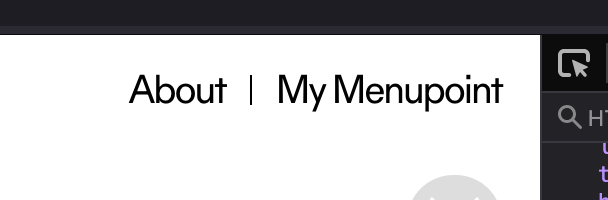
Hi ! Do you have an idea how I could add vertical bars to separate the elements of my menu as shown on the image ?
I tried to add it before the words but as every element is independant the bar is never centered...Thank you vm

-
Have you added it via css?
-
I tried yes... but as i said i can't manage to center it between the words
-
<script>
(function () {
	var lists = document.querySelectorAll('nav.laynav.primary > ul');
	for (var i = 0; i < lists.length; i++) {
		var ul = lists[i];
		// collect the real menu items (excluding dividers)
		var items = [];
		for (var c = 0; c < ul.children.length; c++) {
			var child = ul.children[c];
			if (child.tagName === 'LI' && !child.classList.contains('lay-menu-divider')) {
				items.push(child);
			}
		}
		// insert a divider before every menu item except the first
		for (var j = 1; j < items.length; j++) {
			var prev = items[j].previousElementSibling;
			if (prev && prev.classList.contains('lay-menu-divider')) {
				continue; // divider already there
			}
			var divider = document.createElement('li');
			divider.className = 'lay-menu-divider';
			divider.setAttribute('aria-hidden', 'true');
			ul.insertBefore(divider, items[j]);
		}
	}
})();
</script>

<style>
/* Vertical divider line between menu items (JS-inserted <li>) */
nav.laynav.primary > ul > li.lay-menu-divider {
	display: inline-block;
	vertical-align: middle;   /* vertically centered on the menu line */
	width: 1px;               /* line thickness */
	height: 15px;             /* line height */
	margin: 0 2px;           /* space left/right → breathing room from the text */
	padding: 0;
margin-top: 5px;
	background-color: #000;   /* black */
}
</style>
copy this and put it into "html at bottom"
-
then you can adapt the CSS so the line has the right height and spacing.
Try to adapt the CSS using maybe ChatGPT or Gemini or something if you need help with that
-
I can't find the "html at bottom" window you are talking about... thank you very much for your help
-
I changed the code a little bit. I had one or two things that were not optimal yet. You can copy the code again from my post above.
You will find it in Lay Options . Custom HTML and CSS, and I think it's the very last text box at the bottom.
-
Thank you so much.
-
you're welcome! <3