Skip to content
  • Recent
  • Tags
  • Popular
  • Users
  • Search
Skins
  • Light
  • Brite
  • Cerulean
  • Cosmo
  • Flatly
  • Journal
  • Litera
  • Lumen
  • Lux
  • Materia
  • Minty
  • Morph
  • Pulse
  • Sandstone
  • Simplex
  • Sketchy
  • Spacelab
  • United
  • Yeti
  • Zephyr
  • Dark
  • Cyborg
  • Darkly
  • Quartz
  • Slate
  • Solar
  • Superhero
  • Vapor

  • Default (No Skin)
  • No Skin
Collapse

Lay Theme Forum

  1. Home
  2. Bug Reports
  3. **Bug report: carousel-lazy-img not loading in Safari 26 (macOS 26.5)**

**Bug report: carousel-lazy-img not loading in Safari 26 (macOS 26.5)**

Scheduled Pinned Locked Moved Bug Reports
18 Posts 2 Posters 501 Views 2 Watching
  • Oldest to Newest
  • Newest to Oldest
  • Most Votes
Reply
  • Reply as topic
Log in to reply
This topic has been deleted. Only users with topic management privileges can see it.
  • M Offline
    M Offline
    MWPA
    wrote last edited by
    #4

    Thanks, Armin. It seems the update fixed the problem.

    1 Reply Last reply
    0
    • M Offline
      M Offline
      MWPA
      wrote last edited by
      #5

      Hi Armin,

      After one of the latest updates, I noticed a new issue: no images appear on my project pages in Safari. Everything works correctly in Firefox and Chrome.

      Do you know what might be causing this?

      All the best,

      M

      1 Reply Last reply
      0
      • arminunruhA Offline
        arminunruhA Offline
        arminunruh
        Global Moderator
        wrote last edited by
        #6

        ok i will update my mac os now and test this

        1 Reply Last reply
        0
        • M Offline
          M Offline
          MWPA
          wrote last edited by
          #7

          Hi Armin,

          I’ve narrowed the Safari issue down further.

          The images are loading and decoding correctly. In Safari’s console they return complete: true, valid naturalWidth/naturalHeight, and normal rendered dimensions, for example around 716x477. So it is not a missing image, broken URL, cache, MIME, or JPG decoding issue.

          The problem appears to be CSS stacking/layout. document.elementFromPoint() at the center of a rendered image returns .grid-inner instead of the image itself. When I temporarily made .grid-inner transparent and forced the images to a very high z-index, the images became visible again.

          So Safari seems to place a .grid-inner layer above the project images, or the slider/gallery is ending up in the wrong stacking context. The likely fix is to adjust the z-index/positioning/background of the project gallery versus .grid-inner, rather than changing the image files.

          The temporary test code that made the images visible was:

          document.querySelectorAll('.grid-inner').forEach(el => {
          el.style.setProperty('pointer-events', 'none', 'important');
          el.style.setProperty('background', 'transparent', 'important');
          });

          document.querySelectorAll('img').forEach(img => {
          img.style.setProperty('z-index', '999999', 'important');
          img.style.setProperty('position', 'relative', 'important');
          });

          This is only diagnostic, not a production fix, because it affects all images globally. But it confirms the issue is almost certainly a Safari-specific stacking/overlay problem involving .grid-inner, position, z-index, background, or a related gallery container.

          1 Reply Last reply
          0
          • M Offline
            M Offline
            MWPA
            wrote last edited by
            #8

            Small update: I tested the individual changes separately. Setting only .grid-inner background to transparent did not make the images visible. Setting only pointer-events:none on .grid-inner also did not. Forcing only .slide-inner img to a high z-index also did not.

            The images only became visible with the combined diagnostic override:

            • .grid-inner pointer-events none
            • .grid-inner background transparent
            • all img elements position relative
            • all img elements very high z-index

            So the issue seems to involve an interaction between the grid layer and the image/slider stacking context, not one isolated property. Safari loads and renders the images, but they are visually covered or placed behind another layout layer.

            1 Reply Last reply
            0
            • arminunruhA Offline
              arminunruhA Offline
              arminunruh
              Global Moderator
              wrote last edited by
              #9

              ok is that the exact page where you're seeing the issue, right?
              https://dev.nataschalibbert.nl/work/transit/

              1 Reply Last reply
              0
              • M Offline
                M Offline
                MWPA
                wrote last edited by
                #10

                That’s correct. However, the issue is actually visible on all project pages under “Independent projects / Art commissions”.

                On these pages, the images are placed in the grid with the Lightbox option enabled.

                The issue does not occur on the project pages under “Client-based work / commissions”, where we are using the Element Grid instead.

                1 Reply Last reply
                0
                • arminunruhA Offline
                  arminunruhA Offline
                  arminunruh
                  Global Moderator
                  wrote last edited by
                  #11

                  sure, im gonna fix it today

                  1 Reply Last reply
                  0
                  • arminunruhA Offline
                    arminunruhA Offline
                    arminunruh
                    Global Moderator
                    wrote last edited by arminunruh
                    #12

                    oh, can you use this CSS for a quick fix?

                    .lay-row-same-height-elements{
                    height: 200px!important;
                    }
                    .lay-row-same-height-elements .row-inner{
                    height: 200px!important;
                    }
                    

                    or use this one for more specificity:

                    .lay-row-same-height-elements.lay-row-same-height-include-image{
                    height: 200px!important;
                    }
                    .lay-row-same-height-elements.lay-row-same-height-include-image .row-inner{
                    height: 200px!important;
                    }
                    

                    insteand of 200px you can also use for example 20vw. that should probably look more like it does in the gridder then.

                    i finally installed the latest macos update and can use the browser now.
                    seems like you made all images be

                    align-self: stretch;
                    display: flex;

                    by using the stretch sizing.

                    grafik.png

                    i recently changed the UI for setting this. before it was "same height elements" setting in rows. you did nothing wrong, just seems like this doesnt work anymore in the latest safari...

                    it looks like the latest version of safari just collapses the parent container if all children are stretch.

                    here are some alternative solutions you could do but i would do the one i suggested to you at the start if i was you, cause its the easiest.

                    what you could do:
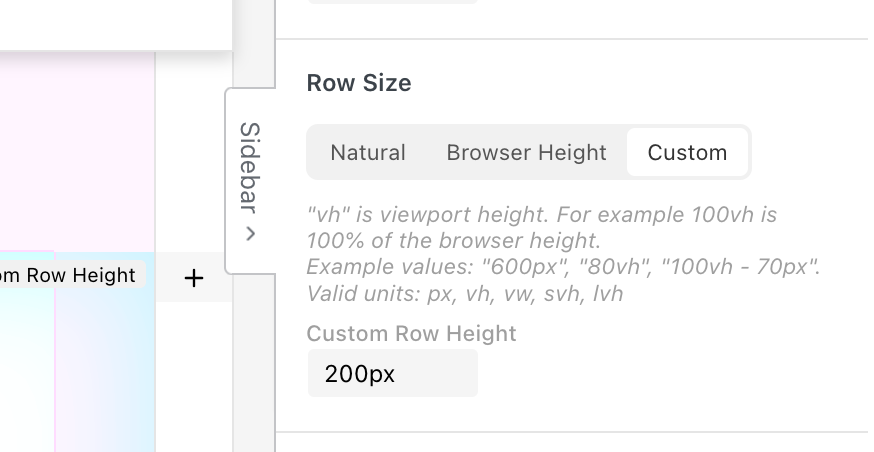
                    15db364b-1048-4a3a-ab5a-d40809f72672-grafik.png

                    click the row, give it a custom height

                    OR

                    what i think would be even better:
                    create a new row, move the images into that row, select the images, simply give the images a fixed height:
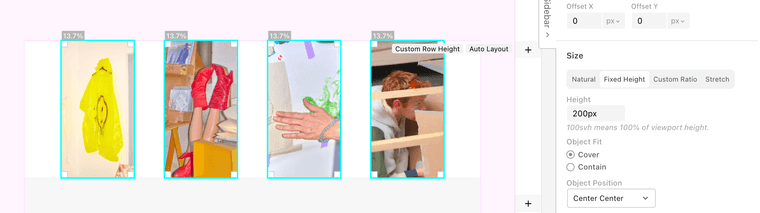
                    ff610743-6147-4a09-b01b-37e61bc90e66-grafik.png

                    OR

                    create a new row, move the images into that new row,
                    select them, make sure they are set to size natural:
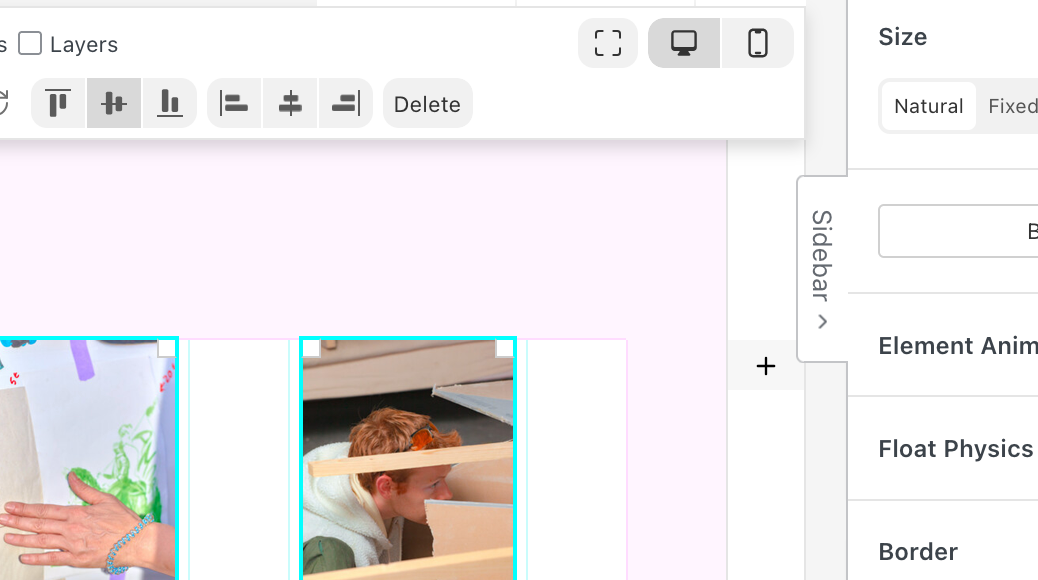
                    cfb8c76c-14ec-4d87-b20f-94f86bf88ae4-grafik.png

                    now use the auto layout mode:
                    https://laytheme.com/documentation/layout-modes.html#auto-layout

                    this way you can select the images, and make them sized by height instead of width:
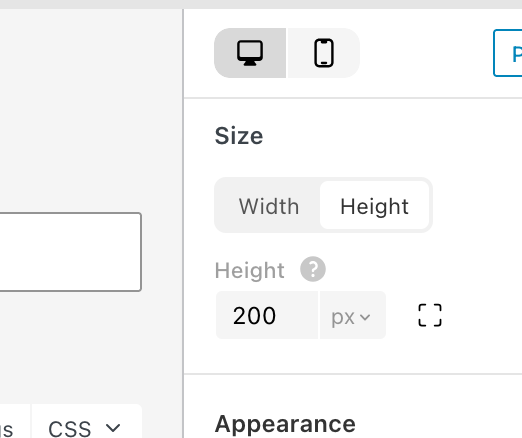
                    46bb7ff9-2716-44c2-bdb6-921b110a5a30-grafik.png

                    1 Reply Last reply
                    0
                    • arminunruhA Offline
                      arminunruhA Offline
                      arminunruh
                      Global Moderator
                      wrote last edited by
                      #13

                      but probably i can just code it in lay theme so the container gets a fixed height in that case hmm
                      but i will have to think about it more cause i dont want to introduce more problems with this fix mmmh

                      1 Reply Last reply
                      0
                      • M Offline
                        M Offline
                        MWPA
                        wrote last edited by
                        #14

                        Thanks, Armin, for taking the time to look into this issue and for sharing your suggestions.

                        Unfortunately, the custom code does not solve the problem properly. The images no longer scale as expected, which creates unwanted gaps between images at certain resolutions.

                        I have also tried all the other suggested solutions, but none of them seem to work reliably. Each approach introduces new 'issues' (in my case) related to scaling, image ratios, or layout behavior.

                        It is not ideal, but I am fine with rebuilding all project pages if that is the best way to solve the issue properly.

                        The setup below, in a new row, comes closest to how it currently works correctly in Firefox and Chrome. However, even with these settings, it still only works in Firefox and Chrome. Image Stretch does not work correctly in Safari?

                        Settings:

                        Row Size: Natural
                        Image Size: Stretch

                        1 Reply Last reply
                        0
                        • M Offline
                          M Offline
                          MWPA
                          wrote last edited by
                          #15

                          I have created a test page with two rows of images:

                          https://www.nataschalibbert.nl/work/transit-test-2/

                          1 Reply Last reply
                          0
                          • arminunruhA Offline
                            arminunruhA Offline
                            arminunruh
                            Global Moderator
                            wrote last edited by
                            #16

                            hey you shouldnt have to redo everything, i will code a fix and release it today i think

                            .column-wrap{
                            min-height: 20vw;
                            }
                            

                            its gonna do sth like this but only for the right containers (thats sth you cant do right now)
                            and that will fix it for safari and then u wont have to redo everything

                            1 Reply Last reply
                            0
                            • arminunruhA Offline
                              arminunruhA Offline
                              arminunruh
                              Global Moderator
                              wrote last edited by
                              #17

                              we'll release the update today with the fix. If it still does not work, then please send me an email to info@laytheme.com with a link to this topic, your website address, and your WordPress admin login.

                              1 Reply Last reply
                              0
                              • M Offline
                                M Offline
                                MWPA
                                wrote last edited by
                                #18

                                Thanks for the update, Armin. It works now.

                                The only thing I had to do was set one image in the row to 'Natural'. This defines the row size. If all the other images are set to 'Stretch', they all get the same height.

                                Thanks again!

                                1 Reply Last reply
                                0
                                Reply
                                • Reply as topic
                                Log in to reply
                                • Oldest to Newest
                                • Newest to Oldest
                                • Most Votes


                                For paid 1-on-1 Lay Theme Coaching, contact Audrey (audrey@cyberslayers.work) or me (info@laytheme.com).

                                We also code custom websites or bespoke Lay features. Drop me a line at info@laytheme.com or check out my work at arminunruh.com.

                                Want to support my work? paypal.me/arminunruh

                                Before you post:
                                1. When using a WordPress Cache plugin, disable it or clear your cache.
                                2. Update Lay Theme and all Lay Theme Addons
                                3. Disable all Plugins
                                4. Go to Lay Options → Custom CSS & HTML, click "Turn Off All Custom Code", click "Save Changes"

                                This often solves issues you might run into

                                When you post:
                                1. Post a link to where the problem is
                                2. Does the problem happen on Chrome, Firefox, Safari or iPhone or Android?
                                3. If the problem is difficult to explain, post screenshots / link to a video to explain it
                                Online Users
                                Forgot your key, lost your files, need a previous Lay Theme or Addon version? Go to www.laykeymanager.com
                                laytheme.com
                                • Login

                                • Don't have an account? Register

                                • Login or register to search.
                                • First post
                                  Last post
                                0
                                • Recent
                                • Tags
                                • Popular
                                • Users
                                • Search

