Menu problem after update from Lay 5 to 11
-
Hello,
I am troubleshooting a small website designed by someone else. It was recently hacked through an older version of Wordpress. I have updated Wordpress, PHP and plugins. Version 5 of Lay theme is used. I tried updating to the current version 11 (big jump), but there are menu problems so I have reverted.
Link to website: https://ifbproductions.fr
Under v11, the menu item "VOIR LES FILMS" (https://ifbproductions.fr/category/films/), incorrectly displays the same content as the menu item "PROJECTIONS" (https://ifbproductions.fr/projections/).See images:
01 VOIR LES FILMS.jpg :
https://ifbproductions.fr/wp-content/uploads/2026/06/01-VOIR-LES-FILMS.jpg
02 PROJECTIONS.jpg :
https://ifbproductions.fr/wp-content/uploads/2026/06/02-PROJECTIONS.jpgWhat changes do I need to make to fix this problem?
Thanks!
-
hey! if i was you i would check
in appearance -> menusif the right pages are linked there.
also, i think one of the pages is a category page?
you could
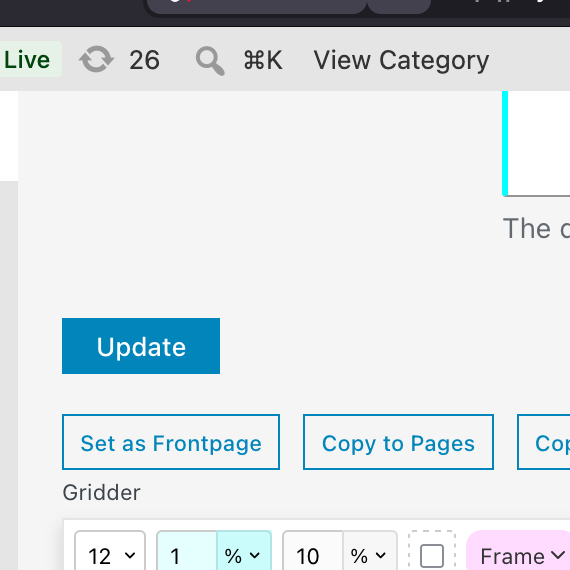
just go to that page, click "copy to pages"
and then link that new page in appearance - menus
also, i would try going to settings -> permalinks
and click "save" there. this refreshes links -
Thank you! I will try your suggestions...
-
Thank you, @arminunruh. It was also necessary to click on "Update" in a few other pages, but your suggestion worked.
-
ok thats great, im happy it worked!!

Hello! It looks like you're interested in this conversation, but you don't have an account yet.
Getting fed up of having to scroll through the same posts each visit? When you register for an account, you'll always come back to exactly where you were before, and choose to be notified of new replies (either via email, or push notification). You'll also be able to save bookmarks and upvote posts to show your appreciation to other community members.
With your input, this post could be even better 💗
Register Login