Skip to content
  • Recent
  • Tags
  • Popular
  • Users
  • Search
Skins
  • Light
  • Brite
  • Cerulean
  • Cosmo
  • Flatly
  • Journal
  • Litera
  • Lumen
  • Lux
  • Materia
  • Minty
  • Morph
  • Pulse
  • Sandstone
  • Simplex
  • Sketchy
  • Spacelab
  • United
  • Yeti
  • Zephyr
  • Dark
  • Cyborg
  • Darkly
  • Quartz
  • Slate
  • Solar
  • Superhero
  • Vapor

  • Default (No Skin)
  • No Skin
Collapse

Lay Theme Forum

  1. Home
  2. Bug Reports
  3. float physics - Gentle float: button disappears (only desktop) & stutters (only mobile, tablet)

float physics - Gentle float: button disappears (only desktop) & stutters (only mobile, tablet)

Scheduled Pinned Locked Moved Bug Reports
13 Posts 2 Posters 430 Views 2 Watching
  • Oldest to Newest
  • Newest to Oldest
  • Most Votes
Reply
  • Reply as topic
Log in to reply
This topic has been deleted. Only users with topic management privileges can see it.
  • A Offline
    A Offline
    afb
    wrote last edited by
    #3

    Desktop and Tablet (iPhone is fine)
    If you scroll down here https://www.annette-fischer.com/work/
    at some point the button disappears/it looks like the button is just one level backwards/ in the background or sth like that..

    I use iPhone 13 an iPad Air (5. Gen) and Mac book pro 2023 and test always on all browsers (chrome, firefox, safari)

    thanks Armin!

    1 Reply Last reply
    0
    • arminunruhA Offline
      arminunruhA Offline
      arminunruh
      Global Moderator
      wrote last edited by
      #4

      ah i see!

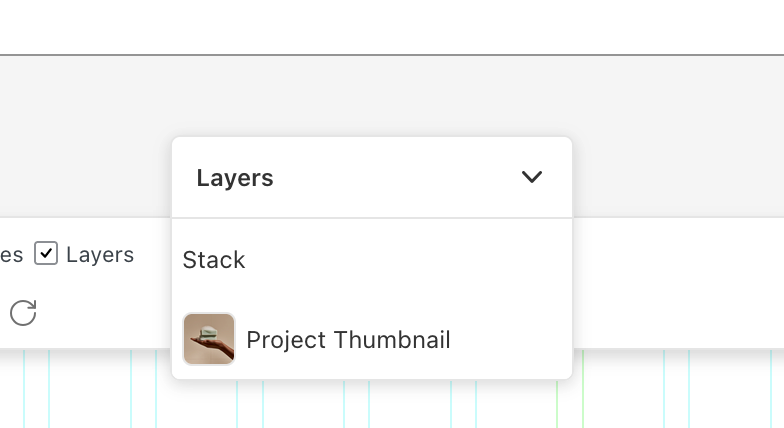
      grafik.png

      can you click "layers" then make sure the floating element is at the very top so it overlaps everything?

      about the performance im not sure.. it seems to be really fluid for me and my device is older than yours hmm its weird

      and does it stutter on all browsers or just one?

      1 Reply Last reply
      0
      • A Offline
        A Offline
        afb
        wrote last edited by
        #5

        Thanks so much Armin!
        The floating element is now at the very top = problem solved.
        The stuttering seems to be gone as well... (firefox, safari, chrome) = problem solved.

        1 Reply Last reply
        0
        • arminunruhA Offline
          arminunruhA Offline
          arminunruh
          Global Moderator
          wrote last edited by
          #6

          ok nice!

          1 Reply Last reply
          0
          • A Offline
            A Offline
            afb
            wrote last edited by
            #7

            Hello Armin, the stuttering on mobile and tablet (firefox, safari, chrome). Desktop is still fine... thanks for the effort...

            1 Reply Last reply
            0
            • arminunruhA Offline
              arminunruhA Offline
              arminunruh
              Global Moderator
              wrote last edited by
              #8

              okay, I will release an update today that will have some performance improvements because maybe now it's stuttering because you use those two WebGL animations.

              1 Reply Last reply
              1
              • A Offline
                A Offline
                afb
                wrote last edited by
                #9

                Hi Armin, my laytheme is updated. The stuttering - when scrolling - still exists on mobile devices, all browsers... thanks for checking

                1 Reply Last reply
                0
                • arminunruhA Offline
                  arminunruhA Offline
                  arminunruh
                  Global Moderator
                  wrote last edited by
                  #10

                  https://www.dropbox.com/scl/fi/qkx64us7n4h1zz6fr5wfi/ScreenRecording_07-28-2026-11-28-22_1.MP4?rlkey=be9hvhbey9r5dciwcnywz0c7h&st=k9u3dn57&dl=0

                  Hey, I recorded this video for you, and you can watch it above. I really can't replicate the stuttering, and I already did some optimizations, but at the moment I really don't know what else I could do. My recommendation to you would be to just disable the float physics for phone.

                  1 Reply Last reply
                  0
                  • arminunruhA Offline
                    arminunruhA Offline
                    arminunruh
                    Global Moderator
                    wrote last edited by
                    #11

                    you could also try to disable the WebGL animations that you have on your page, like both of them, and see if that makes any difference. Maybe it's just too much going on, too much to handle for your phone. I don't know

                    1 Reply Last reply
                    0
                    • A Offline
                      A Offline
                      afb
                      wrote last edited by
                      #12

                      Hi Armin, thanks so much.
                      See here: the yellow element...
                      https://www.annette-fischer.com/work/
                      https://www.annette-fischer.com/about/

                      1 Reply Last reply
                      0
                      • A Offline
                        A Offline
                        afb
                        wrote last edited by
                        #13

                        Hi Armin, can you check this one last time? Otherwise I need to delete it on tablet & mobile. thank you !!
                        See here: the stuttering yellow float physics element (button)...
                        https://www.annette-fischer.com/work/
                        https://www.annette-fischer.com/about/

                        1 Reply Last reply
                        0
                        Reply
                        • Reply as topic
                        Log in to reply
                        • Oldest to Newest
                        • Newest to Oldest
                        • Most Votes


                        We also code custom websites or bespoke Lay features. Drop me a line at info@laytheme.com or check out my work at arminunruh.com.

                        Want to support my work? paypal.me/arminunruh

                        Before you post:
                        1. When using a WordPress Cache plugin, disable it or clear your cache.
                        2. Update Lay Theme and all Lay Theme Addons
                        3. Disable all Plugins
                        4. Go to Lay Options → Custom CSS & HTML, click "Turn Off All Custom Code", click "Save Changes"

                        This often solves issues you might run into

                        When you post:
                        1. Post a link to where the problem is
                        2. Does the problem happen on Chrome, Firefox, Safari or iPhone or Android?
                        3. If the problem is difficult to explain, post screenshots / link to a video to explain it
                        Online Users
                        Forgot your key, lost your files, need a previous Lay Theme or Addon version? Go to www.laykeymanager.com
                        laytheme.com
                        • Login

                        • Don't have an account? Register

                        • Login or register to search.
                        • First post
                          Last post
                        0
                        • Recent
                        • Tags
                        • Popular
                        • Users
                        • Search