Prev/Next Project Links -> projects of same category
-
hello armin,
Unfortunately, after the 7.7.3 update on December 31, the project navigation for navigating to the next/previous project no longer works as expected. As I understand the update description, the navigation should lead to the next project, which after the standard category has the same category as the current project. The corresponding option in the Lay Options is active, but the generated links always lead through all existing projects, regardless of the categories. Is there a way to enable the original behavior without downgrading to a pre 7.7.3 version (I don't want to lose the great new copy/paste feature!)? -
hey do you have a link please?
i can fix it! -
Hello Armin,
here is the link: rm.metagebirge.de
The site is still under construction and many things are still unfinished. Our realized works filtered on the start page under “Projekte” have Prev/Next Project links at the bottom of the corresponding project pages. However, these currently also lead to other project types (News/Publikationen). A “Alle” category has been set up in the backend as the default category so that all content appears on the start page in the project thumbnail grid regardless of the tags used. The second category is “Arbeiten”, under which all realized works are summarized. We do not use the category filter, only the tag filter. You can also have a look at the backend if required. Thank you! -
can you send your website address, /wp-admin/ username and password and a link to this topic to info@laytheme.com?
-
Hello Armin,
we have te same problem.
https://waisenkindertansania.de/category/die-kinder/You'll see, after the 13th child (Baraka) the order is not correct.
Until Baraka, I followed your instruction:
"...order of your projects in the project overview in your admin panel. You can drag and drop the projects there to change the order."
But in long term, its too complicated, as we are adding or deleating new "projects" in this category very often.Can you help me please?
My very best,
AG -
ok i sent you an email, i will have to take a closer look at your site
-
the order needs to be set here, back to the default "menu order"
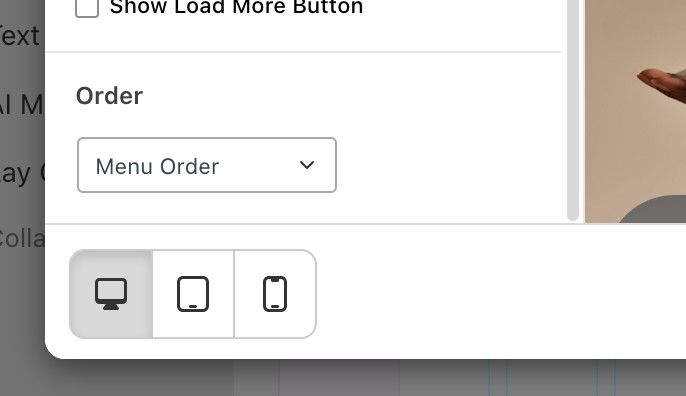
you set it to "custom order" so it has a different order

Hello! It looks like you're interested in this conversation, but you don't have an account yet.
Getting fed up of having to scroll through the same posts each visit? When you register for an account, you'll always come back to exactly where you were before, and choose to be notified of new replies (either via email, or push notification). You'll also be able to save bookmarks and upvote posts to show your appreciation to other community members.
With your input, this post could be even better 💗
Register Login