Skip to content
  • Recent
  • Tags
  • Popular
  • Users
  • Search
Skins
  • Light
  • Brite
  • Cerulean
  • Cosmo
  • Flatly
  • Journal
  • Litera
  • Lumen
  • Lux
  • Materia
  • Minty
  • Morph
  • Pulse
  • Sandstone
  • Simplex
  • Sketchy
  • Spacelab
  • United
  • Yeti
  • Zephyr
  • Dark
  • Cyborg
  • Darkly
  • Quartz
  • Slate
  • Solar
  • Superhero
  • Vapor

  • Default (No Skin)
  • No Skin
Collapse

Lay Theme Forum

  1. Home
  2. Bug Reports
  3. Overlay menu doesn’t slide / can’t change size of gallery with rounded corners

Overlay menu doesn’t slide / can’t change size of gallery with rounded corners

Scheduled Pinned Locked Moved Bug Reports
9 Posts 2 Posters 81 Views 2 Watching
  • Oldest to Newest
  • Newest to Oldest
  • Most Votes
Reply
  • Reply as topic
Log in to reply
This topic has been deleted. Only users with topic management privileges can see it.
  • A
    A
    Aleksandar
    wrote last edited by
    #1

    Hi Armin,

    I have two things I wanted to ask you about.

    the website

    1. Mobile menu
    On mobile, the overlay-menu is supposed to slide in from the right, but instead it just pops up after a short delay. It feels a bit abrupt rather than animated. Also, on my phone there's still some kind of focus/selection outline appearing around it.
    My website contains quite a bit of AI custom code, but Claude suggested this is probably caused by the theme rather than my code. I thought I'd check with you first.

    2. Gallery with rounded corners
    I have a gallery with rounded corners, but I can't resize it properly because the corner radius covers the resize handles (anchor points). The only workaround is to set the corner radius to 0, resize the gallery, and then apply the rounded corners again.
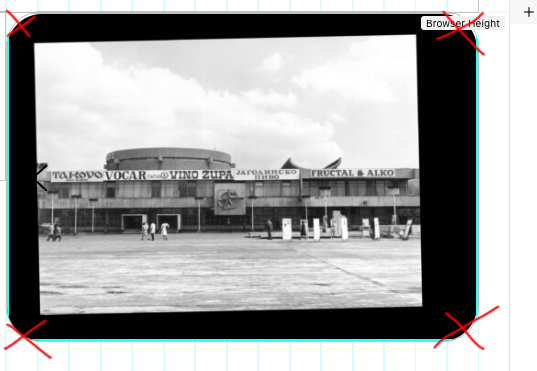
    Screenshot 2026-11-24 at 13.01.37.png

    Just wanted to let you know in case these are known issues.

    1 Reply Last reply
    • arminunruhA
      arminunruhA
      arminunruh
      Global Moderator
      wrote last edited by
      #2

      the rounded corners bug will be fixed with the next update. the sliding thing i have to investigate further

      1 Reply Last reply
      • arminunruhA
        arminunruhA
        arminunruh
        Global Moderator
        wrote last edited by
        #3

        ok the overlay does slide in, but you just cant see it because it fades in after it slides in

        in lay options

        • navigation animations

        turn off "Use “Showing Animation” when opening Page Overlays"

        1 Reply Last reply
        • arminunruhA
          arminunruhA
          arminunruh
          Global Moderator
          wrote last edited by
          #4

          and the focus / selection border will be gone with the next update

          1 Reply Last reply
          • arminunruhA
            arminunruhA
            arminunruh
            Global Moderator
            wrote last edited by
            #5

            very impressive 3d stuff by the way!!

            1 Reply Last reply
            • A
              A
              Aleksandar
              wrote last edited by
              #6

              Hey Armin, thank you and thank you! :-)
              Turning off "Showing Animation" would mean losing the slide-in effect, right? :-( That would be a pity. I wonder what could be causing it, since Contact also slides in from the right and works just fine. Hm...

              1 Reply Last reply
              • A
                A
                Aleksandar
                wrote last edited by
                #7

                One more thing: I noticed that on iOS Safari the fullscreen overlay also tints the status bar (behind the clock and battery). As a test, I changed the background color of the overlay menu to red. Is there a way to prevent the overlay from extending into the safe area, so the status bar stays white?


                Skender.world-2.jpg
                Skender.world-3.jpg

                Design-wise, it is a bit odd because Safari suddenly becomes part of the design. 😵‍💫

                1 Reply Last reply
                • arminunruhA
                  arminunruhA
                  arminunruh
                  Global Moderator
                  wrote last edited by
                  #8

                  this is something theres no control over, ios decides how it handles this by itself i havent found any way to control this

                  1 Reply Last reply
                  • A
                    A
                    Aleksandar
                    wrote last edited by
                    #9

                    So weird. I just read about it too. It feels like interference with the design. :-/ I don’t like that. X-D

                    1 Reply Last reply

                    Hello! It looks like you're interested in this conversation, but you don't have an account yet.

                    Getting fed up of having to scroll through the same posts each visit? When you register for an account, you'll always come back to exactly where you were before, and choose to be notified of new replies (either via email, or push notification). You'll also be able to save bookmarks and upvote posts to show your appreciation to other community members.

                    With your input, this post could be even better 💗

                    Register Login
                    Reply
                    • Reply as topic
                    Log in to reply
                    • Oldest to Newest
                    • Newest to Oldest
                    • Most Votes


                    Online Users
                    Forgot your key, lost your files, need a previous Lay Theme or Addon version? Go to www.laykeymanager.com
                    laytheme.com
                    • Login

                    • Don't have an account? Register

                    • Login or register to search.
                    • First post
                      Last post
                    0
                    • Recent
                    • Tags
                    • Popular
                    • Users
                    • Search