Skip to content
  • Recent
  • Tags
  • Popular
  • Users
  • Search
Skins
  • Light
  • Brite
  • Cerulean
  • Cosmo
  • Flatly
  • Journal
  • Litera
  • Lumen
  • Lux
  • Materia
  • Minty
  • Morph
  • Pulse
  • Sandstone
  • Simplex
  • Sketchy
  • Spacelab
  • United
  • Yeti
  • Zephyr
  • Dark
  • Cyborg
  • Darkly
  • Quartz
  • Slate
  • Solar
  • Superhero
  • Vapor

  • Default (No Skin)
  • No Skin
Collapse

Lay Theme Forum

  1. Home
  2. General Discussion
  3. Tags are not working

Tags are not working

Scheduled Pinned Locked Moved General Discussion
16 Posts 2 Posters 1.9k Views 2 Watching
  • Oldest to Newest
  • Newest to Oldest
  • Most Votes
Reply
  • Reply as topic
Log in to reply
This topic has been deleted. Only users with topic management privileges can see it.
  • reinterpretR
    reinterpretR
    reinterpret
    wrote on last edited by
    #1

    Hi. :-) In my case the tags are not working.
    Here is the page I am working on: https://majvanderlinden.com/collection/

    Thank you! Best regards.

    1 Reply Last reply
    0
    • arminunruhA
      arminunruhA
      arminunruh
      Global Moderator
      wrote on last edited by
      #2

      ah you put $tags$ in the footer, right?

      1 Reply Last reply
      0
      • reinterpretR
        reinterpretR
        reinterpret
        wrote on last edited by
        #3

        No. On the Left. To sort things. But if I click on one and then on another and so on there is nothing happening anymore after a while.

        1 Reply Last reply
        0
        • arminunruhA
          arminunruhA
          arminunruh
          Global Moderator
          wrote on last edited by
          #4

          well looking at how you set up your website,

          the left side is the page under the project overlay

          if you put $tags$ there, thats not the right place to put it. u need to put $tags$ inside of a project.

          the way you want it to work doesnt work

          1 Reply Last reply
          0
          • reinterpretR
            reinterpretR
            reinterpret
            wrote on last edited by
            #5

            Ah. Thank you. But the tags are still on the project page. I made them fixed on the left and changes the look. But still this is the problem?

            1 Reply Last reply
            0
            • reinterpretR
              reinterpretR
              reinterpret
              wrote on last edited by
              #6

              I think I have to activate Reset Button maybe?

              1 Reply Last reply
              0
              • reinterpretR
                reinterpretR
                reinterpret
                wrote on last edited by
                #7

                And I need to replace the "Close" button. I do have an SVG with the Text "ALL" in it.
                Thank you for help

                1 Reply Last reply
                0
                • reinterpretR
                  reinterpretR
                  reinterpret
                  wrote on last edited by
                  #8

                  And it is working now with the tags and the sticky menu. but the client want the close button replaced in a Text "All". This would be realy great to get this done somehow. Then I can go online I think.

                  1 Reply Last reply
                  0
                  • arminunruhA
                    arminunruhA
                    arminunruh
                    Global Moderator
                    wrote on last edited by
                    #9

                    use this css to have text instead of an X for closing the project overlay

                    .close-projects-overlay::before {
                        display: none;
                    }
                    .close-projects-overlay::after {
                        content: 'All';
                        font-size: 20px;
                        font-family: helvetica neue, sans-serif;
                    }
                    

                    idk where your $tags$ text is, can you like post a screenshot with the area marked where it is

                    1 Reply Last reply
                    0
                    • reinterpretR
                      reinterpretR
                      reinterpret
                      wrote on last edited by
                      #10

                      Thank you! Nice.
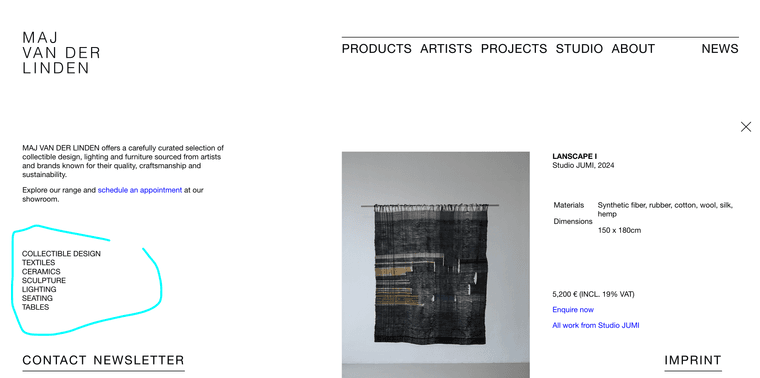
                      Here are the Tags:
                      Screenshot 2025-03-21 at 19.16.27.png

                      1 Reply Last reply
                      0
                      • reinterpretR
                        reinterpretR
                        reinterpret
                        wrote on last edited by
                        #11

                        I did it by myself like you made it. But with the Tags. Thank you!!

                        1 Reply Last reply
                        0
                        • arminunruhA
                          arminunruhA
                          arminunruh
                          Global Moderator
                          wrote on last edited by
                          #12

                          Screenshot 2025-03-23 at 09.17.37.png

                          if u mean these ones
                          they are on a page, they are not in a project layout

                          1 Reply Last reply
                          0
                          • arminunruhA
                            arminunruhA
                            arminunruh
                            Global Moderator
                            wrote on last edited by arminunruh
                            #13

                            u changed the css so the project overlay is only 50% width and the page underneath shows on the left side

                            the page underneath is just a regular page page, $tags$ dont work in there

                            1 Reply Last reply
                            0
                            • arminunruhA
                              arminunruhA
                              arminunruh
                              Global Moderator
                              wrote on last edited by
                              #14

                              hey

                              so i just realized we are talking about sth different.
                              please be more specific next time,
                              an pls post a screenshot of the full website next time, with marking the part you mean

                              cause when you use custom css like that, i dont even know what part of the website you talk about

                              1. you mean the tag filter of the thumbnailgrid
                              2. or you mean $tags$ which is a text you put inside a text element, which will result in a comma separated list of tags

                              you mean the first thing i think!
                              i thought you meant the second thing.

                              1 Reply Last reply
                              0
                              • reinterpretR
                                reinterpretR
                                reinterpret
                                wrote on last edited by
                                #15

                                But now its working...
                                Thank you!! And sorry. Next time I will be more in detail. And I also have the "All" link in the links if something is selected. Everything is good now.

                                1 Reply Last reply
                                0
                                • arminunruhA
                                  arminunruhA
                                  arminunruh
                                  Global Moderator
                                  wrote on last edited by arminunruh
                                  #16

                                  same thing with you wanting the X close icon to be an "All" text.
                                  you meant the X "deselect" icon of the tagfilter of the thumbnailgrid?
                                  but i thought you meant the X close icon of the project overlay!

                                  1 Reply Last reply
                                  0

                                  Hello! It looks like you're interested in this conversation, but you don't have an account yet.

                                  Getting fed up of having to scroll through the same posts each visit? When you register for an account, you'll always come back to exactly where you were before, and choose to be notified of new replies (either via email, or push notification). You'll also be able to save bookmarks and upvote posts to show your appreciation to other community members.

                                  With your input, this post could be even better 💗

                                  Register Login
                                  Reply
                                  • Reply as topic
                                  Log in to reply
                                  • Oldest to Newest
                                  • Newest to Oldest
                                  • Most Votes


                                  Online Users
                                  Forgot your key, lost your files, need a previous Lay Theme or Addon version? Go to www.laykeymanager.com
                                  laytheme.com
                                  • Login

                                  • Don't have an account? Register

                                  • Login or register to search.
                                  • First post
                                    Last post
                                  0
                                  • Recent
                                  • Tags
                                  • Popular
                                  • Users
                                  • Search