Skip to content
  • Recent
  • Tags
  • Popular
  • Users
  • Search
Skins
  • Light
  • Brite
  • Cerulean
  • Cosmo
  • Flatly
  • Journal
  • Litera
  • Lumen
  • Lux
  • Materia
  • Minty
  • Morph
  • Pulse
  • Sandstone
  • Simplex
  • Sketchy
  • Spacelab
  • United
  • Yeti
  • Zephyr
  • Dark
  • Cyborg
  • Darkly
  • Quartz
  • Slate
  • Solar
  • Superhero
  • Vapor

  • Default (No Skin)
  • No Skin
Collapse

Lay Theme Forum

  1. Home
  2. Shop / WooCommerce
  3. Shop Category pages are blank

Shop Category pages are blank

Scheduled Pinned Locked Moved Shop / WooCommerce
6 Posts 3 Posters 885 Views 2 Watching
  • Oldest to Newest
  • Newest to Oldest
  • Most Votes
Reply
  • Reply as topic
Log in to reply
This topic has been deleted. Only users with topic management privileges can see it.
  • P Offline
    P Offline
    Pulp
    wrote on last edited by
    #1

    All of a sudden the products are not showing when the category in the menu bar is selected. I also, have the following message in my wooCommerce

    Screenshot 2025-04-08 at 10.46.40 AM.png

    However the LayTheme does not show up in the list of items I can update. I am not sure if the two issues are related, but updating typically helps resolve issues

    1 Reply Last reply
    0
    • arminunruhA Offline
      arminunruhA Offline
      arminunruh
      Global Moderator
      wrote on last edited by
      #2

      sorry, both things will be fixed with the next version

      1 Reply Last reply
      0
      • S Offline
        S Offline
        steffiwurnitsch
        wrote on last edited by
        #3

        Dear @arminunruh
        It seems the issue is appearing again. Could you take a quick look at it again?

        Thank you so much for your support in advance.

        Bildschirmfoto 2025-10-25 um 14.03.33.png

        1 Reply Last reply
        0
        • arminunruhA Offline
          arminunruhA Offline
          arminunruh
          Global Moderator
          wrote on last edited by arminunruh
          #4

          ah do u have a link?

          the templates getting outdated again and again over time is normal.
          99% of the time that has no effect :O

          1 Reply Last reply
          0
          • S Offline
            S Offline
            steffiwurnitsch
            wrote on last edited by
            #5

            Sure, here’s the link:
            https://theweldingclub.com/shop/shop-start/

            The shop isn’t officially online yet, but everything was working perfectly fine earlier this week, so I was a bit surprised. (Not sure if the Amazon crash affected it?)

            The issue is most noticeable when adding items to the cart: the WooCommerce cart interface no longer appears.

            I can still access the checkout page directly via this link, and the previously added items do show up there:
            https://theweldingclub.com/kasse/

            So it’s probably not exactly the same issue as before, but I’m seeing the same error message.

            I also checked if the pages are linked properly, but everything seems correct here as well. (Screenshot)

            Thanks a lot for your help!
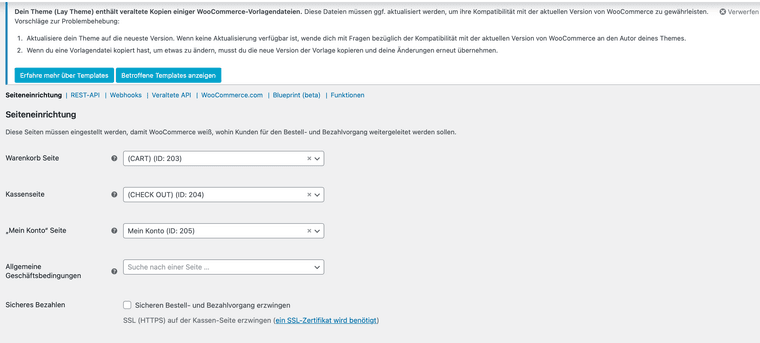
            Bildschirmfoto 2025-10-26 um 17.28.12.png

            1 Reply Last reply
            0
            • arminunruhA Offline
              arminunruhA Offline
              arminunruh
              Global Moderator
              wrote on last edited by
              #6

              can you send your website address, /wp-admin/ username and password and a link to this topic to info@laytheme.com?

              i will try and find some time this evening to take a look. now i need to go to this university and give a lay theme workshop :O

              1 Reply Last reply
              0
              Reply
              • Reply as topic
              Log in to reply
              • Oldest to Newest
              • Newest to Oldest
              • Most Votes


              I also code custom websites or custom Lay features.
              💿 Email me here: 💿
              info@laytheme.com

              Our Web Development company: 100k.studio

              Want to tip me? https://www.paypal.com/paypalme/arminunruh

              Before you post:
              1. When using a WordPress Cache plugin, disable it or clear your cache.
              2. Update Lay Theme and all Lay Theme Addons
              3. Disable all Plugins
              4. Go to Lay Options → Custom CSS & HTML, click "Turn Off All Custom Code", click "Save Changes"

              This often solves issues you might run into

              When you post:
              1. Post a link to where the problem is
              2. Does the problem happen on Chrome, Firefox, Safari or iPhone or Android?
              3. If the problem is difficult to explain, post screenshots / link to a video to explain it
              Online Users
              C
              CineST
              Forgot your key, lost your files, need a previous Lay Theme or Addon version? Go to www.laykeymanager.com
              laytheme.com
              • Login

              • Don't have an account? Register

              • Login or register to search.
              • First post
                Last post
              0
              • Recent
              • Tags
              • Popular
              • Users
              • Search