image hover bring to front
-
-
Hello, I think I was born in to your email.
In Lay Options → Image Hover Addon.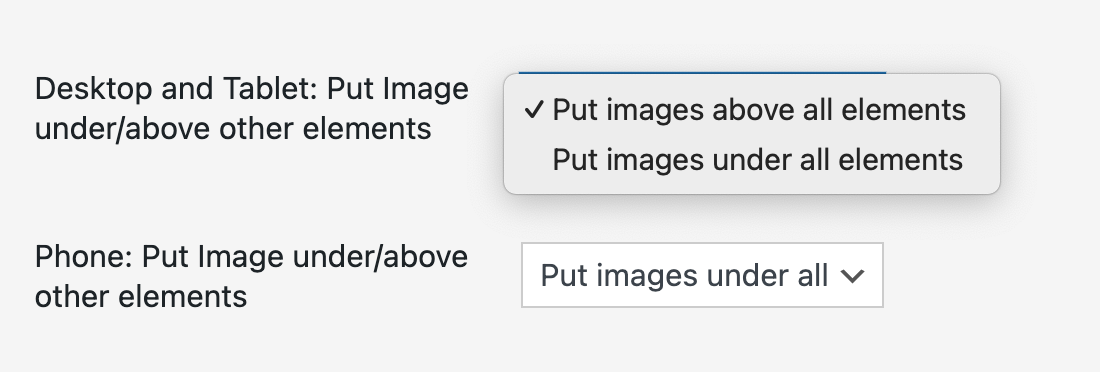
If that doesn't work, I will need the link to your website. To the page where this happens.
-
Hello, I think I was born in to your email.
In Lay Options → Image Hover Addon.If that doesn't work, I will need the link to your website. To the page where this happens.
@arminunruh
oh I'm sorry. unfortunately does not work yet.
https://www.lilliseiler.de/work/ -
Oh, you want them above the menu
Well, due to something called stacking context.
https://developer.mozilla.org/en-US/docs/Web/CSS/CSS_positioned_layout/Stacking_contextThat's not really doable unless we change some things to have the images and the nav in the same stacking context.
Enter this css in "lay options" -> "custom css & html" -> "custom css for desktop"
/*stacking context, so zIndex of hover images are in same context as nav (i think they are with this) */ .lay-content{ position: static!important; } /*put lay nav zindex below */ .laynav{ z-index: 0!important; } /*we still had a opacity 0 navbar that would then be above our menu so hide it*/ .navbar{ display: none!important; } -
Oh, you want them above the menu
Well, due to something called stacking context.
https://developer.mozilla.org/en-US/docs/Web/CSS/CSS_positioned_layout/Stacking_contextThat's not really doable unless we change some things to have the images and the nav in the same stacking context.
Enter this css in "lay options" -> "custom css & html" -> "custom css for desktop"
/*stacking context, so zIndex of hover images are in same context as nav (i think they are with this) */ .lay-content{ position: static!important; } /*put lay nav zindex below */ .laynav{ z-index: 0!important; } /*we still had a opacity 0 navbar that would then be above our menu so hide it*/ .navbar{ display: none!important; }@arminunruh thanks!

Hello! It looks like you're interested in this conversation, but you don't have an account yet.
Getting fed up of having to scroll through the same posts each visit? When you register for an account, you'll always come back to exactly where you were before, and choose to be notified of new replies (either via email, or push notification). You'll also be able to save bookmarks and upvote posts to show your appreciation to other community members.
With your input, this post could be even better 💗
Register Login