Skip to content
  • Recent
  • Tags
  • Popular
  • Users
  • Search
Skins
  • Light
  • Brite
  • Cerulean
  • Cosmo
  • Flatly
  • Journal
  • Litera
  • Lumen
  • Lux
  • Materia
  • Minty
  • Morph
  • Pulse
  • Sandstone
  • Simplex
  • Sketchy
  • Spacelab
  • United
  • Yeti
  • Zephyr
  • Dark
  • Cyborg
  • Darkly
  • Quartz
  • Slate
  • Solar
  • Superhero
  • Vapor

  • Default (No Skin)
  • No Skin
Collapse

Lay Theme Forum

  1. Home
  2. Shop / WooCommerce
  3. BUG: not possible ot register during checkout

BUG: not possible ot register during checkout

Scheduled Pinned Locked Moved Shop / WooCommerce
8 Posts 2 Posters 695 Views 2 Watching
  • Oldest to Newest
  • Newest to Oldest
  • Most Votes
Reply
  • Reply as topic
Log in to reply
This topic has been deleted. Only users with topic management privileges can see it.
  • L Offline
    L Offline
    lortnok
    wrote on last edited by
    #1

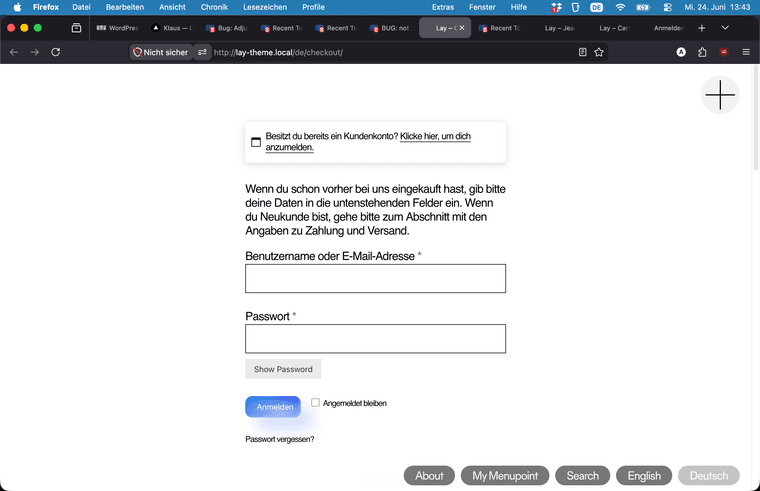
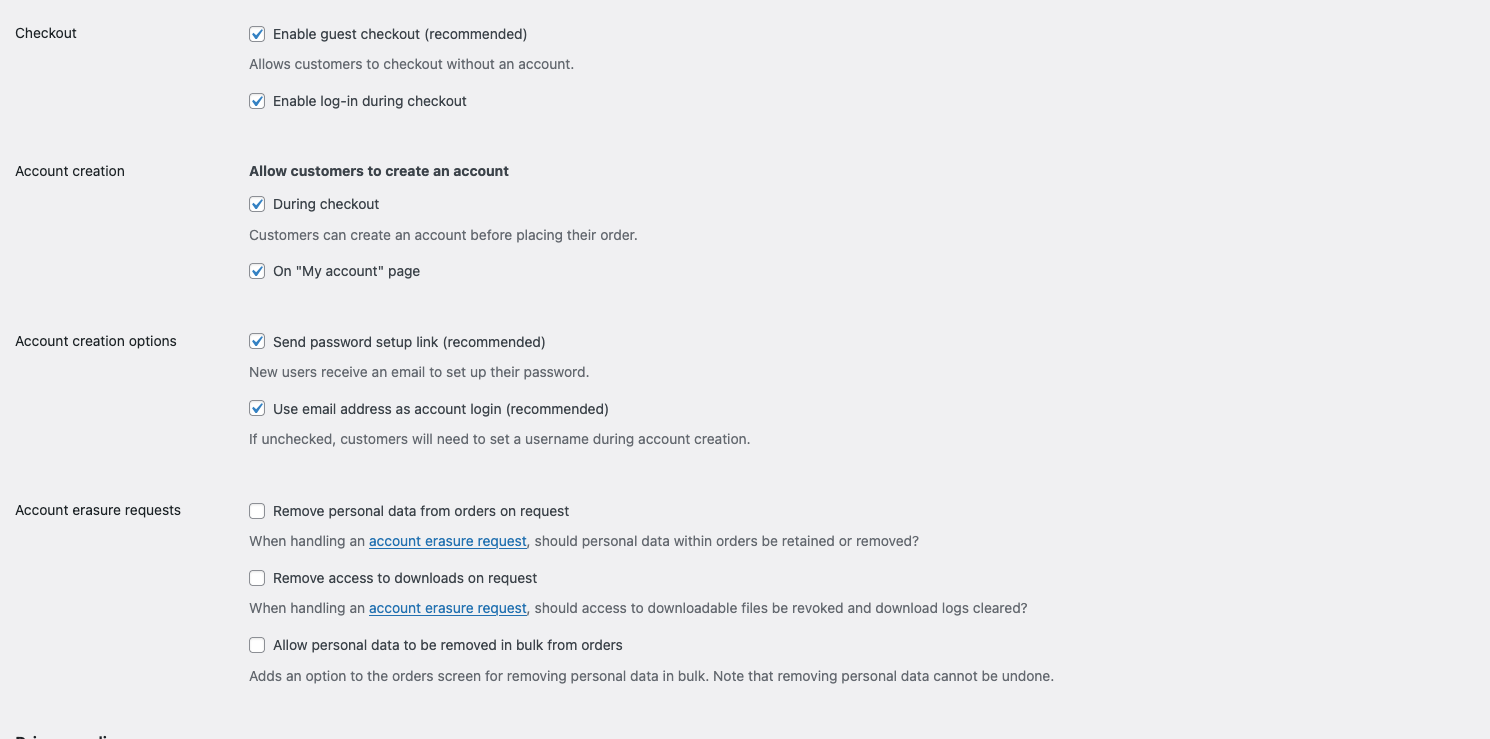
    The option to let customers register during checkout is ticked but there is no such option in the checkout page.. only the button "returning customer?" appears. how to fix this? I suppose it is a bug, I am pretty sure it worked before. I haven't touched the site for a long time and now I am discovering these bugs.

    P.S. It is possible to register on the acount page when ticked so that works..
    Screenshot 2025-08-26 at 13.33.16.png

    1 Reply Last reply
    0
    • arminunruhA Offline
      arminunruhA Offline
      arminunruh
      Global Moderator
      wrote on last edited by
      #2

      ah! i see. you want an account registration during checkout.
      im not sure if lay theme ever supported that, i think i never coded this for lay theme.

      if you think it worked before, you can try to use an older version of lay theme.
      you can get it on www.laykeymanager.com

      im going to look into this, maybe there is an easy way to enable this for lay theme

      1 Reply Last reply
      0
      • arminunruhA Offline
        arminunruhA Offline
        arminunruh
        Global Moderator
        wrote on last edited by
        #3

        image.png

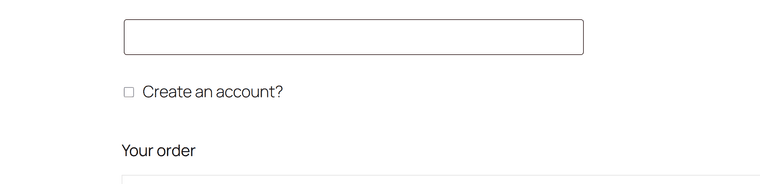
        i see. usually there should be this checkbox, but only if we are not logged in to /wp-admin/

        1 Reply Last reply
        0
        • arminunruhA Offline
          arminunruhA Offline
          arminunruh
          Global Moderator
          wrote on last edited by arminunruh
          #4

          ok with the next update, the checkbox will be shown:
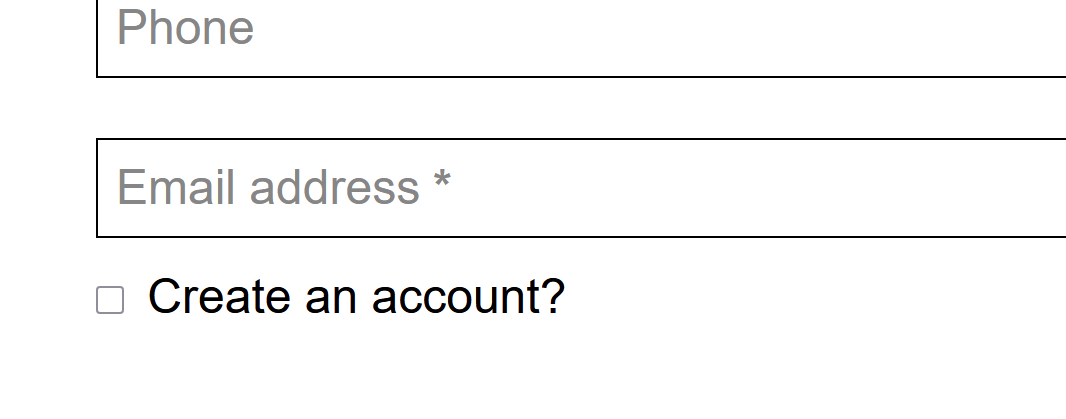
          image.png

          i double checked, and i believe it has never been shown. if it was, it must have been a very old lay theme version

          L 1 Reply Last reply
          1
          • arminunruhA arminunruh

            ok with the next update, the checkbox will be shown:

            image.png

            i double checked, and i believe it has never been shown. if it was, it must have been a very old lay theme version

            L Offline
            L Offline
            lortnok
            wrote on last edited by
            #5

            @arminunruh fantastic!

            1 Reply Last reply
            0
            • L Offline
              L Offline
              lortnok
              wrote last edited by
              #6

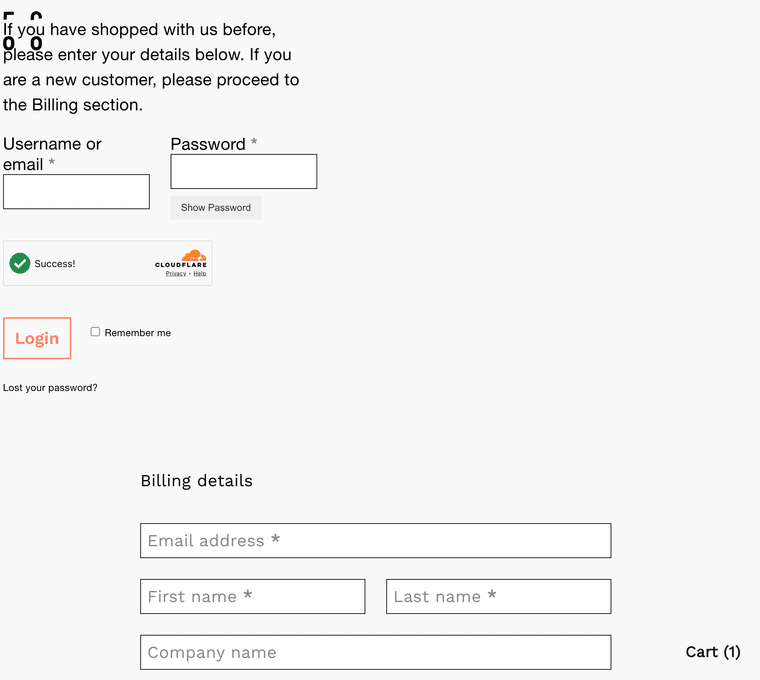
              Is it still possible to let users create account on the checkout page? I don't see this option. I opened my site in private browser and I am not logged in. Also when I click on the login for existing user the layout is shifted and the login fields are in the top left corner. Is it like this for everyone?

              1 Reply Last reply
              0
              • L Offline
                L Offline
                lortnok
                wrote last edited by lortnok
                #7

                Screenshot 2026-06-11 at 11.34.33.png

                why is this in the top left corner ;(

                ps.: not because of the captcha, it was the same before without any captcha.

                1 Reply Last reply
                0
                • L Offline
                  L Offline
                  lortnok
                  wrote last edited by
                  #8

                  fix that worked for me for both problems: (placed as custom css)

                  /Reveal the create-account checkbox on the checkout page
                  body:not(.lay-checkout-use-placeholders) .woocommerce #customer_details .create-account.form-row label,
                  .woocommerce #customer_details .create-account.form-row label {
                  display: inline-block !important;
                  position: static !important;
                  pointer-events: auto !important;
                  }

                  /* 2. login form position fix

                  /* ===== Checkout login form (stacked) ===== */

                  /* Center the "Click here to login" toggle bar */
                  .woocommerce .woocommerce-form-login-toggle {
                  max-width: 450px;
                  margin: 0 auto !important;
                  }

                  /* The login box itself: centered, padded, bordered */
                  .woocommerce form.woocommerce-form-login {
                  margin: 0 auto 40px !important;
                  padding: 30px !important;
                  border: 1px solid #ddd !important;
                  border-radius: 6px;
                  }

                  /* Stack the username and password fields full-width */
                  .woocommerce form.woocommerce-form-login .form-row-first,
                  .woocommerce form.woocommerce-form-login .form-row-last {
                  width: 100%;
                  float: none;
                  }
                  .woocommerce form.woocommerce-form-login .form-row {
                  margin-bottom: 18px;
                  }

                  /* Make inputs fill the row */
                  .woocommerce form.woocommerce-form-login input[type="text"],
                  .woocommerce form.woocommerce-form-login input[type="password"] {
                  width: 100%;
                  box-sizing: border-box;
                  }

                  1 Reply Last reply
                  0
                  Reply
                  • Reply as topic
                  Log in to reply
                  • Oldest to Newest
                  • Newest to Oldest
                  • Most Votes


                  For paid 1-on-1 Lay Theme Coaching, contact Audrey (audrey@cyberslayers.work) or me (info@laytheme.com).

                  We also code custom websites or bespoke Lay features. Drop me a line at info@laytheme.com or check out my work at arminunruh.com.

                  Want to support my work? paypal.me/arminunruh

                  Before you post:
                  1. When using a WordPress Cache plugin, disable it or clear your cache.
                  2. Update Lay Theme and all Lay Theme Addons
                  3. Disable all Plugins
                  4. Go to Lay Options → Custom CSS & HTML, click "Turn Off All Custom Code", click "Save Changes"

                  This often solves issues you might run into

                  When you post:
                  1. Post a link to where the problem is
                  2. Does the problem happen on Chrome, Firefox, Safari or iPhone or Android?
                  3. If the problem is difficult to explain, post screenshots / link to a video to explain it
                  Online Users
                  Forgot your key, lost your files, need a previous Lay Theme or Addon version? Go to www.laykeymanager.com
                  laytheme.com
                  • Login

                  • Don't have an account? Register

                  • Login or register to search.
                  • First post
                    Last post
                  0
                  • Recent
                  • Tags
                  • Popular
                  • Users
                  • Search