Full support for variable fonts (multiple axes, e.g. Recursive)
-
Hi there,
I have a question about variable font support in Lay Theme.
I’m using the Recursive Variable Font (.ttf), which includes several axes — for example wght, slnt, CASL, and MONO.In the Text Format editor, all axes are listed, but only the wght axis (Weight) actually has any visible effect. Adjusting the other axes (like CASL or MONO) doesn’t change the text appearance.
My questions:
• Does Lay Theme currently support only the wght axis, or should it be possible to control all variable font axes?
• If only wght works, is there a way to enable full font-variation-settings support via custom CSS or a future update?
• Would it make a difference if I used a .woff2 version of the font instead of .ttf?I’d love to use Recursive’s full potential — especially the Casualness and Monospacing features.
Thanks a lot in advance for any insights!Best, Juli
-
hey!! i think that lay theme should support all axes. but maybe somehow it doesnt work for that font.
could you send me the font to info@laytheme.com and also send a link to this post with the email?i think ttf should be the right format. not sure if woff2 would make a difference
-
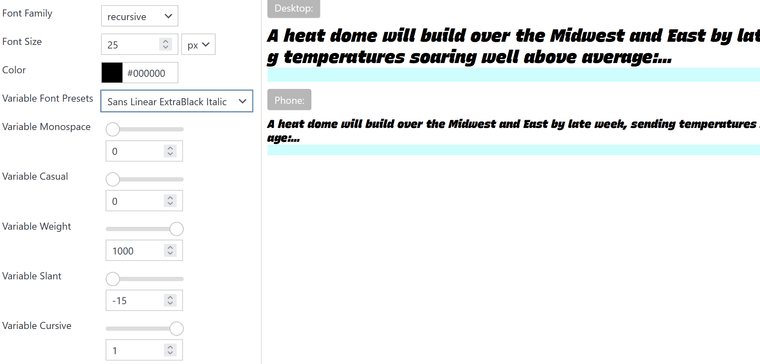
Hey, so I saw several problems here:
the link you gave me https://www.recursive.design/ makes it possible to export the font in a way where it's a variable font. But also makes it possible to export the font where you just set the variables and export it, and then it's not a variable font anymore, but it's just this normal font that has the variables already set.
On the website, you need to make sure that you select "range" for every axis to actually export it as a fully variable font:
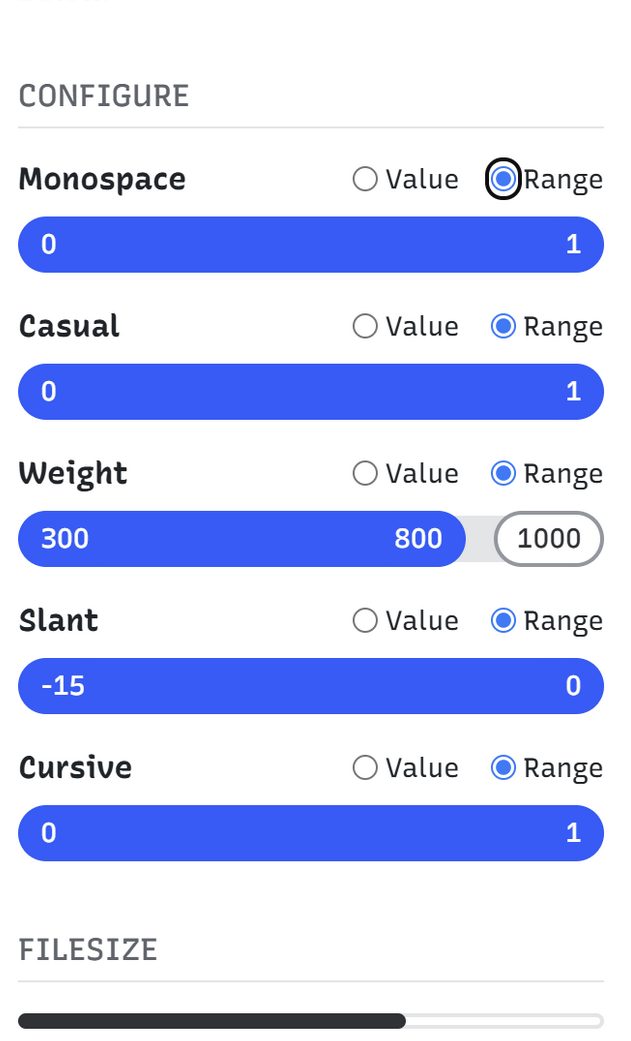
Here is the font file that I exported and that I'm using:
https://www.dropbox.com/scl/fi/fo14osyejoehm9gk12bvi/Recursive_VF_1.085.ttf?rlkey=7t99puwaqqmf7tk9qx0w15mdx&st=eco9cpuh&dl=0this one contains all the axes.
The other problem I saw was that an axis oftentimes is just between 0 and 1. So it needs to be able to do steps in 0.1 increments, which didn't work with Lay Theme. Lay Theme only did axis steps in 1 increments, but I changed this, and it will be part of the new update.
Also, I saw some issues with Webfonts loading in general in the text formats page.
I fixed that too with the new update.The font that I get is this one:

It seems that if there is a dot in the name of the font, it didn't work.
I changed some code, so when you upload a font in Lay Options > Webfonts in the future, that font file can have dots, special signs, and so on, but it will still work. But font files you have already uploaded that contain those special signs won't work.
I will release this update later today. When you update Lay Theme, can you just re-upload the font file in Lay Options > Webfonts and then choose it in text formats? Then the axes should work.And here is a website where you can also upload variable fonts and verify the different axes that are available:
https://fontdrop.info/#/?darkmode=true -
Oh, and apologies for the late answer. I had to support a big website launch last week, so I was just too busy.
-
Hi Armin, thank you so much for your Help! I think it was the special Characters and/or the 0.1 increments. Now everything works fine!
However i noticed, that i cant delete the already installed webfonts anymore. Is this something related to the Update?
Thanks again!
Juli -
Can you please send:
- a link to this forum topic
- your website address
- /wp-admin/ username and password
to: info@laytheme.com

Hello! It looks like you're interested in this conversation, but you don't have an account yet.
Getting fed up of having to scroll through the same posts each visit? When you register for an account, you'll always come back to exactly where you were before, and choose to be notified of new replies (either via email, or push notification). You'll also be able to save bookmarks and upvote posts to show your appreciation to other community members.
With your input, this post could be even better 💗
Register Login