Skip to content
  • Recent
  • Tags
  • Popular
  • Users
  • Search
Skins
  • Light
  • Brite
  • Cerulean
  • Cosmo
  • Flatly
  • Journal
  • Litera
  • Lumen
  • Lux
  • Materia
  • Minty
  • Morph
  • Pulse
  • Sandstone
  • Simplex
  • Sketchy
  • Spacelab
  • United
  • Yeti
  • Zephyr
  • Dark
  • Cyborg
  • Darkly
  • Quartz
  • Slate
  • Solar
  • Superhero
  • Vapor

  • Default (No Skin)
  • No Skin
Collapse

Lay Theme Forum

  1. Home
  2. General Discussion
  3. Fixed Article menu

Fixed Article menu

Scheduled Pinned Locked Moved General Discussion
6 Posts 2 Posters 130 Views 1 Watching
  • Oldest to Newest
  • Newest to Oldest
  • Most Votes
Reply
  • Reply as topic
Log in to reply
This topic has been deleted. Only users with topic management privileges can see it.
  • R Offline
    R Offline
    Remco van Dun
    wrote on last edited by
    #1

    Hi!

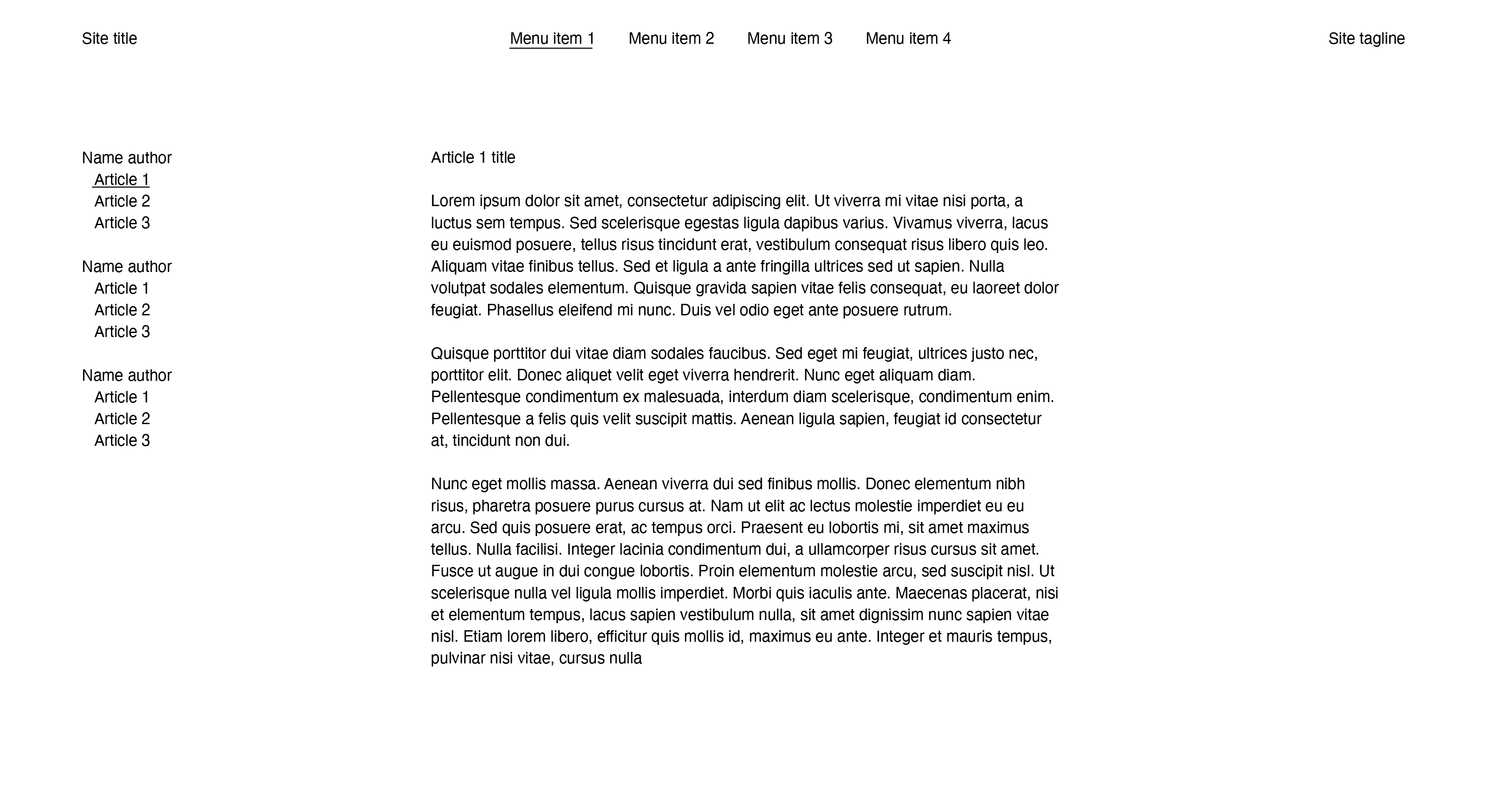
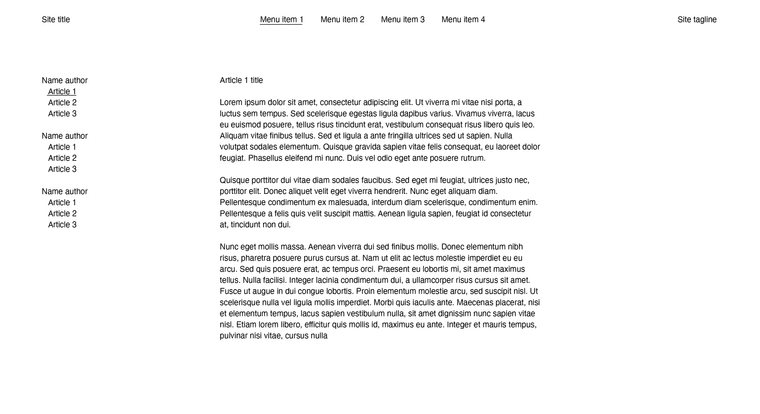
    Been breaking my head over how to execute this idea in the backend. It comes down to a vertical fixed 'secondary menu' on a specific menu page that contains articles from different authors.

    Selecting an article should change the middle column content, and keep the article column fixed on the left. But it should also be easy to add another author and articles...

    Example:
    Screenshot 2025-11-11 at 09.38.23.png

    I've tried a news item and project index as a workaround but this didn't seem practical unless I'm missing something.

    Adding a secondary menu sounds too complex to add new articles to and manage the content?
    If any body has an idea or can send me the right direction would be appreciated.

    1 Reply Last reply
    0
    • arminunruhA Offline
      arminunruhA Offline
      arminunruh
      Global Moderator
      wrote on last edited by
      #2

      well

      in lay options, set menu amount to two

      image.png

      in appearance -> menus
      create the second menu and assign it to the second menu slot

      just like here
      https://laytheme.com/documentation/menus.html#multiple-menus

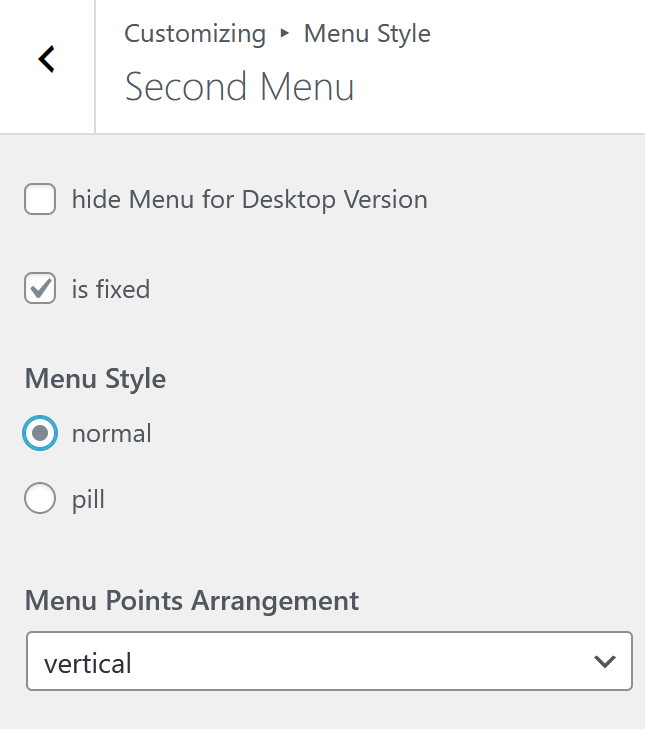
      now in customize -> menu style -> second menu
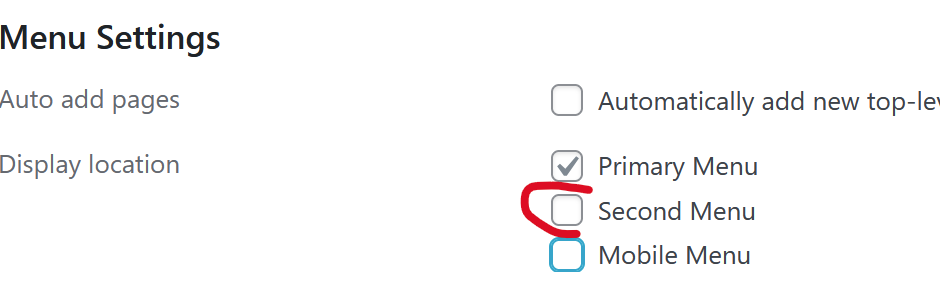
      image.png

      here just make the "menu points arrangement" vertical:
      c9c9eafc-62f5-4a51-b3e7-d62adccadf8f-image.png

      1 Reply Last reply
      0
      • arminunruhA Offline
        arminunruhA Offline
        arminunruh
        Global Moderator
        wrote on last edited by
        #3

        and make sure to create submenus like here
        https://laytheme.com/documentation/menus.html#submenus

        and in customize -> menu style -> submenus

        make sure to use always show
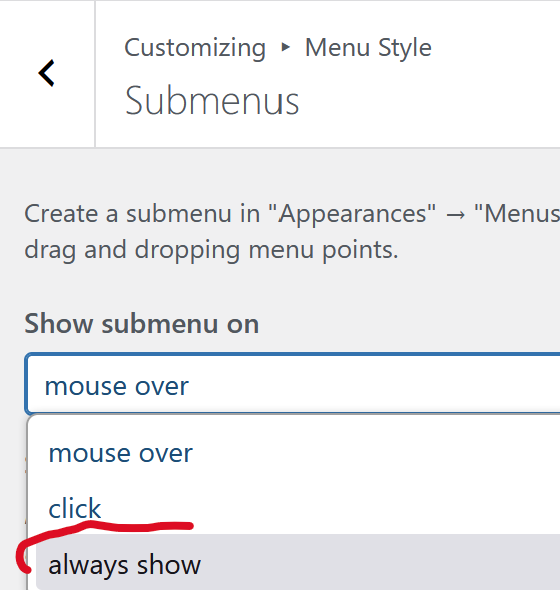
        image.png

        1 Reply Last reply
        0
        • R Offline
          R Offline
          Remco van Dun
          wrote last edited by Remco van Dun
          #4

          So I know about secondary menu's but this vertical menu needs to appear at page Menu item 1. I'm sure its possible to use css and hide this menu on other pages. But I want the "articles" to be projects which get added automatically to this vertical menu. Under different authors names.
          Is there a way to automatically add these through tags or categories? Like with a project index?

          1 Reply Last reply
          0
          • arminunruhA Offline
            arminunruhA Offline
            arminunruh
            Global Moderator
            wrote last edited by
            #5

            Hmm I think no!

            But you could create a shortcode and use php code to then create some code to make the menu exactly like you want.

            basically you could use the snippets plugin, write your own php code then use a shortcode

            a little like here
            https://www.youtube.com/watch?v=05qGKezYTF8

            u wouldnt need ACF though like i use in this video

            1 Reply Last reply
            0
            • arminunruhA Offline
              arminunruhA Offline
              arminunruh
              Global Moderator
              wrote last edited by
              #6

              i can code this for you too for 90€ per hour

              1 Reply Last reply
              0
              Reply
              • Reply as topic
              Log in to reply
              • Oldest to Newest
              • Newest to Oldest
              • Most Votes


              I also code custom websites or custom Lay features.
              šŸ’æ Email me here: šŸ’æ
              info@laytheme.com

              Our Web Development company: 100k.studio

              Want to tip me? https://www.paypal.com/paypalme/arminunruh

              Before you post:
              1. When using a WordPress Cache plugin, disable it or clear your cache.
              2. Update Lay Theme and all Lay Theme Addons
              3. Disable all Plugins
              4. Go to Lay Options → Custom CSS & HTML, click "Turn Off All Custom Code", click "Save Changes"

              This often solves issues you might run into

              When you post:
              1. Post a link to where the problem is
              2. Does the problem happen on Chrome, Firefox, Safari or iPhone or Android?
              3. If the problem is difficult to explain, post screenshots / link to a video to explain it
              Online Users
              C
              condriaco
              Forgot your key, lost your files, need a previous Lay Theme or Addon version? Go to www.laykeymanager.com
              laytheme.com
              • Login

              • Don't have an account? Register

              • Login or register to search.
              • First post
                Last post
              0
              • Recent
              • Tags
              • Popular
              • Users
              • Search