Skip to content
  • Recent
  • Tags
  • Popular
  • Users
  • Search
Skins
  • Light
  • Brite
  • Cerulean
  • Cosmo
  • Flatly
  • Journal
  • Litera
  • Lumen
  • Lux
  • Materia
  • Minty
  • Morph
  • Pulse
  • Sandstone
  • Simplex
  • Sketchy
  • Spacelab
  • United
  • Yeti
  • Zephyr
  • Dark
  • Cyborg
  • Darkly
  • Quartz
  • Slate
  • Solar
  • Superhero
  • Vapor

  • Default (No Skin)
  • No Skin
Collapse

Lay Theme Forum

  1. Home
  2. Bug Reports
  3. Issue with scroll animations and site transitions (settings don't apply)
Issue with scroll animations and site transitions (settings don't apply)

Scheduled Pinned Locked Moved Bug Reports
4 Posts 2 Posters 93 Views 2 Watching
  • Oldest to Newest
  • Newest to Oldest
  • Most Votes
Reply
  • Reply as topic
Log in to reply
This topic has been deleted. Only users with topic management privileges can see it.
  • ffingerF Offline
    ffingerF Offline
    ffinger
    wrote on last edited by
    #1

    Hey :)

    I have an issue with changing the settings for scroll animations and animations when navigating.
    Somehow some settings don't apply.

    Scroll animations:
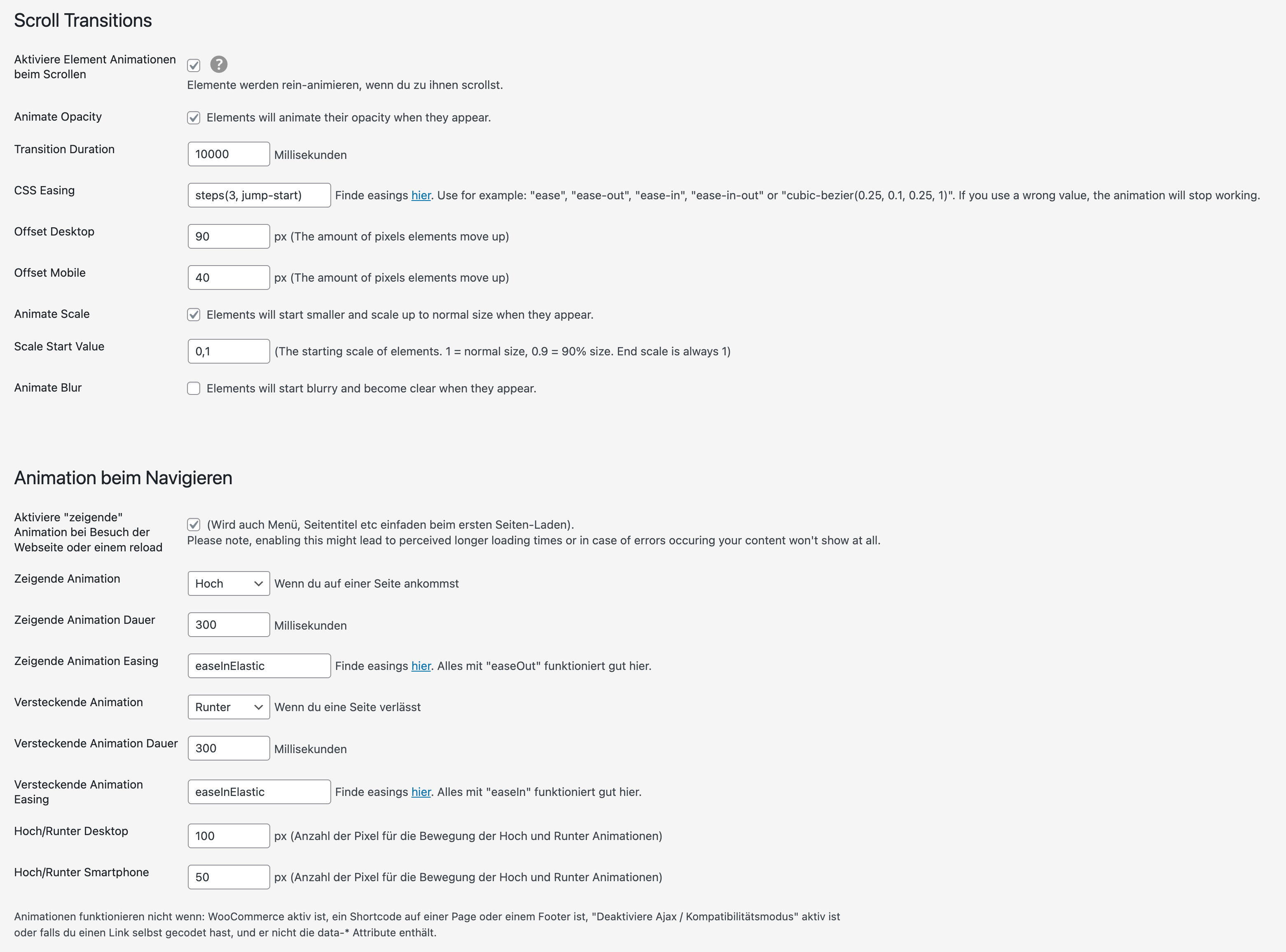
    I changed the animation duration to 10 sec and the easing to something weird like "steps(3, jump-start)" to see if it has some effect.
    Result --> animations still run very fast and with ease

    Animations while navigating (transitions):
    I can change the animation duration, but not the easing. I changed the easing to "easeInElastic"
    Result --> animations still run "linear"

    I deactivated all plugins and custom code...

    here's a screenshot of my settings
    Bildschirmfoto 2025-11-14 um 10.42.41.png

    here's a link to the regarding site (settings from screenshot still applied.
    www.felixfinger.de

    Any idea what I am doing wrong?
    Best,
    Felix

    https://www.felixfinger.de

    1 Reply Last reply
    0
    • arminunruhA Offline
      arminunruhA Offline
      arminunruh
      Global Moderator
      wrote on last edited by
      #2

      hey the links always say "Find easings here"

      and then the "here" is a page where u can find the easings that should work.
      however, it seems that the link changed :D

      https://animejs.com/v3/documentation/#pennerFunctions

      this is the right link i will update it!
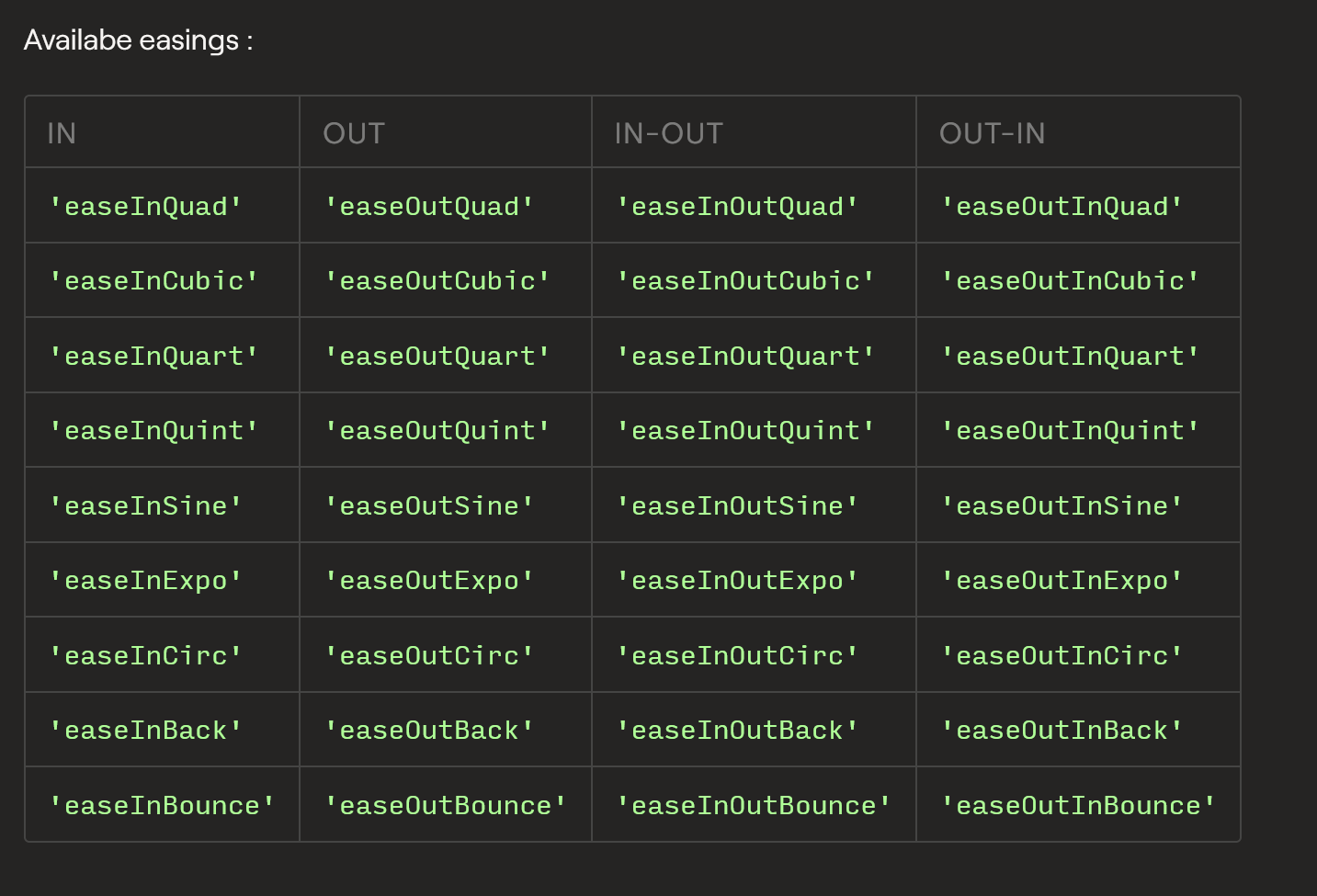
      image.png

      the "easeInElastic" easing simply doesnt exist as a valid easing to use. u can use the ones u see above.

      I changed the animation duration to 10 sec and the easing to something weird like "steps(3, jump-start)" to see if it has some effect.

      I think steps.. is not a valid easing function

      1 Reply Last reply
      0
      • ffingerF Offline
        ffingerF Offline
        ffinger
        wrote on last edited by
        #3

        Hey @arminunruh ,

        oh yes this worked thanks! Yep I followed the links and found the easings there, but I didn't know that you can only use the penner Functions.

        For the scroll animations:
        I now use a cubic-bezier ease that scales from 1.1 down to 1.0. This works for images on project sites, but not for the thumbnail grid – on thumbnail grid there it still scales up when scrolling the projects and also the animation duration settings don't seem to have any effect on the thumbnail grid. Is there a separate way to control the scroll animations for thumbnail grids?

        Best,
        Felix

        https://www.felixfinger.de

        1 Reply Last reply
        0
        • ffingerF Offline
          ffingerF Offline
          ffinger
          wrote on last edited by
          #4

          Ok apparently it just took a bit longer to update :D now it also works on the thumbnail grid ... all issues solved. THANKS A TON !

          https://www.felixfinger.de

          1 Reply Last reply
          1
          Reply
          • Reply as topic
          Log in to reply
          • Oldest to Newest
          • Newest to Oldest
          • Most Votes


          I also code custom websites or custom Lay features.
          šŸ’æ Email me here: šŸ’æ
          info@laytheme.com

          Our Web Development company: 100k.studio

          Want to tip me? https://www.paypal.com/paypalme/arminunruh

          Before you post:
          1. When using a WordPress Cache plugin, disable it or clear your cache.
          2. Update Lay Theme and all Lay Theme Addons
          3. Disable all Plugins
          4. Go to Lay Options → Custom CSS & HTML, click "Turn Off All Custom Code", click "Save Changes"

          This often solves issues you might run into

          When you post:
          1. Post a link to where the problem is
          2. Does the problem happen on Chrome, Firefox, Safari or iPhone or Android?
          3. If the problem is difficult to explain, post screenshots / link to a video to explain it
          Online Users
          Forgot your key, lost your files, need a previous Lay Theme or Addon version? Go to www.laykeymanager.com
          laytheme.com
          • Login

          • Don't have an account? Register

          • Login or register to search.
          • First post
            Last post
          0
          • Recent
          • Tags
          • Popular
          • Users
          • Search