Skip to content
  • Recent
  • Tags
  • Popular
  • Users
  • Search
Skins
  • Light
  • Brite
  • Cerulean
  • Cosmo
  • Flatly
  • Journal
  • Litera
  • Lumen
  • Lux
  • Materia
  • Minty
  • Morph
  • Pulse
  • Sandstone
  • Simplex
  • Sketchy
  • Spacelab
  • United
  • Yeti
  • Zephyr
  • Dark
  • Cyborg
  • Darkly
  • Quartz
  • Slate
  • Solar
  • Superhero
  • Vapor

  • Default (No Skin)
  • No Skin
Collapse

Lay Theme Forum

  1. Home
  2. General Discussion
  3. Maximum width + burger overlay

Maximum width + burger overlay

Scheduled Pinned Locked Moved General Discussion
5 Posts 2 Posters 105 Views 2 Watching
  • Oldest to Newest
  • Newest to Oldest
  • Most Votes
Reply
  • Reply as topic
Log in to reply
This topic has been deleted. Only users with topic management privileges can see it.
  • A Online
    A Online
    ac-rosebud
    wrote on last edited by
    #1

    Hello,

    I would appreciate some help with a current project. I have two questions:

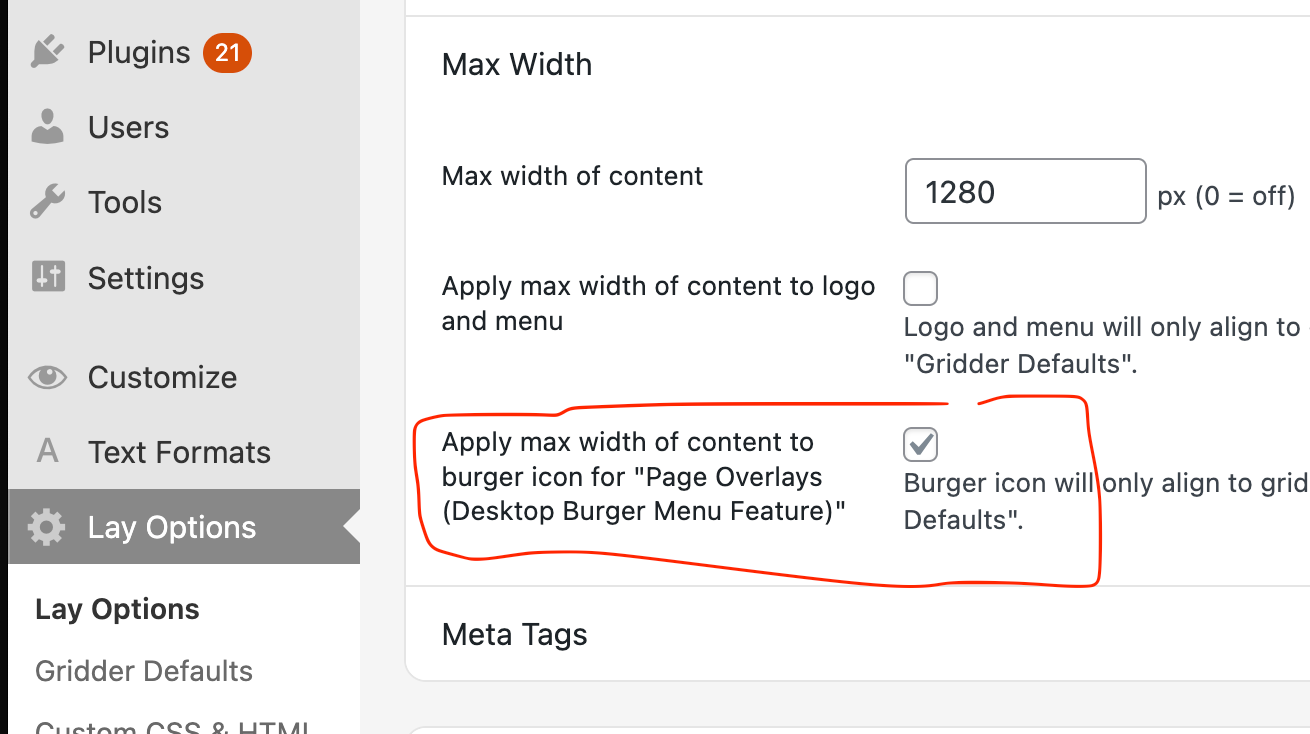
    1. I am working on a website where I use a maximum width for large screen sizes. I would like to use a burger menu (burger overlay), but the burger icon does not respect the maximum width of the website and stays full-width instead. How can I make the burger icon align with the same maximum width as the rest of the content?

    2. I would like to use an icon for the search instead of displaying the word “Suche”. Is this possible in Laytheme, and if so, how can it be implemented?

    Here is the link to the Work-in-Progress Website: https://neueschule.at/neueschule/home/

    Thank you very much for your help.

    Best,

    Annija

    1 Reply Last reply
    0
    • arminunruhA Offline
      arminunruhA Offline
      arminunruh
      Global Moderator
      wrote on last edited by
      #2

      ok i will add a setting for 1:

      Screenshot 2025-12-23 at 10.20.02.png

      i will release an update for it now

      for 2: let me think about it more

      1 Reply Last reply
      0
      • A Online
        A Online
        ac-rosebud
        wrote last edited by
        #3

        Hi Armin,

        thank you so much! That’s amazing. Now there is only the same issue with the X (close) button.

        Thank you very much for your help :)

        1 Reply Last reply
        0
        • arminunruhA Offline
          arminunruhA Offline
          arminunruh
          Global Moderator
          wrote last edited by
          #4

          Mmmh well the X close Icon is tied to how the overlay is shown

          overlays can be set to have different widths and can be on the left side of the screen or right, or be 100% width

          its getting a little too complicated to code and im not sure many people would even use this

          if you think your x icon is too far out, you could use some custom css like

          .overlay-close{
          right: 200px!important;
          }

          if for example you only want this for bigger screens, add this in:
          lay options -> custom css & html -> custom css

          /* Media query for screens 1024px and wider */
          @media (min-width: 1024px) {
            .overlay-close {
              right: 200px!important;
            }
          }
          

          this may not exactly match the position of the burger icon or may need some tweaking or even sth like

          right: 15vw;

          (a percentage width based position, "vw" instead of px)

          but this is all i can offer you :/

          1 Reply Last reply
          0
          • A Online
            A Online
            ac-rosebud
            wrote last edited by
            #5

            Thank you!

            1 Reply Last reply
            0
            Reply
            • Reply as topic
            Log in to reply
            • Oldest to Newest
            • Newest to Oldest
            • Most Votes


            I also code custom websites or custom Lay features.
            💿 Email me here: 💿
            info@laytheme.com

            Our Web Development company: 100k.studio

            Want to tip me? https://www.paypal.com/paypalme/arminunruh

            Before you post:
            1. When using a WordPress Cache plugin, disable it or clear your cache.
            2. Update Lay Theme and all Lay Theme Addons
            3. Disable all Plugins
            4. Go to Lay Options → Custom CSS & HTML, click "Turn Off All Custom Code", click "Save Changes"

            This often solves issues you might run into

            When you post:
            1. Post a link to where the problem is
            2. Does the problem happen on Chrome, Firefox, Safari or iPhone or Android?
            3. If the problem is difficult to explain, post screenshots / link to a video to explain it
            Online Users
            S
            skimstil
            A
            ac-rosebud
            H
            hammercity
            C
            clnstz
            Forgot your key, lost your files, need a previous Lay Theme or Addon version? Go to www.laykeymanager.com
            laytheme.com
            • Login

            • Don't have an account? Register

            • Login or register to search.
            • First post
              Last post
            0
            • Recent
            • Tags
            • Popular
            • Users
            • Search