Skip to content
  • Recent
  • Tags
  • Popular
  • Users
  • Search
Skins
  • Light
  • Brite
  • Cerulean
  • Cosmo
  • Flatly
  • Journal
  • Litera
  • Lumen
  • Lux
  • Materia
  • Minty
  • Morph
  • Pulse
  • Sandstone
  • Simplex
  • Sketchy
  • Spacelab
  • United
  • Yeti
  • Zephyr
  • Dark
  • Cyborg
  • Darkly
  • Quartz
  • Slate
  • Solar
  • Superhero
  • Vapor

  • Default (No Skin)
  • No Skin
Collapse

Lay Theme Forum

  1. Home
  2. General Discussion
  3. Code Snippet: make captions on carousel follow mouse

Code Snippet: make captions on carousel follow mouse

Scheduled Pinned Locked Moved General Discussion
4 Posts 3 Posters 153 Views 1 Watching
  • Oldest to Newest
  • Newest to Oldest
  • Most Votes
Reply
  • Reply as topic
Log in to reply
This topic has been deleted. Only users with topic management privileges can see it.
  • arminunruhA Offline
    arminunruhA Offline
    arminunruh
    Global Moderator
    wrote on last edited by
    #1

    I just coded this snippet to make captions in a carousel follow the mouse cursor.
    Its for someone's Lay Theme website. I got this request by email and yea I wanted to share it here in case someone wants to do this too.

    It only works for type "Slide". The user had this config for their carousel:
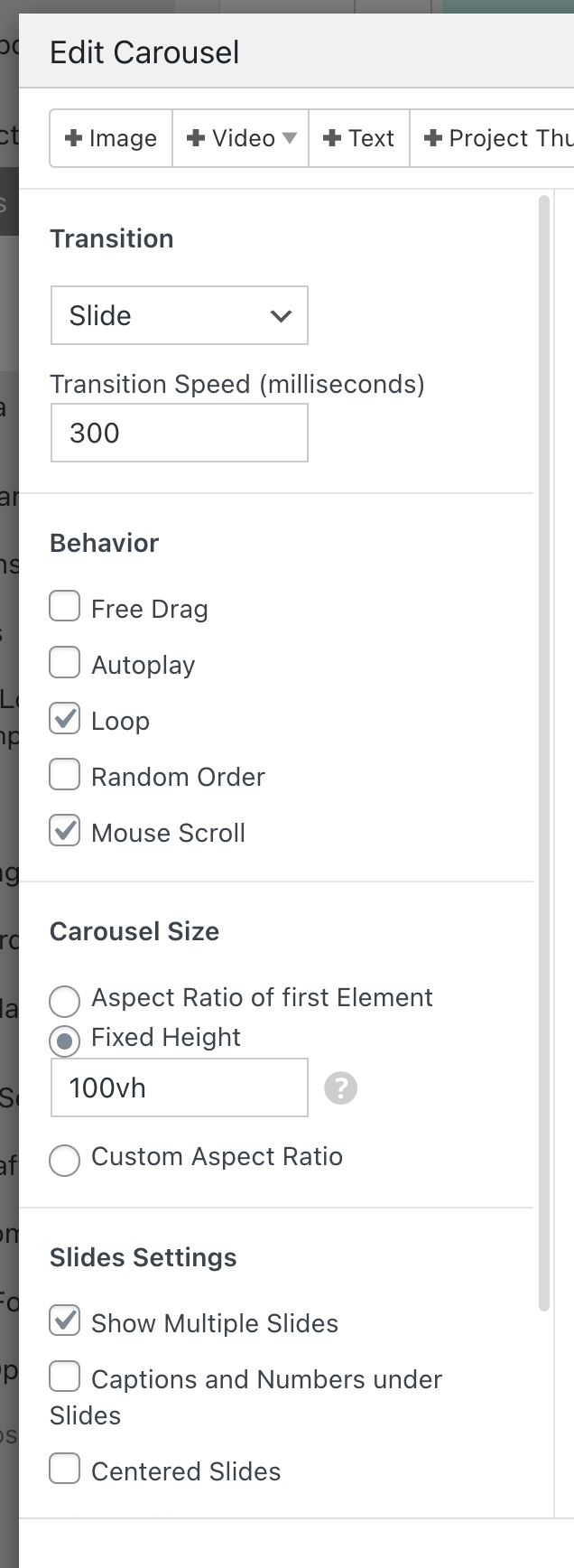
    Screenshot 2026-01-05 at 19.03.52.png

    Add this javascript into "Lay Options" -> "Custom CSS & HTML" -> "Custom HTML at bottom":

    <script>
        var currentIx = -1;
        
        var reset = function(e){
            currentIx = -1;
            jQuery(".fixed-caption").remove();
            jQuery(window).off('mousemove wheel', doFollow);
        }
        
        var doFollow = function(e){
            var el = document.elementFromPoint(e.clientX, e.clientY);
            var $slide = jQuery(el).closest(".lay-carousel-slide");
            if($slide.length > 0){
                var ix = $slide.attr('data-swiper-slide-index');
                if(ix != undefined && ix != currentIx){
                    currentIx = ix;
                    
                    var $wrap = $slide.closest('.lay-carousel-wrap');
                    var $caption = $wrap.find('.single-caption.ix-'+ix);
                    jQuery(".fixed-caption").remove();
                    if($caption){
                        var $clone = $caption.clone();
                        $clone.css({
                            'position': 'fixed',
                            'top': 10,
                            'left': 10,
                            'zIndex': 98,
                            'pointer-events': 'none'}).addClass('fixed-caption')
                        jQuery("body").append($clone);
                    }
                }
                jQuery('.fixed-caption').css('transform', 'translate('+e.clientX+'px, '+e.clientY+'px)');
            }
        }
        
        window.laytheme.on('newpageshown', function(){
            if(window.utility.isTouchDevice){
                return;
            }
            reset();
            //if(jQuery("body").attr('data-id') == 282){
                jQuery(".lay-carousel-sink-parent").hide();
                jQuery(window).on('mousemove wheel', doFollow);
            //}
        })
    </script>
    

    on a touchdevice, this does nothing. as we dont have mouse cursors on touch devices :)

    1 Reply Last reply
    2
    • M Offline
      M Offline
      michael_vvc
      wrote last edited by
      #2

      nice one! thanks, armin

      1 Reply Last reply
      0
      • M Offline
        M Offline
        michael_vvc
        wrote last edited by
        #3

        maybe it would be cool to collect code snippets like this in the documentation section on the website, so they’re easier to find.

        1 Reply Last reply
        2
        • M Offline
          M Offline
          MWPA
          wrote last edited by
          #4

          Nice one Armin, thanks!

          1 Reply Last reply
          1
          Reply
          • Reply as topic
          Log in to reply
          • Oldest to Newest
          • Newest to Oldest
          • Most Votes


          I also code custom websites or custom Lay features.
          💿 Email me here: 💿
          info@laytheme.com

          Our Web Development company: 100k.studio

          Want to tip me? https://www.paypal.com/paypalme/arminunruh

          Before you post:
          1. When using a WordPress Cache plugin, disable it or clear your cache.
          2. Update Lay Theme and all Lay Theme Addons
          3. Disable all Plugins
          4. Go to Lay Options → Custom CSS & HTML, click "Turn Off All Custom Code", click "Save Changes"

          This often solves issues you might run into

          When you post:
          1. Post a link to where the problem is
          2. Does the problem happen on Chrome, Firefox, Safari or iPhone or Android?
          3. If the problem is difficult to explain, post screenshots / link to a video to explain it
          Online Users
          O
          obliek
          Forgot your key, lost your files, need a previous Lay Theme or Addon version? Go to www.laykeymanager.com
          laytheme.com
          • Login

          • Don't have an account? Register

          • Login or register to search.
          • First post
            Last post
          0
          • Recent
          • Tags
          • Popular
          • Users
          • Search