Carousel: bugs, feature requests / autoplay Video: controls for battery saving mode, PLaceholder image, Custom cursor behavior
-
hi laytheme guys,
first of all thanks for this amazing tool! i love it. but i ran into different problems and want to ask for help here in the forum.MacOS 15.6.1, Safari 18.6, did every recommended troubleshooting step
1. VIDEO BEHAVIOR IN CAROUSEL
Page set up:
- frontpage is 100vh carousel
containing:
- first element is one video (7mb, mp4, x264, 1080p)
- next elements are project thumbnails
Behavior while Battery Saving Mode "OFF" - everything is fine.
Behavior while Battery Saving Mode "ON":- instead of loading video: black screen, no placeholder image (yes i set one, double checked it)
if video is VP-9 codec insted of x264, you sometimes get the first frame displayed, but no play button, when autoplay is blocked from battery saving mode. when you navigate through the carousel, click on a project thumbnail scroll there for a bit an then navigate back to frontpage, the video is loading and autoplaying just fine.
Tested same video file outside of the carousel and you get the expected behavior for battery save mode "ON" with the blocking of autoplay, BUT displaying a playbutton on the video file.
Would love to have the same behavior for videos inside a carousel :)
2. Custom Cursors
Page set up:
- frontpage is 100vh carousel
containing:
- first element is one video (7mb, mp4, x264, 1080p)
- next elements are project thumbnails
project sites containing also carousel
if i set custom navigation cursor, these will only show up, when element in carousel is not a clickable thumbnail.
would love to have the option for setting custom navigation arrows and also a custom "click pointer". a nice implemantation would be, the width divided in thirds, and the corresponding cursor would only appear in its section.
3. Navigation inside Carousel
Page set up:
- frontpage is 100vh carousel
containing:
- first element is one video (7mb, mp4, x264, 1080p)
- next elements are project thumbnails
project sites containing also carousel
maybe i am just dumb, but would love to have features like:
- e.g. Site Title, brings you back to first element in carousel or specific element in carousel, WHILE you are in the carousel. (When linking from a different page back to a carousel it starts a the first element)
- when in project carousel and navigating back to site before (which is, a described, also a carousel) it brings you back to the same element in the carousel where you left the carousel. in other words: a carousel remembers the element where you left it.
- a back button for the site
If anyone could help me or give me a hint how to solve some of this, i appreciate it!
thanks in advance, if you need more information, please let me know!greetings,
alex -
hello!
sorry about the delay, i delayed it cause i saw i would probably need more time to answer this / work on this
-
2:
at the moment, the only way to do this is to enable the setting where you have previous and next buttons.
in: lay options -> carousel:
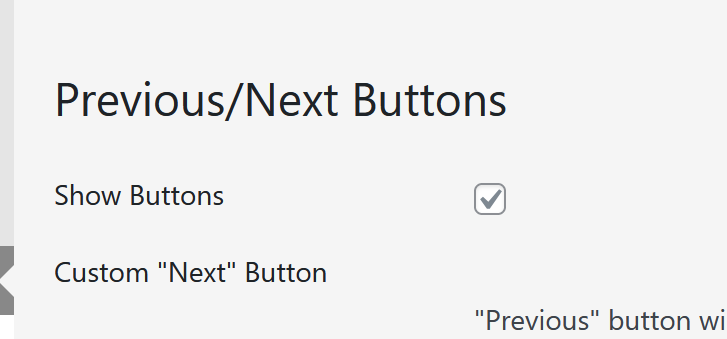
then, use custom css in lay options -> custom css:
/* Hide the SVG icons inside the buttons */
.lay-carousel .flickity-prev-next-button svg {
    display: none !important;
}

/* Make buttons full height and 25% width */
.lay-carousel .flickity-prev-next-button {
    height: 100% !important;
    width: 25% !important;
    top: 0 !important;
    bottom: 0 !important;
    transform: none !important;
    background: transparent !important;
    border-radius: 0 !important;
    margin: 0 !important;
    padding: 0 !important;
    z-index: 10 !important;
}

/* Position the Left button and add custom cursor */
.lay-carousel .flickity-prev-next-button.previous {
    left: 0 !important;
    cursor: url('YOUR_PREV_IMAGE_URL_HERE'), auto !important;
}

/* Position the Right button and add custom cursor */
.lay-carousel .flickity-prev-next-button.next {
    right: 0 !important;
    cursor: url('YOUR_NEXT_IMAGE_URL_HERE'), auto !important;
}
make sure to replace these "YOUR_NEXT_IMAGE_URL_HERE" with image URLs to your cursors. they cant be bigger than 128px width and height
1.:
mh i see. i will need to work on this, not sure yet when i will try to find some time today or next week3.:
not really possible, but if you use the fullscreen slider addon, at least you will get back to the last slide if you come back from a page -
Hi @arminunruh ,
thank you again for your effort und time you spend in soling individual problems.
I also just saw your reply on my post. In the meantime I found some work arounds.for
-
Video auto playback
I just use the h264 codec instead of VP-9 despite the bigger file size. At least for now its fine, but I would appreciate a fix for VP-9 :)
But with both codecs the placeholder image does not get loaded when Video is used inside a Carousel. -
I used this code created by Gemini. So please don't judge me, if it's bad code, but it works for my specific use case. But still thought: sharing is caring :D
I think it's very fragile and not very flexible, but for know works :D
Custom CSS Desktop
html, body, a, button, input, .lay-overlay {
    cursor: none !important;
}

/* Carousel "Hand" Killer */
html body .lay-carousel,
html body .lay-carousel a,
html body .lay-carousel img,
html body .lay-carousel span,
html body .lay-carousel .col {
    cursor: none !important;
}
html body .lay-carousel a:hover,
html body .lay-carousel img:hover {
    cursor: none !important;
}


/* ================================================= */
/* 4. DER CUSTOM CURSOR */
/* ================================================= */

#custom-cursor {
    z-index: 2147483647 !important;
    position: fixed;
    top: 0; left: 0;
    width: 20px; height: 20px;
    background-color: white;
    border-radius: 50%;
    pointer-events: none;
    transform: translate(-50%, -50%);
    transition: width 0.2s ease, height 0.2s ease, background-color 0.2s ease;
    will-change: transform, width, height;

    /* STANDARD: Normal (Weißer Punkt) */
    mix-blend-mode: normal !important;
}

/* ================================================= */
/* 5. CURSOR AUF WEISSEN SEITEN (Und Overlay) */
/* ================================================= */

/* Wenn .is-white-page aktiv ist ODER das Overlay offen ist -> Exclusion */
body.is-white-page #custom-cursor,
body.lay-overlay-open #custom-cursor {
    mix-blend-mode: exclusion !important;
}


/* ================================================= */
/* 6. TEXT-FARBEN FIX (AUF WEISSEN SEITEN) */
/* ================================================= */

/* Alles auf Schwarz zwingen, wenn .is-white-page aktiv ist */
body.is-white-page .sitetitle,
body.is-white-page .sitetitle *,
body.is-white-page nav.lay-nav a,
body.is-white-page nav.lay-nav span,
body.is-white-page .laynav-element,
body.is-white-page .laynav-position-top-right a,
body.is-white-page .mobile-title,
body.is-white-page .mobile-title * {
    color: #000000 !important;
    opacity: 1 !important;
    fill: #000000 !important;
    stroke: #000000 !important;
    mix-blend-mode: normal !important;
}


/* ================================================= */
/* 7. CAPTION FIX BEI OVERLAY */
/* ================================================= */

.lay-overlay {
    z-index: 2147483600 !important;
    background-color: white !important;
}

body.lay-overlay-open .caption-animator,
body.lay-overlay-open .caption-wrapper {
    visibility: hidden !important;
    opacity: 0 !important;
    z-index: -1 !important;
}


/* ================================================= */
/* 8. CURSOR HOVER ZUSTÄNDE */
/* ================================================= */

/* A) Bild Hover (Thumbnail) -> Rot */
#custom-cursor.hovered-image {
    width: 40px;
    height: 40px;
    background-color: rgb(255, 0, 0) !important;
    mix-blend-mode: normal !important;
    opacity: 0.9;
}

/* B) Text Link Hover -> Rot/Exclusion */
#custom-cursor.hovered-text {
    width: 40px;
    height: 40px;
    background-color: rgb(255, 0, 0) !important;
    mix-blend-mode: exclusion !important;
}

/* C) BACK BUTTON HOVER (Ganz unten -> Höchste Prio) */
body #custom-cursor.hovered-btn {
    width: 40px !important;
    height: 40px !important;
    background-color: white !important;
    opacity: 1 !important;
    mix-blend-mode: exclusion !important;
}
Custom HTML at bottom
<script>
(function() {
    var cursor = document.getElementById("custom-cursor");
    var cursorX = -100;
    var cursorY = -100;

    // 1. Performance-Bewegung
    document.addEventListener("mousemove", function(e) {
        cursorX = e.clientX;
        cursorY = e.clientY;
    });

    function loop() {
        if(cursorX > 0) {
            cursor.style.transform = 'translate3d(' + (cursorX - cursor.offsetWidth/2) + 'px, ' + (cursorY - cursor.offsetHeight/2) + 'px, 0)';
        }
        requestAnimationFrame(loop);
    }
    loop();

    // 2. Hover Listener Logik
    function addHoverListeners() {
        var imageTargets = document.querySelectorAll(".lay-carousel-slide a, #custom-back-btn, .custom-overlay-close-icon, .overlay-close");
        imageTargets.forEach(function(el) {
            el.removeEventListener("mouseenter", onImageEnter);
            el.removeEventListener("mouseleave", onImageLeave);
            el.addEventListener("mouseenter", onImageEnter);
            el.addEventListener("mouseleave", onImageLeave);
        });

        var textTargets = document.querySelectorAll("a:not(.lay-carousel-slide a), .lay-nav a, .sitetitle a, .pointer, button, .clickable, .lay-overlay a");
        textTargets.forEach(function(el) {
            if(el.querySelector('img')) return;
            el.removeEventListener("mouseenter", onTextEnter);
            el.removeEventListener("mouseleave", onTextLeave);
            el.addEventListener("mouseenter", onTextEnter);
            el.addEventListener("mouseleave", onTextLeave);
        });

        var plainMedia = document.querySelectorAll(".lay-carousel img, .lay-carousel video");
        plainMedia.forEach(function(el) {
            if(el.closest('a')) return;
            el.removeEventListener("mouseenter", onPlainMediaEnter);
            el.removeEventListener("mouseleave", onPlainMediaLeave);
            el.addEventListener("mouseenter", onPlainMediaEnter);
            el.addEventListener("mouseleave", onPlainMediaLeave);
        });

        setTimeout(checkInitialState, 100);
    }

    function checkInitialState() {
        if(cursorX <= 0) return;
        var el = document.elementFromPoint(cursorX, cursorY);
        if(!el) return;
        if ( (el.tagName === 'IMG' || el.tagName === 'VIDEO') && el.closest('.lay-carousel') && !el.closest('a') ) {
            onPlainMediaEnter();
        }
    }

    function onImageEnter() { cursor.classList.add("hovered-image"); cursor.classList.remove("hovered-text", "no-blend"); }
    function onImageLeave() { cursor.classList.remove("hovered-image"); }
    function onTextEnter() { cursor.classList.add("hovered-text"); cursor.classList.remove("hovered-image", "no-blend"); }
    function onTextLeave() { cursor.classList.remove("hovered-text"); }
    function onPlainMediaEnter() { cursor.classList.add("no-blend"); }
    function onPlainMediaLeave() { cursor.classList.remove("no-blend"); }

    addHoverListeners();
    window.laytheme.on("newpageshown", function() {
        cursor.classList.remove("hovered-image", "hovered-text", "no-blend");
        setTimeout(addHoverListeners, 200);
    });
    setTimeout(addHoverListeners, 1000);
})();
</script>
Also Gemini'ed a solution for the function, also don't know if its really flexible but works for my website layout fine.
CSS Desktop
/* ================================================= */
/* 9. CUSTOM BACK BUTTON */
/* ================================================= */

#custom-back-btn {
    position: fixed;
    bottom: 25px;
    left: 20px;
    width: auto !important;
    height: 30px;
    z-index: 2147483500 !important;
    display: none;
    line-height: 0;
    cursor: none !important;
    mix-blend-mode: normal !important;
}

#custom-back-btn img {
    height: 100% !important;
    width: auto !important;
    display: block;
    filter: none !important;
}

/* Back Button Invertieren (Nur auf weißen Seiten) */
body.is-white-page #custom-back-btn img {
    filter: invert(1) !important;
    opacity: 1 !important;
}
body.is-white-page #custom-back-btn {
    mix-blend-mode: normal !important;
    filter: none !important;
}
HTML at Bottom
<div id="custom-back-btn">
    <img src="https://alexboecker.de/wp-content/uploads/2026/01/pfiel-weis-links-50px-back-button.png" alt="Back">
</div>

<script>
window.laytheme.on("newpageshown", function(layoutObj, type, obj){

    var backBtn = jQuery('#custom-back-btn');
    var storageKey = 'alex_pos_final_v3';
    var isHomePage = jQuery('body').hasClass('slug-frontpage') || window.location.pathname === '/' || window.location.pathname === '';

    // --- GRÖSSE AN MENÜ ANPASSEN ---
    function syncButtonSize() {
        var menuLink = jQuery('.lay-nav a').first();
        if(menuLink.length === 0) { menuLink = jQuery('._Headline').first(); }

        if(menuLink.length > 0) {
            var fontSize = menuLink.css('font-size');
            backBtn.css('height', fontSize);
            // console.log("Back Button Höhe angepasst auf: " + fontSize);
        }
    }

    syncButtonSize();
    jQuery(window).off('resize.btnSize').on('resize.btnSize', syncButtonSize);

    // --- A) STARTSEITE LOGIK ---
    if (isHomePage) {
        var attempts = 0;
        function waitForSwiper() {
            var swiperEl = document.querySelector('.swiper-container');
            if (swiperEl && swiperEl.swiper) {
                initHomePageLogic(swiperEl.swiper);
            } else {
                attempts++;
                if (attempts < 40) setTimeout(waitForSwiper, 50);
            }
        }
        waitForSwiper();

        function initHomePageLogic(swiper) {
            var savedIndex = sessionStorage.getItem(storageKey);
            if (savedIndex && parseInt(savedIndex) > 0) {
                swiper.slideToLoop(parseInt(savedIndex), 0);
            }
            updateButton(swiper);
            swiper.on('slideChange', function() {
                sessionStorage.setItem(storageKey, swiper.realIndex);
                updateButton(swiper);
            });
            backBtn.off('click').on('click', function() {
                swiper.slideToLoop(0, 600);
                sessionStorage.setItem(storageKey, 0);
                setTimeout(function(){ backBtn.fadeOut(); }, 600);
            });
        }
        function updateButton(swiper) {
            if (swiper.realIndex > 0) backBtn.fadeIn();
            else backBtn.fadeOut();
        }

    // --- B) PROJEKTSEITE LOGIK ---
    } else {
        backBtn.fadeIn();
        backBtn.off('click').on('click', function(e) {
            e.preventDefault();
            window.location.href = "https://alexboecker.de/";
        });
    }

    // --- C) SITE TITLE RESET ---
    jQuery('.sitetitle, .sitetitle a, .lay-nav .sitetitle a').off('click').on('click', function(event) {
        sessionStorage.setItem(storageKey, 0);
        var linkTarget = jQuery(this).closest('a').attr('href');
        var currentUrl = window.location.href.replace(/\/$/, "");
        if (linkTarget && linkTarget.replace(/\/$/, "") === currentUrl) {
             var swiperEl = document.querySelector('.swiper-container');
             if (swiperEl && swiperEl.swiper) swiperEl.swiper.slideToLoop(0, 0);
        }
    });
});
</script>
Maybe its helping someone in the future :D
thank you, have great day!
-
-
this is great!! thanks for sharing
for the next update, the videos in the carousel will contain the poster attribute:

you will need to update both lay theme and the carousel addon for this to work
-
no worries, if it helps someone or gives you ideas how to solve it more elegant than me i am happy :)
thank you so much, i am looking forward to the next update :)

Hello! It looks like you're interested in this conversation, but you don't have an account yet.
Getting fed up of having to scroll through the same posts each visit? When you register for an account, you'll always come back to exactly where you were before, and choose to be notified of new replies (either via email, or push notification). You'll also be able to save bookmarks and upvote posts to show your appreciation to other community members.
With your input, this post could be even better 💗
Register Login