Using project thumbnail grid as main nav
-
Hi forum,
I'm using the project thumbnail grid as the main nav:
http://cepetitmonde.com/calendrier/- Each time a new page loads the rest of the page contents are jerked down into place when the thumbnail grid loads (last).
Is there a script I could add to make it load first?
- Ideally, could the thumbnail grid stay on the page as does the normal navigation.
A half-solution to this is to fix the thumbnail grid, but I can't seem to change the z-index so the content goes under, even with z-index:100000000000 !important;
see here: http://cepetitmonde.com/a-propos-de
Is there a way to correct this?
Thanks!
Daniel -
Hi Dani!
The website looks super sweet.
But I am not sure if it si the best solution to use gridder as a navigation.
On resizing the page you get those weird looking things:


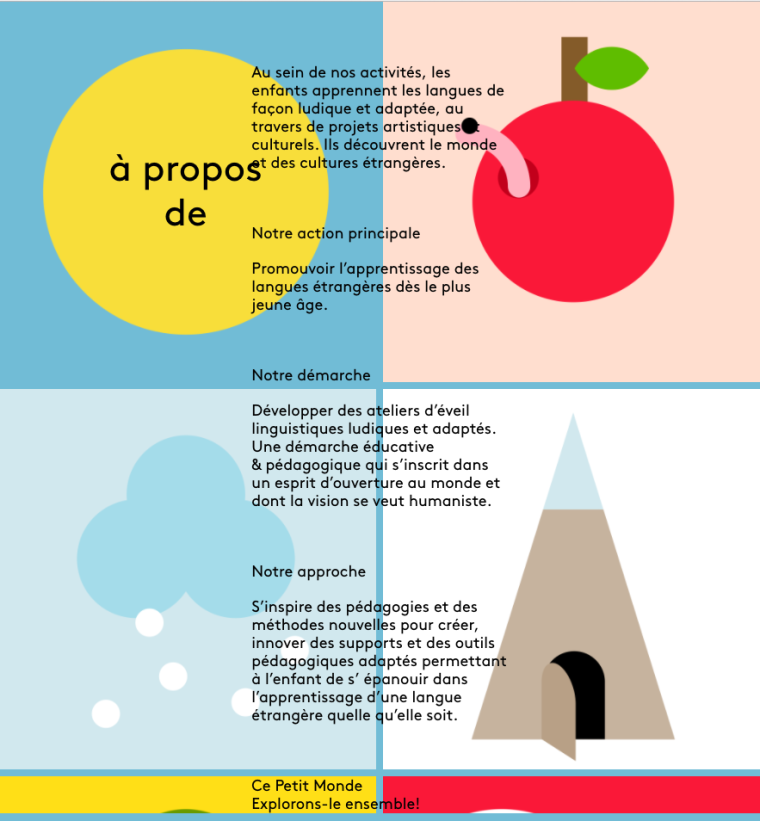
Also you are right. It is a bit tricky to have the content going under the "navigation".
I would strongly recommend to write the navigation in the custom HTML and CSS area.
Then you can also make it sticky with addingposition: fixed;to it.Let me know if you have further questions!
All the best!
Marius


Hello! It looks like you're interested in this conversation, but you don't have an account yet.
Getting fed up of having to scroll through the same posts each visit? When you register for an account, you'll always come back to exactly where you were before, and choose to be notified of new replies (either via email, or push notification). You'll also be able to save bookmarks and upvote posts to show your appreciation to other community members.
With your input, this post could be even better 💗
Register Login