Skip to content
  • Recent
  • Tags
  • Popular
  • Users
  • Search
Skins
  • Light
  • Brite
  • Cerulean
  • Cosmo
  • Flatly
  • Journal
  • Litera
  • Lumen
  • Lux
  • Materia
  • Minty
  • Morph
  • Pulse
  • Sandstone
  • Simplex
  • Sketchy
  • Spacelab
  • United
  • Yeti
  • Zephyr
  • Dark
  • Cyborg
  • Darkly
  • Quartz
  • Slate
  • Solar
  • Superhero
  • Vapor

  • Default (No Skin)
  • No Skin
Collapse

Lay Theme Forum

  1. Home
  2. Bug Reports
  3. stack row gutter mobile

stack row gutter mobile

Scheduled Pinned Locked Moved Bug Reports
5 Posts 2 Posters 31 Views 2 Watching
  • Oldest to Newest
  • Newest to Oldest
  • Most Votes
Reply
  • Reply as topic
Log in to reply
This topic has been deleted. Only users with topic management privileges can see it.
  • M Offline
    M Offline
    mariajover
    wrote last edited by
    #1

    Hello!

    I’m trying to set a different value for the gap between items inside a stack for desktop and mobile. Since there is no option for ‘Stack Row Gutter’ in mobile, I tried using a bottom padding for every item, but the mobile value doesn’t override the desktop one or even appear in the CSS. The Stack Row Gutter approach seems like the better way to do it, could you please add the mobile option for it?

    Thanksss!

    1 Reply Last reply
    0
    • arminunruhA Offline
      arminunruhA Offline
      arminunruh
      Global Moderator
      wrote last edited by
      #2

      are you using a custom phone layout?

      1 Reply Last reply
      0
      • arminunruhA Offline
        arminunruhA Offline
        arminunruh
        Global Moderator
        wrote last edited by
        #3

        or are u using the mobile tab of the sidebar?
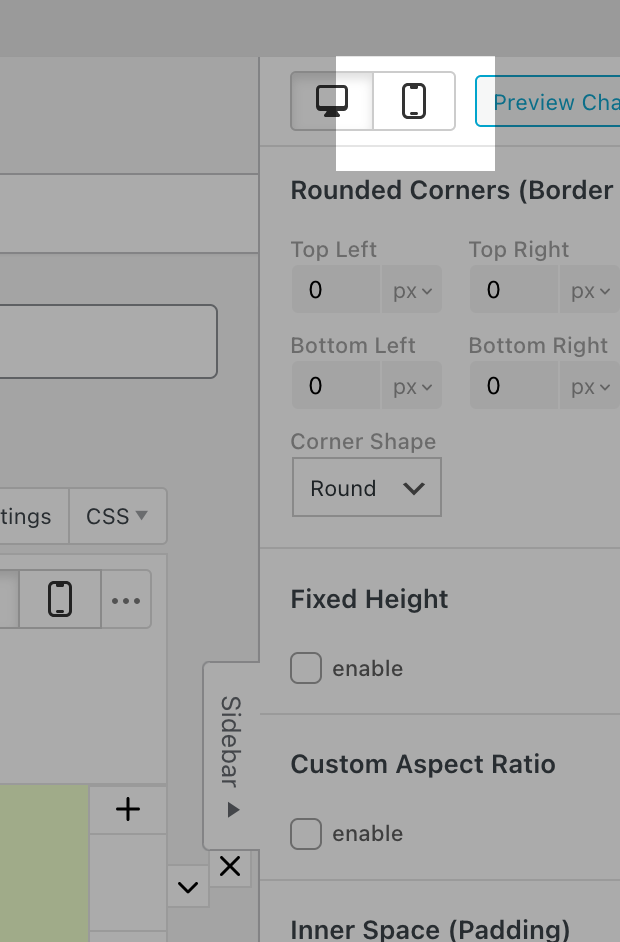
        Screenshot 2026-03-19 at 14.05.54.png

        1 Reply Last reply
        0
        • arminunruhA Offline
          arminunruhA Offline
          arminunruh
          Global Moderator
          wrote last edited by
          #4

          if u use a custom phone layout, you can set the row gutter independently of one another.

          if you dont use a custom phone layout, then you use the automatically generated phone layout which puts all elements on top of one another.

          In that case, the spacing of the elements is determined by the spacing you set in Customize > Mobile > Mobile Spaces

          But right now I see that unfortunately the spacing you set in the customizer for the automatically generated phone layout is used for the elements within the stack. But additionally, the stack row gutter is added to them as well.

          Is that maybe the source of your problem? The space gets too large?

          But of course I can also code a mobile setting for this. I'm just trying to understand better what your setup is so I can identify what needs to be done better.

          1 Reply Last reply
          0
          • arminunruhA Offline
            arminunruhA Offline
            arminunruh
            Global Moderator
            wrote last edited by arminunruh
            #5

            With the next Lay Theme update, the issue where Stack row gutters lead to too big spaces in stacks for automatically generated phone layouts will be fixed.

            1 Reply Last reply
            0
            Reply
            • Reply as topic
            Log in to reply
            • Oldest to Newest
            • Newest to Oldest
            • Most Votes


            I also code custom websites or custom Lay features.
            💿 Email me here: 💿
            info@laytheme.com

            Our Web Development company: 100k.studio

            Want to tip me? https://www.paypal.com/paypalme/arminunruh

            Before you post:
            1. When using a WordPress Cache plugin, disable it or clear your cache.
            2. Update Lay Theme and all Lay Theme Addons
            3. Disable all Plugins
            4. Go to Lay Options → Custom CSS & HTML, click "Turn Off All Custom Code", click "Save Changes"

            This often solves issues you might run into

            When you post:
            1. Post a link to where the problem is
            2. Does the problem happen on Chrome, Firefox, Safari or iPhone or Android?
            3. If the problem is difficult to explain, post screenshots / link to a video to explain it
            Online Users
            Forgot your key, lost your files, need a previous Lay Theme or Addon version? Go to www.laykeymanager.com
            laytheme.com
            • Login

            • Don't have an account? Register

            • Login or register to search.
            • First post
              Last post
            0
            • Recent
            • Tags
            • Popular
            • Users
            • Search
