Skip to content
  • Recent
  • Tags
  • Popular
  • Users
  • Search
Skins
  • Light
  • Brite
  • Cerulean
  • Cosmo
  • Flatly
  • Journal
  • Litera
  • Lumen
  • Lux
  • Materia
  • Minty
  • Morph
  • Pulse
  • Sandstone
  • Simplex
  • Sketchy
  • Spacelab
  • United
  • Yeti
  • Zephyr
  • Dark
  • Cyborg
  • Darkly
  • Quartz
  • Slate
  • Solar
  • Superhero
  • Vapor

  • Default (No Skin)
  • No Skin
Collapse

Lay Theme Forum

  1. Home
  2. General Discussion
  3. Different background images per row – responsive scaling

Different background images per row – responsive scaling

Scheduled Pinned Locked Moved General Discussion
9 Posts 2 Posters 62 Views 2 Watching
  • Oldest to Newest
  • Newest to Oldest
  • Most Votes
Reply
  • Reply as topic
Log in to reply
This topic has been deleted. Only users with topic management privileges can see it.
  • B Offline
    B Offline
    biografie
    wrote last edited by
    #1

    Dear Laytheme Forum,

    I would like to use different background images for different rows on a page of my website.

    The idea: I commissioned a designer to create a frame that looks like a floor plan of an apartment, where each row represents a different “room.”

    The issue I’m facing is that the background images are not displayed correctly — parts of the “walls” get cut off when I set them as backgrounds.

    I’m looking for a solution (maybe with using CSS) where:
    the background image fully covers the entire row (top, bottom, left, and right),
    nothing important gets cut off,
    and the image scales proportionally depending on the browser size (responsive behavior).

    You can see my page here:
    http://www.ar-mut.ch/start

    This is what one of the images looks like:
    https://ar-mut.ch/wp-content/uploads/2026/03/Ar.Mut_HP_1024x768_v02_s06.png

    Does anyone have an idea how to achieve this properly?
    Thanks a lot and best regards,
    Dennis

    1 Reply Last reply
    0
    • arminunruhA Offline
      arminunruhA Offline
      arminunruh
      Global Moderator
      wrote last edited by
      #2

      hey dennis!

      can you post a picture of the design here, so i can see what the end goal is?

      i can certainly make this happen, i just need to see the big picture

      B 1 Reply Last reply
      0
      • arminunruhA Offline
        arminunruhA Offline
        arminunruh
        Global Moderator
        wrote last edited by
        #3

        currently you can insert a image, use fixed height, and object position contain and make sure the images' width goes over the full layout width and then make sure height is set to 100svh:
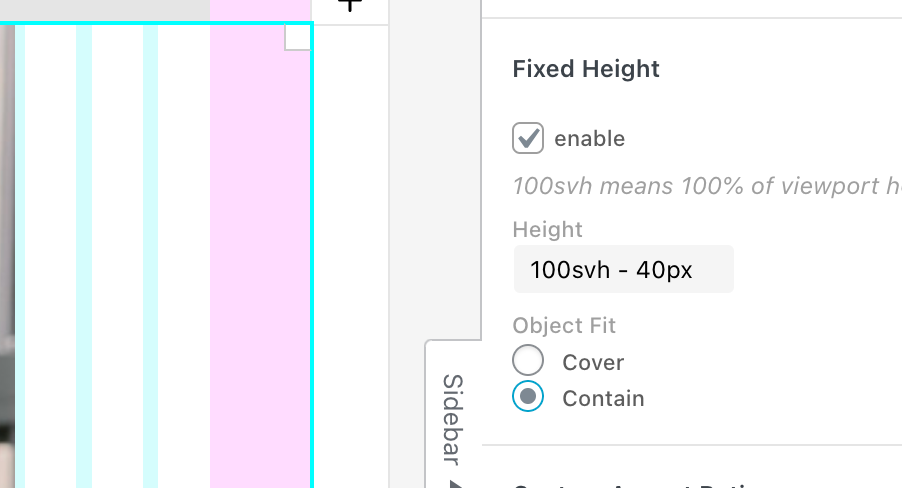
        grafik.png

        but i think thats not sufficient for what you need

        1 Reply Last reply
        0
        • arminunruhA Offline
          arminunruhA Offline
          arminunruh
          Global Moderator
          wrote last edited by
          #4

          actually since the texts you want to have on the frame need to position themselves with the image when the browser sizes i changing, have you ever though about this:

          just insert the frame as a normal image, then in the sidebar, use the "text on image" feature:
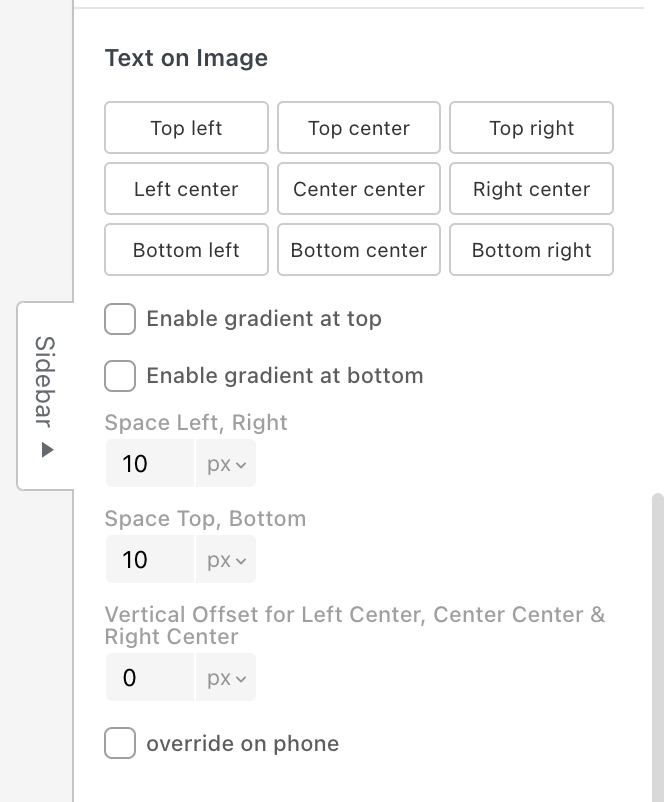
          grafik.png

          1 Reply Last reply
          0
          • arminunruhA arminunruh

            hey dennis!

            can you post a picture of the design here, so i can see what the end goal is?

            i can certainly make this happen, i just need to see the big picture

            B Offline
            B Offline
            biografie
            wrote last edited by biografie
            #5

            @arminunruh sure. Something like this: https://ar-mut.ch/wp-content/uploads/2026/03/Bildschirmfoto-2026-03-25-um-14.56.19.jpg

            or like this:

            https://ar-mut.ch/wp-content/uploads/2026/03/Bildschirmfoto-2026-03-25-um-14.57.33.jpg

            Here a worktest, where you see my problem: https://ar-mut.ch/start-test/

            1 Reply Last reply
            0
            • arminunruhA Offline
              arminunruhA Offline
              arminunruh
              Global Moderator
              wrote last edited by arminunruh
              #6

              ok i see, please try this:

              remove the empty rows from your layout,
              dont use custom row height or browser height on your row

              instead, click on an empty part of the row, then enter values for row padding top and row padding bottom (here i chose 50px, 50px as u see in the screenshot below), choose the row background image, and then choose object fit: fill, like here:
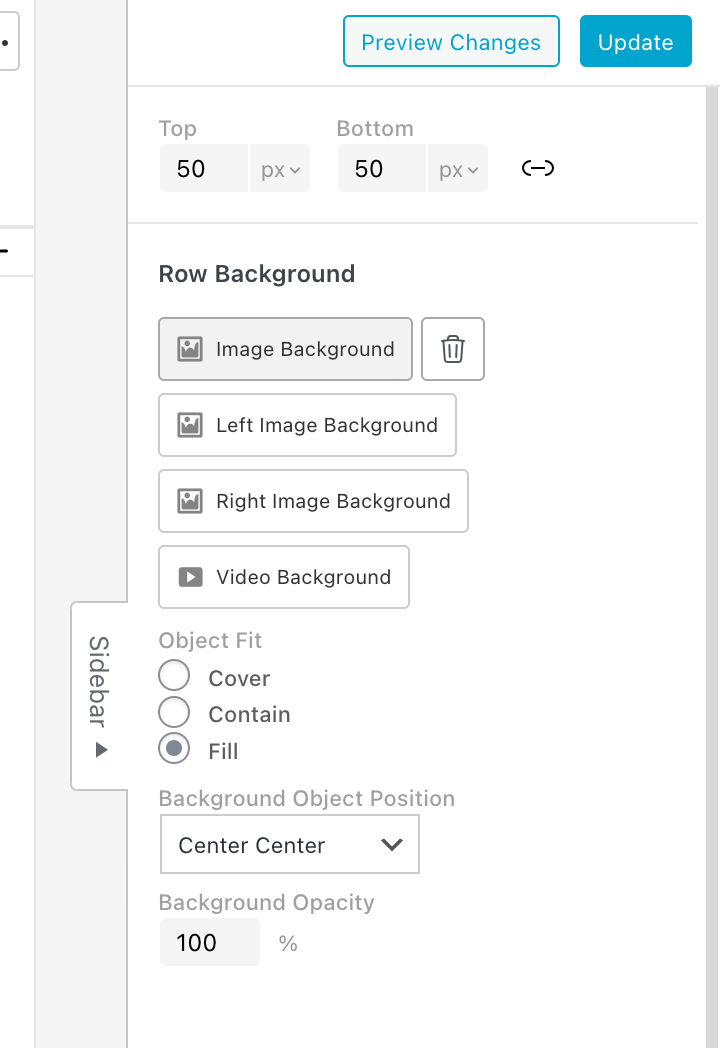
              grafik.png

              object fit: fill will only be available with the next update

              this will stretch your image to be a perfect frame around the row

              1 Reply Last reply
              0
              • B Offline
                B Offline
                biografie
                wrote last edited by
                #7

                Oh great. Thanks. When will be the next update? :)

                1 Reply Last reply
                0
                • arminunruhA Offline
                  arminunruhA Offline
                  arminunruh
                  Global Moderator
                  wrote last edited by
                  #8

                  maybe today or tomorrow. i ended up calling it "stretch" instead of fill just to let u know

                  1 Reply Last reply
                  1
                  • B Offline
                    B Offline
                    biografie
                    wrote last edited by
                    #9

                    hey thanks that worked absolutely fine. Great help!

                    1 Reply Last reply
                    0
                    Reply
                    • Reply as topic
                    Log in to reply
                    • Oldest to Newest
                    • Newest to Oldest
                    • Most Votes


                    I also code custom websites or custom Lay features.
                    💿 Email me here: 💿
                    info@laytheme.com

                    Our Web Development company: 100k.studio

                    Want to tip me? https://www.paypal.com/paypalme/arminunruh

                    Before you post:
                    1. When using a WordPress Cache plugin, disable it or clear your cache.
                    2. Update Lay Theme and all Lay Theme Addons
                    3. Disable all Plugins
                    4. Go to Lay Options → Custom CSS & HTML, click "Turn Off All Custom Code", click "Save Changes"

                    This often solves issues you might run into

                    When you post:
                    1. Post a link to where the problem is
                    2. Does the problem happen on Chrome, Firefox, Safari or iPhone or Android?
                    3. If the problem is difficult to explain, post screenshots / link to a video to explain it
                    Online Users
                    Forgot your key, lost your files, need a previous Lay Theme or Addon version? Go to www.laykeymanager.com
                    laytheme.com
                    • Login

                    • Don't have an account? Register

                    • Login or register to search.
                    • First post
                      Last post
                    0
                    • Recent
                    • Tags
                    • Popular
                    • Users
                    • Search
