embedded ThriveCart checkout form not loading on mobile version
-
I want to embed a checkout form on a client’s website. On the desktop version, it works perfectly using the provided code. It also works in mobile mode as long as I don’t create a separate mobile version of the site.
However, once I create a dedicated mobile version—which is necessary since most users visit the site on mobile—the form no longer loads (or is not displayed).
Where is my mistake in thinking?
Here is the embed code provided by ThriveCart:
<div data-thrivecart-account="robertherrmanncoaching" data-thrivecart-tpl="v2" data-thrivecart-product="1" class="thrivecart-embeddable" data-thrivecart-embeddable="tc-robertherrmanncoaching-1-4BE8KG"></div><script async src="//tinder.thrivecart.com/embed/v1/thrivecart.js" id="tc-robertherrmanncoaching-1-4BE8KG"></script>Here is the link to a page with the embedded form.
May anybody helps?
-
Looks like a mobile layout issue, not the embed code.
When you create a separate mobile version, the desktop elements don’t carry over. Your ThriveCart block probably isn’t added (or is hidden) in the mobile layout.
Just re-add the embed in the mobile version and it should work
-
hej @samfrancis, thanks for your answer.
of course I embedet the code also in the mobile layout, it is just not showing up.Gridder Desktop

Gridder Mobile

-
-
hey can you please try this: duplicate the page. then for that page delete the custom phone layout. then see if it shows up
-
heres a more detailed explanation:
hey, this is a known thing with lay themes custom phone layout: lay theme renders BOTH the desktop layout and the custom-phone-layout into the same html (one is just hidden via css depending on viewport width). so if you place the thrivecart embed in both layouts, it ends up in the dom twice — and thrivecart (like a lot of embeds with unique ids) doesnt handle duplicate instances and silently fails to load.
two options: 1. disable the custom phone layout temporarily — lay theme then falls back to a single-column auto-mobile view of the desktop layout and your embed exists only once. try this first, its the simplest fix. 2. keep the embed in only ONE of the two layouts (e.g. only in the custom phone layout, with a placeholder element in the desktop layout) — more fiddly. let me know if option 1 works for you.
-
Hej @arminunruh ,
thanks for the response. Option 1 workes technically, as i tested it before. sadly this won’t work for the client, as he needs a custom phone version.
page without mobile layoutThe desktop layout of the planned page is to complex for the mobile version and the mobile version to boring for desktop.
Option 2 would show no form in desktop, or do I misunderstood? It is crucial, to have the form in both layouts.
-
can u create 2 different checkouts? can you ask the thrivecart people if they can make it possible that people can have 2 checkouts on their page?
-
im gonna think about this more too maybe i can find a solution
-
ok so this will be fixed with the next lay theme update, i found a way
-
hey if you update lay theme now, please go to lay options. then in the compatibility section, enable: "Enable Smart Loading for HTML and Shortcode Elements"
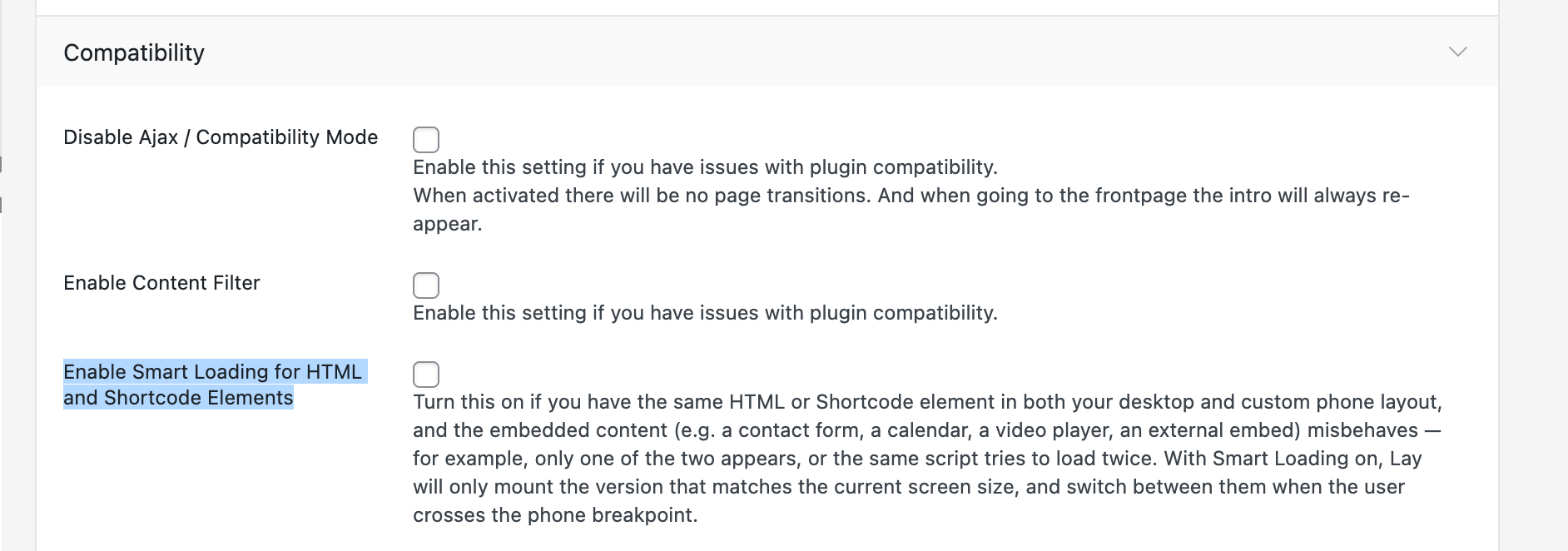
let me know if that worked for you <3
-
Hi @arminunruh, sorry for the late response. Thank you for the update – everything works fine now.
perfect! -
okay, amazing, just do me one favor, please check if the ThriveCart embed, if it actually really works, like if you click around in there and order something or whatever it does
Because it gets shown now in both desktop and mobile, it would be cool if you could check if it really works too, like when you click around inside of it. The way it works now is actually a little wild. Basically, just the whole ThriveCart will just swap in and out of the desktop or the mobile version of the markup. Based on what screen size you're on
