Mouseover Image for Thumbnails | Background Color as fallback
-
Hi,
I would like to use the "Mouseover Image for Thumbnails" function (probably with highly compressed WebP images for performance reasons) but would like to have a fallback in form of a simple background color, if no image is set in the post or if WebP isn't supported. This usually works by activating "show Background Color" (and by defining a color) in the Theme customizer. But when I activate it, it won't show the Mouseover Image anymore. It still shows up in the source code though. Is it possible to change the order somehow, like [Thumbnail Image] > over > [Mouseover Image] > over > [Background color]. Or could I somehow define a background color for the Mouseover Image itself via CSS?
Thanks so much and all the best!
-
hey there! Oh, that's a great idea! Take a look at this! This will be in the next Lay Theme version.
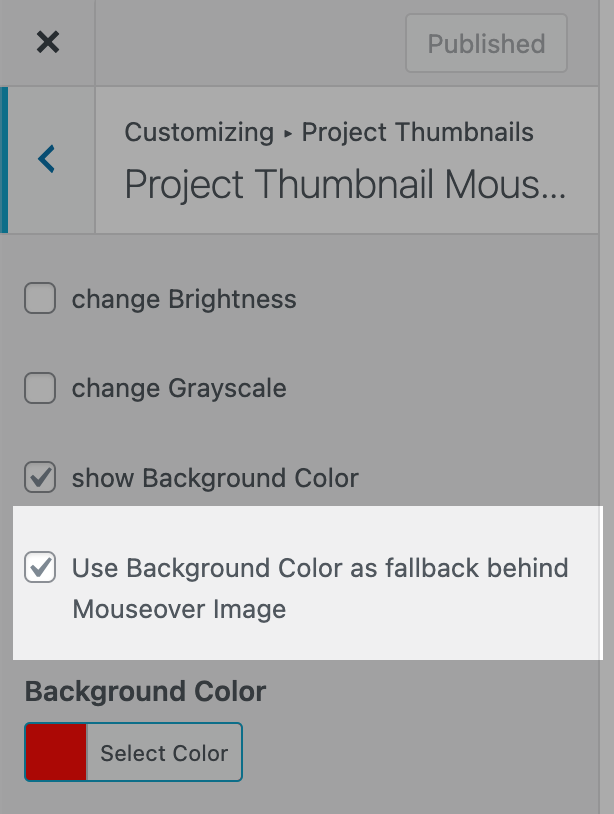
-

Hello! It looks like you're interested in this conversation, but you don't have an account yet.
Getting fed up of having to scroll through the same posts each visit? When you register for an account, you'll always come back to exactly where you were before, and choose to be notified of new replies (either via email, or push notification). You'll also be able to save bookmarks and upvote posts to show your appreciation to other community members.
With your input, this post could be even better 💗
Register Login