Skip to content
  • Recent
  • Tags
  • Popular
  • Users
  • Search
Skins
  • Light
  • Brite
  • Cerulean
  • Cosmo
  • Flatly
  • Journal
  • Litera
  • Lumen
  • Lux
  • Materia
  • Minty
  • Morph
  • Pulse
  • Sandstone
  • Simplex
  • Sketchy
  • Spacelab
  • United
  • Yeti
  • Zephyr
  • Dark
  • Cyborg
  • Darkly
  • Quartz
  • Slate
  • Solar
  • Superhero
  • Vapor

  • Default (No Skin)
  • No Skin
Collapse

Lay Theme Forum

  1. Home
  2. Bug Reports
  3. When opening a project page, it does not respect the previously selected language.

When opening a project page, it does not respect the previously selected language.

Scheduled Pinned Locked Moved Bug Reports
11 Posts 2 Posters 227 Views 2 Watching
  • Oldest to Newest
  • Newest to Oldest
  • Most Votes
Reply
  • Reply as topic
Log in to reply
This topic has been deleted. Only users with topic management privileges can see it.
  • D Offline
    D Offline
    dnlbrv
    wrote last edited by
    #2

    Hey sorry, the path disappear because is configurated in the language preferences. But the traductions in project pages doesn't work, always show the deafault languaje selected in preferences no the languaje selectd in the website.

    1 Reply Last reply
    0
    • arminunruhA Offline
      arminunruhA Offline
      arminunruh
      Global Moderator
      wrote last edited by
      #3

      hey yea i will release the fix in like an hour or so

      1 Reply Last reply
      0
      • arminunruhA Offline
        arminunruhA Offline
        arminunruh
        Global Moderator
        wrote last edited by
        #4

        okay can you install the update and try again now?

        1 Reply Last reply
        0
        • D Offline
          D Offline
          dnlbrv
          wrote last edited by
          #5

          Hey, Im under 10.9.7 version but the problem persist. In the projects doesn't respect the language selected.

          1 Reply Last reply
          0
          • D Offline
            D Offline
            dnlbrv
            wrote last edited by
            #6

            And qTranslate-XT Version 3.15.5

            1 Reply Last reply
            0
            • arminunruhA Offline
              arminunruhA Offline
              arminunruh
              Global Moderator
              wrote last edited by
              #7

              what if you click "clear layout cache" at the top?
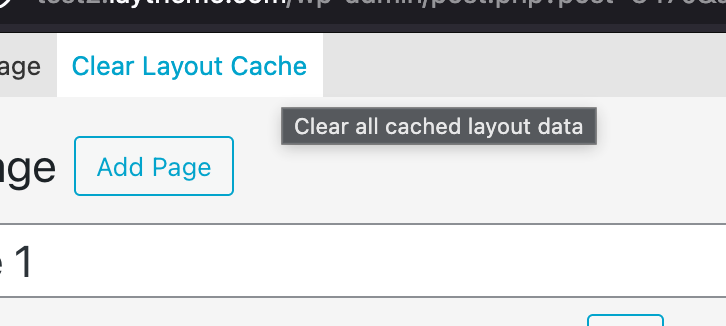
              Bildschirmfoto 2026-05-09 um 20.35.42.png

              1 Reply Last reply
              0
              • D Offline
                D Offline
                dnlbrv
                wrote last edited by
                #8

                sorry, where is this option?

                1 Reply Last reply
                0
                • arminunruhA Offline
                  arminunruhA Offline
                  arminunruh
                  Global Moderator
                  wrote last edited by
                  #9

                  at the top!

                  can you send your /wp-admin/ login info to: info@laytheme.com ? then i will take a look

                  1 Reply Last reply
                  0
                  • D Offline
                    D Offline
                    dnlbrv
                    wrote last edited by
                    #10

                    Hey I send a email with the data

                    1 Reply Last reply
                    0
                    • arminunruhA Offline
                      arminunruhA Offline
                      arminunruh
                      Global Moderator
                      wrote last edited by
                      #11

                      Seems like an issue with using an outdated child theme hmmm

                      1 Reply Last reply
                      0
                      Reply
                      • Reply as topic
                      Log in to reply
                      • Oldest to Newest
                      • Newest to Oldest
                      • Most Votes


                      For paid 1-on-1 Lay Theme Coaching, contact Audrey (audrey@cyberslayers.work) or me (info@laytheme.com).

                      We also code custom websites or bespoke Lay features. Drop me a line at info@laytheme.com or check out my work at arminunruh.com.

                      Want to support my work? paypal.me/arminunruh

                      Before you post:
                      1. When using a WordPress Cache plugin, disable it or clear your cache.
                      2. Update Lay Theme and all Lay Theme Addons
                      3. Disable all Plugins
                      4. Go to Lay Options → Custom CSS & HTML, click "Turn Off All Custom Code", click "Save Changes"

                      This often solves issues you might run into

                      When you post:
                      1. Post a link to where the problem is
                      2. Does the problem happen on Chrome, Firefox, Safari or iPhone or Android?
                      3. If the problem is difficult to explain, post screenshots / link to a video to explain it
                      Online Users
                      Forgot your key, lost your files, need a previous Lay Theme or Addon version? Go to www.laykeymanager.com
                      laytheme.com
                      • Login

                      • Don't have an account? Register

                      • Login or register to search.
                      • First post
                        Last post
                      0
                      • Recent
                      • Tags
                      • Popular
                      • Users
                      • Search