page overlay burger menu hide on desktop?
-
is it possible to hide the burger menu from desktop? And also activate the nav bar in mobile while hiding the mobile menu? because i want to use an overlay as menu in mobile but not on the destkop version?
-
so basically you want to use a page overlay with a burger icon on phone
but not on desktopand you want to be able to show the mobile menu bar
but not show the standard mobile menu iconsyea that all makes sense amazing ideas!!
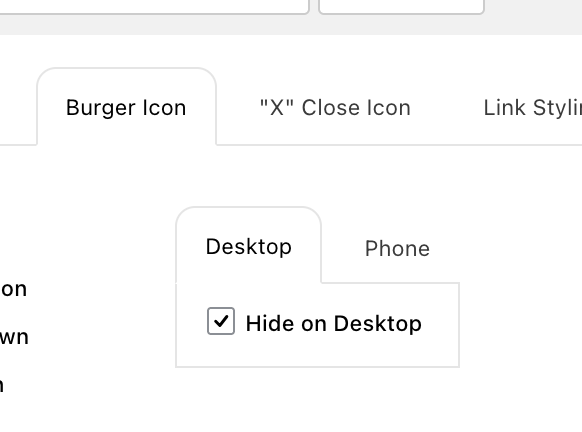
This update will include a hide for desktop checkbox. In the customizer, you will also be able to hide the mobile menu icons, so you can just leave the mobile menu bar unhidden there. Just make sure that in Customize Mobile Menu you uncheck "Hide" there. Because that setting hides the mobile menu bar, the mobile menu icons, and the mobile menu, it hides everything.
-
amazing! thank you so much @arminunruh and sorry for the delay!
and additionaly it would be amazing if there was an option where we can decide on which page which overlay (and menu) is hidden or active...
-
hey there, that's actually a little difficult and kind of a lot of work to do, but if that feature is really important to you, I can code it for you for €90 per hour + VAT. It would probably take a few hours to do this right.
-
hey @arminunruh no problem. Thank you for your offer - maybe i come back to it :) to be honest the option would be cool, but i only need it on a site i'm working on right now (so only once in the last few years). I think i can manage to get results with custom code to hide the overlay on a certain page and vice versa... if i can't figure a way - i come back to you...

Hello! It looks like you're interested in this conversation, but you don't have an account yet.
Getting fed up of having to scroll through the same posts each visit? When you register for an account, you'll always come back to exactly where you were before, and choose to be notified of new replies (either via email, or push notification). You'll also be able to save bookmarks and upvote posts to show your appreciation to other community members.
With your input, this post could be even better 💗
Register Login