Skip to content
  • Recent
  • Tags
  • Popular
  • Users
  • Search
Skins
  • Light
  • Brite
  • Cerulean
  • Cosmo
  • Flatly
  • Journal
  • Litera
  • Lumen
  • Lux
  • Materia
  • Minty
  • Morph
  • Pulse
  • Sandstone
  • Simplex
  • Sketchy
  • Spacelab
  • United
  • Yeti
  • Zephyr
  • Dark
  • Cyborg
  • Darkly
  • Quartz
  • Slate
  • Solar
  • Superhero
  • Vapor

  • Default (No Skin)
  • No Skin
Collapse

Lay Theme Forum

  1. Home
  2. Bug Reports
  3. titles in overviews show only one language after update (qtranslate)

titles in overviews show only one language after update (qtranslate)

Scheduled Pinned Locked Moved Bug Reports
11 Posts 3 Posters 134 Views 2 Watching
  • Oldest to Newest
  • Newest to Oldest
  • Most Votes
Reply
  • Reply as topic
Log in to reply
This topic has been deleted. Only users with topic management privileges can see it.
  • arminunruhA Offline
    arminunruhA Offline
    arminunruh
    Global Moderator
    wrote last edited by
    #2

    okay, so I will release a Lay Theme update later today that may fix this. If it doesn't fix it, I would need your admin login for that website, or you would need to create a new admin user for me. Then just send it to info@laytheme.com with a link to this topic, because then I would need to take a closer look as to why this happens on your site, because I can't replicate this on my website.

    1 Reply Last reply
    0
    • LLLLLLLLLL Offline
      LLLLLLLLLL Offline
      LLLLLLLLL
      wrote last edited by
      #3

      Hi, here's a similar case, and it's working fine with the latest update
      delunesadomingo.es

      1 Reply Last reply
      0
      • arminunruhA Offline
        arminunruhA Offline
        arminunruh
        Global Moderator
        wrote last edited by
        #4

        hey you LLLLLLL, so for you it was fixed with the latest update?

        1 Reply Last reply
        0
        • LLLLLLLLLL Offline
          LLLLLLLLLL Offline
          LLLLLLLLL
          wrote last edited by
          #5

          Latest update didn't change anything. It's been working fine

          1 Reply Last reply
          1
          • C Offline
            C Offline
            clrcrtq
            wrote last edited by
            #6

            fixed, thank you! @arminunruh

            1 Reply Last reply
            0
            • arminunruhA Offline
              arminunruhA Offline
              arminunruh
              Global Moderator
              wrote last edited by
              #7

              amazing!

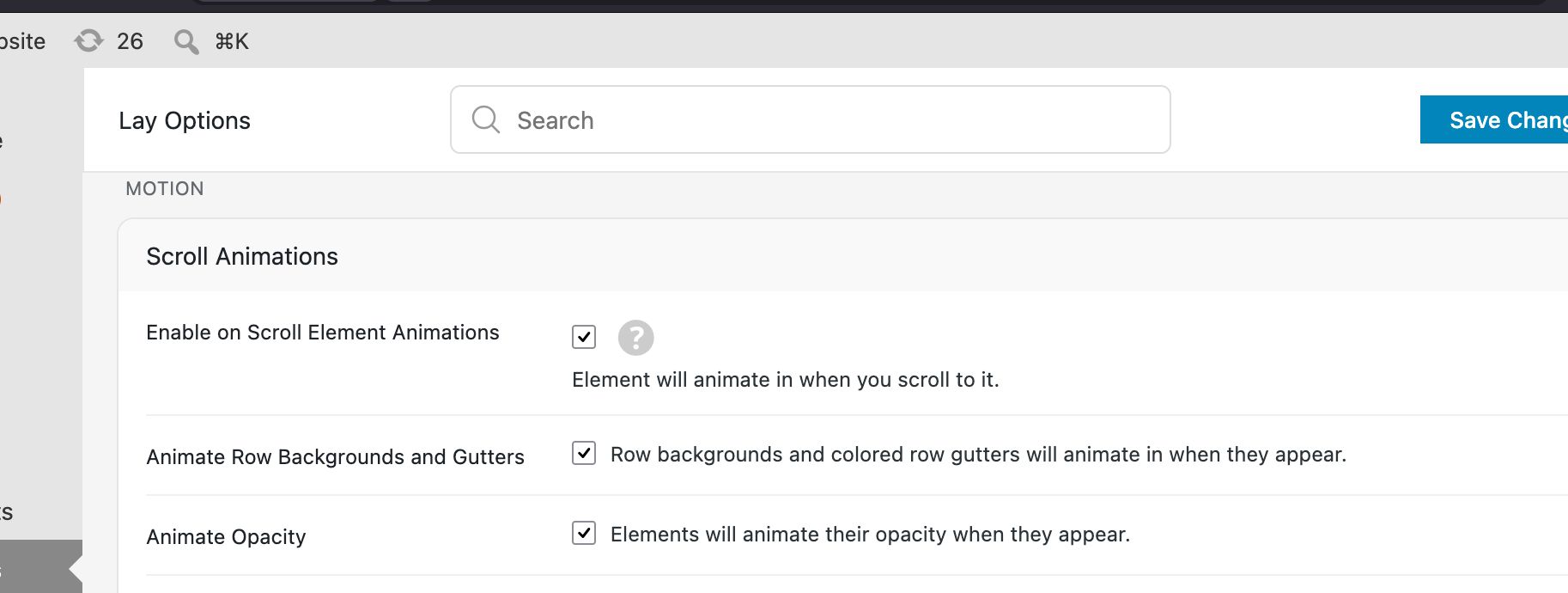
              @clrcrtq if you want you can also turn off:

              "Animate Row Backgrounds and Gutters"
              grafik.png

              because maybe that doesnt look so good for your footer right now

              1 Reply Last reply
              0
              • C Offline
                C Offline
                clrcrtq
                wrote last edited by
                #8

                @arminunruh oh thank you that is good to know, since it turned on with a recent update

                sadly the bug was reintroduced in the last 2 updates. in v. 11.4.9 it's showing again english titles overwriting german ones, in 11.4.8 it was german titles overwriting english ones :D

                https://beyond.global/de/blog

                1 Reply Last reply
                0
                • C Offline
                  C Offline
                  clrcrtq
                  wrote last edited by
                  #9

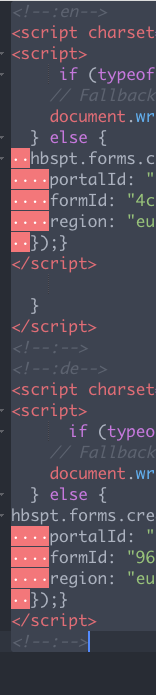
                  a similiar error seems to be happening now when implementing html snippets with the qtranslate function, it ignores the german one and only shows the english on the contact form. i know qtranslate can introduce their own bugs and is not part of laytheme, but it was kinda working great before 🥲
                  Screenshot 2026-07-16 at 14.47.51.png

                  1 Reply Last reply
                  0
                  • arminunruhA Offline
                    arminunruhA Offline
                    arminunruh
                    Global Moderator
                    wrote last edited by
                    #10

                    Hey, as with the previous problems with qtranslate, I couldn't reproduce them, so it's kind of hard for me to fix what I can't see.

                    So far, no one has sent me their admin login to their website, where I can actually see the issue and test it out and build a fix.

                    So if you could send me your admin login to my email and I could check it out there, that would be of great help, then I can fix it.

                    info@laytheme.com
                    website address, wp-admin username and pw
                    and a link to this topic for context please

                    have a nice day

                    1 Reply Last reply
                    0
                    • arminunruhA Offline
                      arminunruhA Offline
                      arminunruh
                      Global Moderator
                      wrote last edited by
                      #11

                      hey can you update lay theme now and try again? i may have found the issue / solution

                      1 Reply Last reply
                      0
                      Reply
                      • Reply as topic
                      Log in to reply
                      • Oldest to Newest
                      • Newest to Oldest
                      • Most Votes


                      For paid 1-on-1 Lay Theme Coaching, contact Audrey (audrey@cyberslayers.work) or me (info@laytheme.com).

                      We also code custom websites or bespoke Lay features. Drop me a line at info@laytheme.com or check out my work at arminunruh.com.

                      Want to support my work? paypal.me/arminunruh

                      Before you post:
                      1. When using a WordPress Cache plugin, disable it or clear your cache.
                      2. Update Lay Theme and all Lay Theme Addons
                      3. Disable all Plugins
                      4. Go to Lay Options → Custom CSS & HTML, click "Turn Off All Custom Code", click "Save Changes"

                      This often solves issues you might run into

                      When you post:
                      1. Post a link to where the problem is
                      2. Does the problem happen on Chrome, Firefox, Safari or iPhone or Android?
                      3. If the problem is difficult to explain, post screenshots / link to a video to explain it
                      Online Users
                      AntoineA
                      Antoine
                      Forgot your key, lost your files, need a previous Lay Theme or Addon version? Go to www.laykeymanager.com
                      laytheme.com
                      • Login

                      • Don't have an account? Register

                      • Login or register to search.
                      • First post
                        Last post
                      0
                      • Recent
                      • Tags
                      • Popular
                      • Users
                      • Search