linked page for WIP project pages
-
Hi Armin,
I'm working on and compiling some project pages that I haven't finished yet. I'm fine with having thumbnails of these projects show up in the thumbnail grid view, but I'd like them to link to a sort of maintenance page when clicked.
It would be great to have something like a maintenance mode option for WIP project pages.
Is this possible in some way?
-
hey Starc, I would suggest you leave a project as private or as a draft and then just click preview in the project without publishing it. This way it won't be in the project thumbnail grid.
Here is where we make a project private:
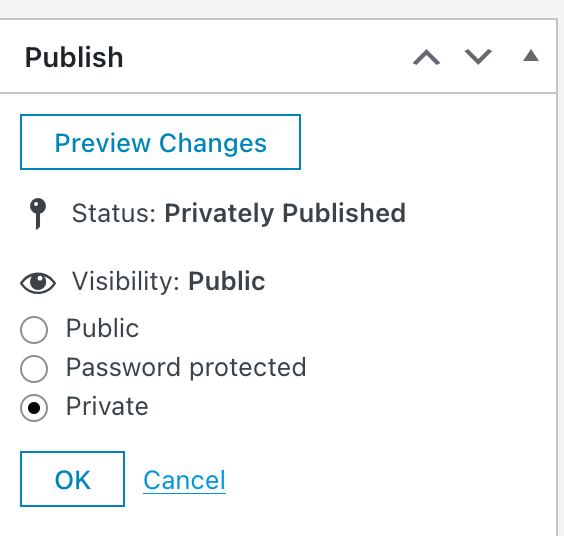
-
but it seems like when layout cache is enabled, setting a project back to private if it was already published may not remove it.
that will be fixed with the next update.
you may also set the project to password protected -
Thank you Armin,
I solved it (Claude) in this way via custom js
// DOVREBBE REDICTARE I PROGETTI
document.addEventListener('click', function(e) {
var link = e.target.closest('a.thumb[data-id]');
if (!link) return;var wipIds = ['93', '101']; // 93 Ventrice Odontoiatria 101 Psinel
var wipUrl = '[Custom link for WIP placeholder page]';if (wipIds.indexOf(link.getAttribute('data-id')) !== -1) {
e.preventDefault();
e.stopImmediatePropagation();
window.location.href = wipUrl;
}
}, true);
// DOVREBBE REDICTARE I PROGETTIWhen the thumbnail is clicked this autoredirect to a specific work in progress page. When the page is finished i will remove the id number from this
var wipIds =
-
ah ok cool! well done


Hello! It looks like you're interested in this conversation, but you don't have an account yet.
Getting fed up of having to scroll through the same posts each visit? When you register for an account, you'll always come back to exactly where you were before, and choose to be notified of new replies (either via email, or push notification). You'll also be able to save bookmarks and upvote posts to show your appreciation to other community members.
With your input, this post could be even better 💗
Register Login