multiple slides carousel caption position
-
Hi there !
I want to create a multiple slides carousel including projects thumbnails with their captions placed above the project thumbnail. When I select the placement option, it only shows one single caption instead of all the captions of the visibles projects thumbnails. This problem did not occured when the caption placement is put below the carousel.
Caption position below carousel :
 image url)
Caption position above carousel :
 image url)
So I would like to know if there is a way to change the position of the captions in order to make them appear above the carousel and all visibles at once ?
I am currently working on a local website so I cannot provide a live link, but I hope these screenshots will help :)
Thanks in advance,
Regards,Hugo
-
hey!
i will release a new carousel addon update where this is fixed. i think today or tomorrow.
update it, then: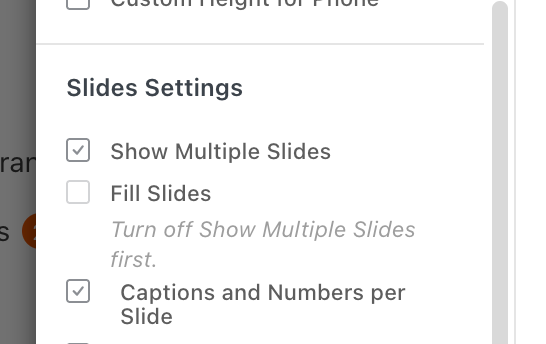
make sure to enable "captions and numbers per slide"
and in captions
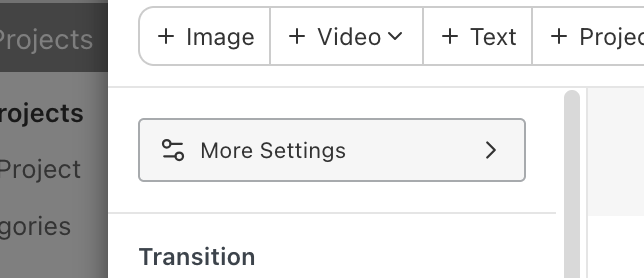
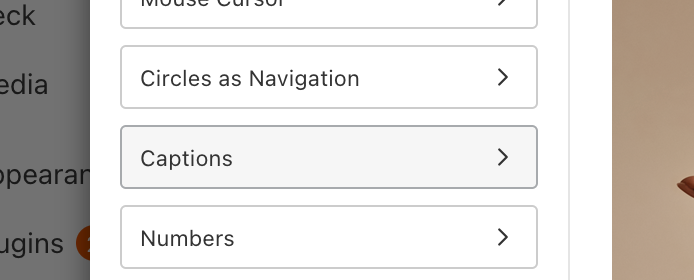
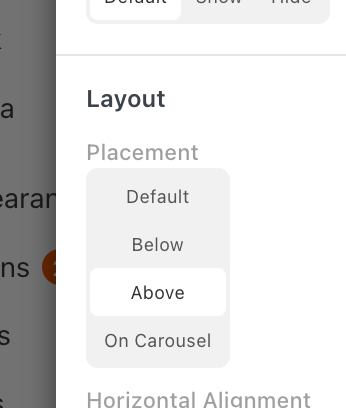
placement above:
-

Hello! It looks like you're interested in this conversation, but you don't have an account yet.
Getting fed up of having to scroll through the same posts each visit? When you register for an account, you'll always come back to exactly where you were before, and choose to be notified of new replies (either via email, or push notification). You'll also be able to save bookmarks and upvote posts to show your appreciation to other community members.
With your input, this post could be even better 💗
Register Login