Images don't load properly (Apple Safari only)
-
Hi there,
I'm facing a problem with my Portfolio images, almost every second picture doesn't seem to load properly - see picture attached.
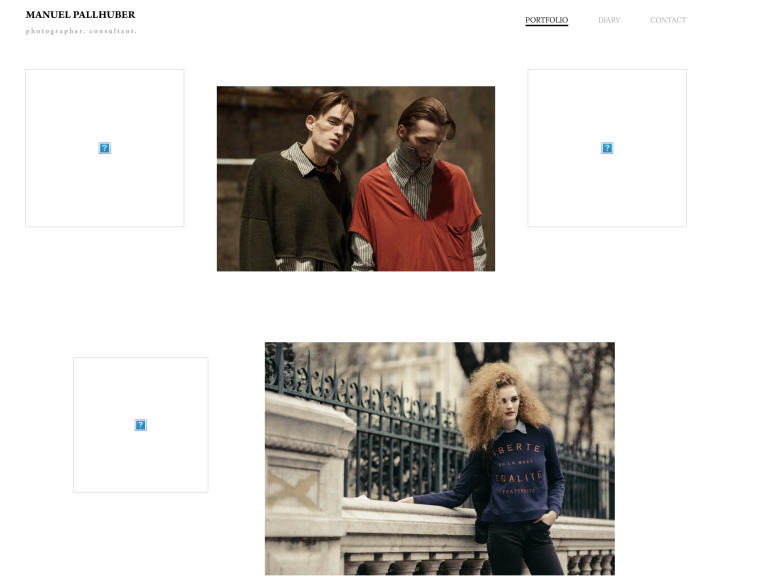
The weird thing - this only happens in Safari, with google chrome everything works properly. Those are the only browsers I tried till now.
Even after deleting the whole cache and browser data of safari.
Also the link to the picture seems to be another one, as if I load it with google chrome.e.g.:
1st. Picture Safari:
http://www.manuelpallhuber.com/wp-content/uploads/2017/05/Platzhalterbild-28-von-54-1-768x1152.jpg1st. Picture Google Chrome:
http://www.manuelpallhuber.com/wp-content/uploads/2017/05/sulvam-fashion-editorial-florence-italy-02-512x768.jpgHope there is a quick solution to fix that, cause it's kind of a bad experience for everybody visiting through safari right now.
Thank you!
Manuel -
Ok, I found out it was caused by the automatically created resized versions of the images.
Now I deactivated this function, which really slowed down the loading times.Is there any way to optimize that? Or force Wordpress to create new resized image versions?
Best,
Manuel -
Hi Manuel,
there are plugins for Wordpress to reduce the size of the images.
Also you can try to save the images smaller in Photoshop's save for web.All the best :-)
Marius

Hello! It looks like you're interested in this conversation, but you don't have an account yet.
Getting fed up of having to scroll through the same posts each visit? When you register for an account, you'll always come back to exactly where you were before, and choose to be notified of new replies (either via email, or push notification). You'll also be able to save bookmarks and upvote posts to show your appreciation to other community members.
With your input, this post could be even better 💗
Register Login