Background colour change on rollover
-
Hi Marius
I began by adding the above code
CSS
.red {
background: #f1f1f1 !important;
}
.red:hover {
background-color: #ff1900 !important;
}
.blue {
background: #f1f1f1 !important;
}
.blue:hover {
background-color: #ff1900 !important;
}JQUERY
<script>
window.laytheme.on("newpage", function(layoutObj, type, obj){jQuery(document).on("hover", ".thumb",
function(event) {jQuery("body").removeClass("red"); jQuery("body").removeClass("blue"); jQuery("body").removeClass("yellow"); var category = jQuery(this).attr("data-catid"); if (category == 6) { jQuery("body").addClass("red"); } if (category == 3) { jQuery("body").addClass("blue"); } if (category == 5) { jQuery("body").addClass("yellow"); }}
);
});
</script>as I said above this worked all be it the hover off only worked once the mouse had left the window not the thumbnail
I did attempt an example with mouseenter and mouseout in JSFIDDLE -
https://jsfiddle.net/Toby05/3yjw0dpk/15/#&togetherjs=9ISpwkHzla
HTML
<div class="box" data-catid="1">data-catid=1</div>
CSS
.box
JQUERY
$(document).ready(function(){
$(".box").mouseenter(function(){
$(this).css("background-color", "#ff1900");
});
$(".box").mouseleave(function(){
$(this).css("background-color", "#f1f1f1");
});
});but have been unsuccessful in applying more than one colour / category and adding to lay theme.
Cheers
Toby -
Hi Marius
I've managed to get some jquery working on JSFIDDLE but when I transferred the code into Layhtheme
it doesn't workhttps://jsfiddle.net/Toby05/va6a10g1/45/#&togetherjs=VIBsap8NEF
and here's the code i'm pasting into CUSTOM HEAD CONTENT:
<script>
window.laytheme.on("newpage", function(layoutObj, type, obj){
jquery(document).on ("mouseover", ".thumb",
function() {
var category = $(this).attr("data-catid");
if (category == 1)
jquery(this).css('background', "rgb(251,25,0)");
}).on("mouseout", function() {
jquery(this).css('background', "rgb(241,241,241)");
}).on("mouseover", function() {
var category = $(this).attr("data-catid");
if (category == 2)
jquery(this).css('background', "rgb(24, 176, 247)");
}).on("mouseout", function() {
jquery(this).css('background', "rgb(241,241,241)");
}).on("mouseover", function() {
var category = $(this).attr("data-catid");
if (category == 3)
jquery(this).css('background', "rgb(255,222,0)");
}).on("mouseout", function() {
jquery(this).css('background', "rgb(241,241,241)");
}).on ("mouseover",function() {
var category = $(this).attr("data-catid");
if (category == 4)
jquery(this).css('background', "rgb(115,195,19)");
}).on("mouseout", function() {
jquery(this).css('background', "rgb(241,241,241)");
});
</script>Thanks
Toby -
Hi @Toby
as far as I understood – you wanted that the background is changing to a specific color when you hover a category, right?
This is not happening in your example.
Are we talking about the same thing?
All the best!
Marius
-
Hi Marius
Yes that's what I want - unfortunately my attempts have been unsuccessful - can you help resolve this?
The previous post I'd attached the wrong JSFIDDLE - Here is my latest attempt
https://jsfiddle.net/Toby05/va6a10g1/67/#&togetherjs=y4rLV5GyyC
Thanks
Toby -
Hi @Toby
add this to your CUSTOM HEAD CONTENT:
<script>
window.laytheme.on("newpage", function(layoutObj, type, obj){

jQuery(document).on("hover", ".thumb",
  function(event) {

  	jQuery("body").removeClass("red");
    jQuery("body").removeClass("blue");

    var category = jQuery(this).attr("data-catid");

    if (category == 1) {
      jQuery("body").addClass("red");
	  }

    if (category == 2) {
   		jQuery("body").addClass("blue");
	  }

  }

);

});
</script>
and this to your custom CSS:
.red {
  background: red !important;
}

.blue {
  background: blue !important;
}
I have two projects with two different categories.
If you inspect the thumbnails they are called 1 and 2: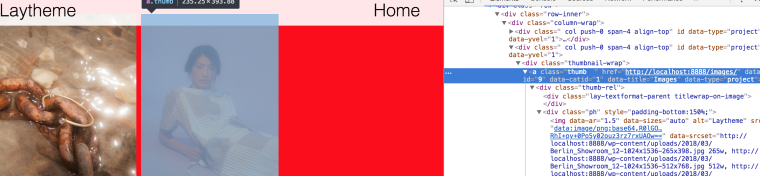
I placed the images as project thumbnails:
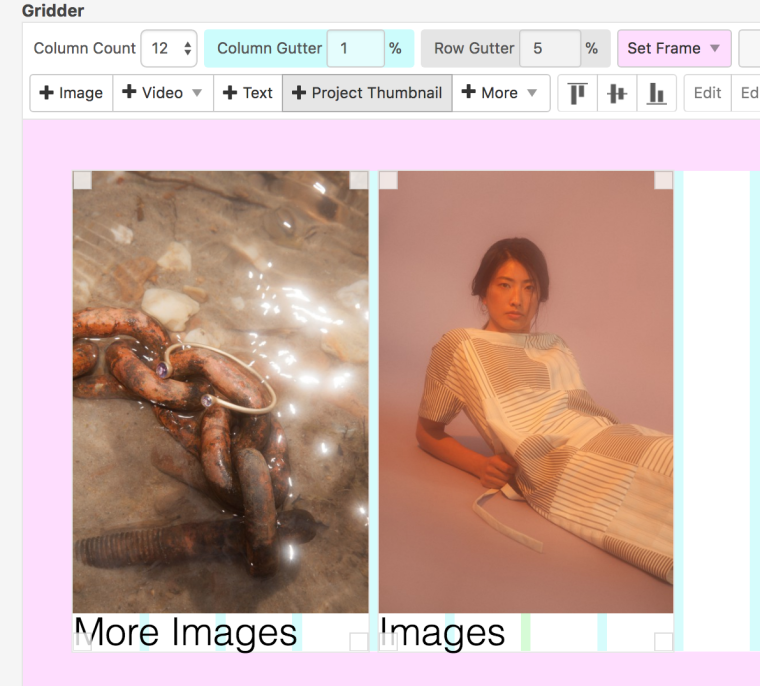
You will probably need to adjust the code.
But this is the base and you can go on from there.Good luck!
Marius
Dear @Toby
this is the way to go:
The code you just posted is already a step backward.
Please try this code and let me know where the problem is.
All the best!
Marius
@mariusjopen said in Background colour change on rollover:
Hi @Toby
add this to your CUSTOM HEAD CONTENT:
<script>
window.laytheme.on("newpage", function(layoutObj, type, obj){

jQuery(document).on("hover", ".thumb",
  function(event) {

  	jQuery("body").removeClass("red");
    jQuery("body").removeClass("blue");

    var category = jQuery(this).attr("data-catid");

    if (category == 1) {
      jQuery("body").addClass("red");
	  }

    if (category == 2) {
   		jQuery("body").addClass("blue");
	  }

  }

);

});
</script>
and this to your custom CSS:
.red {
  background: red !important;
}

.blue {
  background: blue !important;
}
I have two projects with two different categories.
If you inspect the thumbnails they are called 1 and 2:I placed the images as project thumbnails:
You will probably need to adjust the code.
But this is the base and you can go on from there.Good luck!
Marius
-
Hi Marius
As I explained last week when I add the above code there is no mouse leave effect when the mouse leaves the thumbnail to revert back to the original colour (#f1f1f1)
So I added this code to CSS - example for the red hover
.red {
background: #f1f1f1 !important;
}
.red:hover {
background-color: #ff1900 !important;
}Which nearly works, however the mouse leave doesn't revert back to #f1f1f1 until the mouse / pointer leaves the window - I'd like it to happen when the mouse leaves the thumbnail.
Any ideas
Cheers
Toby -
Dear Toby,
may I ask you to post the code in the
this formatto this thread. And also make it as readable as possible for me. Breaks etc.
Otherwise I need to do a surgery which costs a lot of time.Thank you
Marius
-
-
Hi Marius
Ok so far my code appears like this -
CUSTOM HEAD CONTENT:
<script>
window.laytheme.on("newpage", function(layoutObj, type, obj){

jQuery(document).on("hover", ".thumb",
function(event) {

jQuery("body").removeClass("red");
jQuery("body").removeClass("blue");

var category = jQuery(this).attr("data-catid");

if (category == 1) {
  jQuery("body").addClass("red");
  }

if (category == 2) {
	jQuery("body").addClass("blue");
  }
}

);

});
</script>
and CSS
.red {
background: #f1f1f1!important;
}
.red:hover {
background-color: #ff1900  !important;
}

.blue {
background: #f1f1f1 !important;
}

.blue:hover {
background-color: #0280f8 !important;
}
but the hover only works when the mouse leaves the window not when leaving the thumbnail
Chers
Toby -
Dear @Toby
this works:
.red {
    background: red !important;
}

.blue {
    background: blue !important;
}
<script> window.laytheme.on("newpage", function(layoutObj, type, obj){ jQuery(document).on("mouseenter", ".thumb", function(event) { var category = jQuery(this).attr("data-catid"); if (category == 1) { jQuery("body").addClass("red"); } if (category == 2) { jQuery("body").addClass("blue"); } }); jQuery(document).on("mouseleave", ".thumb", function(event) { jQuery("body").removeClass("red"); jQuery("body").removeClass("blue"); }); }); </script>All the best!
Marius
-
Dear @Toby
this works:
.red {
    background: red !important;
}

.blue {
    background: blue !important;
}
<script> window.laytheme.on("newpage", function(layoutObj, type, obj){ jQuery(document).on("mouseenter", ".thumb", function(event) { var category = jQuery(this).attr("data-catid"); if (category == 1) { jQuery("body").addClass("red"); } if (category == 2) { jQuery("body").addClass("blue"); } }); jQuery(document).on("mouseleave", ".thumb", function(event) { jQuery("body").removeClass("red"); jQuery("body").removeClass("blue"); }); }); </script>All the best!
Marius
-
Perfect! Happy to hear!

Hello! It looks like you're interested in this conversation, but you don't have an account yet.
Getting fed up of having to scroll through the same posts each visit? When you register for an account, you'll always come back to exactly where you were before, and choose to be notified of new replies (either via email, or push notification). You'll also be able to save bookmarks and upvote posts to show your appreciation to other community members.
With your input, this post could be even better 💗
Register Login