Skip to content
  • Recent
  • Tags
  • Popular
  • Users
  • Search
Skins
  • Light
  • Brite
  • Cerulean
  • Cosmo
  • Flatly
  • Journal
  • Litera
  • Lumen
  • Lux
  • Materia
  • Minty
  • Morph
  • Pulse
  • Sandstone
  • Simplex
  • Sketchy
  • Spacelab
  • United
  • Yeti
  • Zephyr
  • Dark
  • Cyborg
  • Darkly
  • Quartz
  • Slate
  • Solar
  • Superhero
  • Vapor

  • Default (No Skin)
  • No Skin
Collapse

Lay Theme Forum

  1. Home
  2. General Discussion
  3. Menu: open external Links diretly in same tab

Menu: open external Links diretly in same tab

Scheduled Pinned Locked Moved General Discussion
8 Posts 2 Posters 1.3k Views
  • Oldest to Newest
  • Newest to Oldest
  • Most Votes
Reply
  • Reply as topic
Log in to reply
This topic has been deleted. Only users with topic management privileges can see it.
  • H
    H
    huhno
    wrote on last edited by
    #1

    Hey Guys,
    im trying to build up a menu for my homepage. When I include external links, they will be opened in a new tab. Is there a way to open them directly in the same tab?

    Best

    huhno

    1 Reply Last reply
    0
    • mariusjopenM
      mariusjopenM
      mariusjopen
      Global Moderator
      wrote on last edited by
      #2

      Ola @huhno
      no. Unfortunately not.

      You could write a little jQuery which add the attribute target="_blank" to the link.

      All the best!

      Marius

      www.mariusjopen.world

      1 Reply Last reply
      0
      • H
        H
        huhno
        wrote on last edited by
        #3

        alright, thanks! as I'm a bloody beginner in all of this...could you tell me what exactly i could do?

        1 Reply Last reply
        0
        • H
          H
          huhno
          wrote on last edited by
          #4

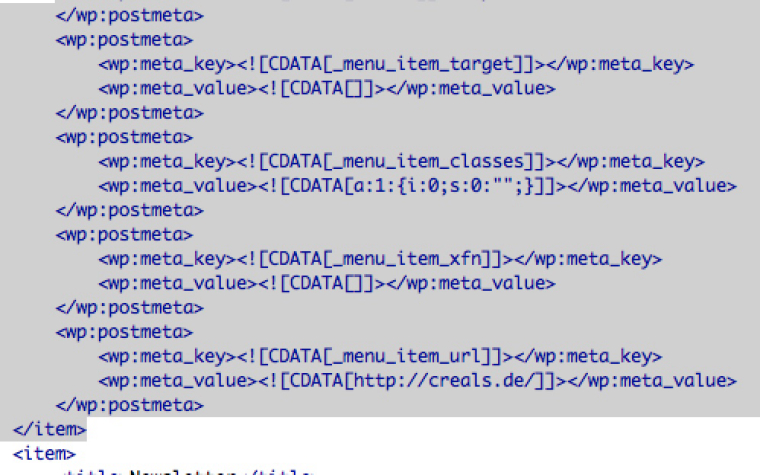
          0_1521014102936_Ohne Titel.jpeg

          so i tired to exportmy wordpress file and to find the menu links...am I right with that one?

          1 Reply Last reply
          0
          • H
            H
            huhno
            wrote on last edited by
            #5

            0_1521014246082_Ohne Titel2.jpeg

            another part could be this. I'm sorry for my noob behaviour :(

            1 Reply Last reply
            0
            • mariusjopenM
              mariusjopenM
              mariusjopen
              Global Moderator
              wrote on last edited by
              #6

              Dear @huhno
              nothing to worry about. Great that you build websites with Laytheme already.

              I write that for you:

              window.laytheme.on("newpage", function(layoutObj, type, obj){
              jQuery('a[target="_blank"]').removeAttr('target');
              });
              

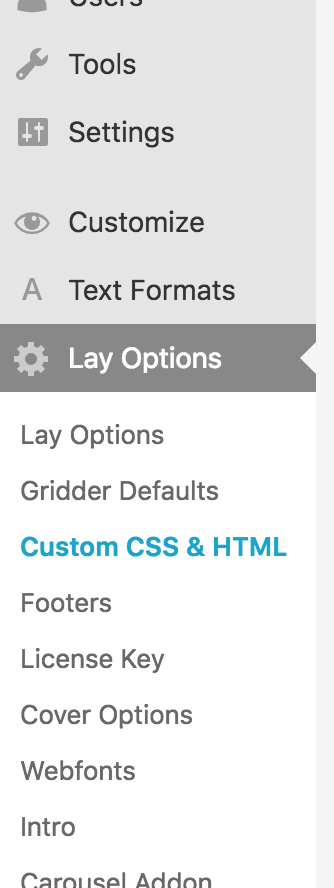
              Add it here:
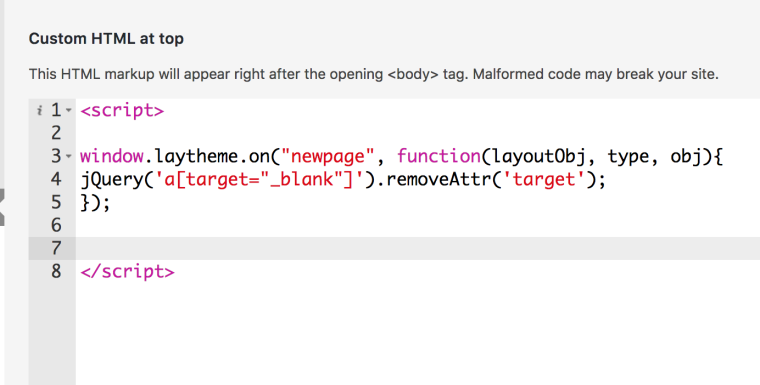
              0_1521232837624_Bildschirmfoto 2018-03-16 um 17.40.21.png

              Hope I could help!

              Please note that this is for ALL external links now.

              Best!

              Marius

              www.mariusjopen.world

              1 Reply Last reply
              0
              • H
                H
                huhno
                wrote on last edited by huhno
                #7

                hey @mariusjopen ,
                thanks for your answer. I think I don't know where to put that code...any hints?

                1 Reply Last reply
                0
                • mariusjopenM
                  mariusjopenM
                  mariusjopen
                  Global Moderator
                  wrote on last edited by
                  #8

                  Dear @huhno

                  have a look here:
                  0_1522079813530_Bildschirmfoto 2018-03-26 um 17.56.36.png

                  All the best!

                  Marius

                  www.mariusjopen.world

                  1 Reply Last reply
                  0

                  Hello! It looks like you're interested in this conversation, but you don't have an account yet.

                  Getting fed up of having to scroll through the same posts each visit? When you register for an account, you'll always come back to exactly where you were before, and choose to be notified of new replies (either via email, or push notification). You'll also be able to save bookmarks and upvote posts to show your appreciation to other community members.

                  With your input, this post could be even better 💗

                  Register Login
                  Reply
                  • Reply as topic
                  Log in to reply
                  • Oldest to Newest
                  • Newest to Oldest
                  • Most Votes


                  Online Users
                  L
                  lukas123
                  Forgot your key, lost your files, need a previous Lay Theme or Addon version? Go to www.laykeymanager.com
                  laytheme.com
                  • Login

                  • Don't have an account? Register

                  • Login or register to search.
                  • First post
                    Last post
                  0
                  • Recent
                  • Tags
                  • Popular
                  • Users
                  • Search