Delete fading effect on fullscreen addon
-
Hello there, i'm almost finalising the website. I did a gallery : http://www.claudia-ferri.com/category/portraits/ (psw: ciaone) and if you click on a image you can arrive on the exact image in the fullscreen slider (it only works with the first two images now, but basically there's some jQuery that say click the navigation circle (of nav bar for full screen) n° 2, or 4 or 6 etc. We do not see circles of nav because I made the white now).
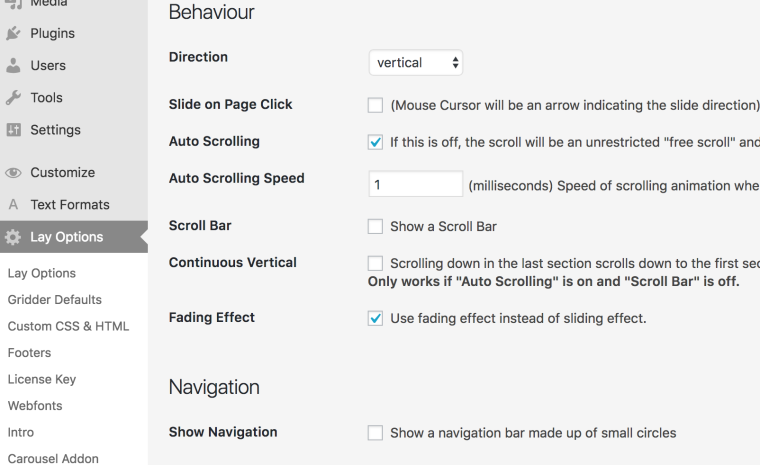
I would like to know - seeing this "link to a specific image" in the slider is not possible with a carousel (or is it?), and so I need to stay stick with fullscreen - if there is a way to add some java or whatever could be useful to delete the fading effect of the fullscreen so that the transition is "direct" as in the carousel.
thank you for you help!!
-
at this page it doesn't work at all:
http://www.claudia-ferri.com/category/portraits/Can you show me a page where you have achieved to slide to the second one?
All the best!
Marius
-
Sorry, I updated the website today
http://www.claudia-ferri.com/category/portraits works only on the first row now (need to link the rest)
ideally the gallery would need a carousel, but i know this operation of linking into a specific image is not possible with that (isn't it? )
So I have a fullscreen, but would love to delete fading effect.
Tanks
-
Any news @mariusjopen ? :) thanks for the help
-
-
it was thaaat easy!!!! thank you so much (i put it to 0 and it's perfect!)
-

Hello! It looks like you're interested in this conversation, but you don't have an account yet.
Getting fed up of having to scroll through the same posts each visit? When you register for an account, you'll always come back to exactly where you were before, and choose to be notified of new replies (either via email, or push notification). You'll also be able to save bookmarks and upvote posts to show your appreciation to other community members.
With your input, this post could be even better 💗
Register Login