Skip to content
  • Recent
  • Tags
  • Popular
  • Users
  • Search
Skins
  • Light
  • Brite
  • Cerulean
  • Cosmo
  • Flatly
  • Journal
  • Litera
  • Lumen
  • Lux
  • Materia
  • Minty
  • Morph
  • Pulse
  • Sandstone
  • Simplex
  • Sketchy
  • Spacelab
  • United
  • Yeti
  • Zephyr
  • Dark
  • Cyborg
  • Darkly
  • Quartz
  • Slate
  • Solar
  • Superhero
  • Vapor

  • Default (No Skin)
  • No Skin
Collapse

Lay Theme Forum

  1. Home
  2. Bug Reports
  3. setting up static layer on top of the website
setting up static layer on top of the website

Scheduled Pinned Locked Moved Bug Reports
2 Posts 2 Posters 313 Views 1 Watching
  • Oldest to Newest
  • Newest to Oldest
  • Most Votes
Reply
  • Reply as topic
Log in to reply
This topic has been deleted. Only users with topic management privileges can see it.
  • Y Offline
    Y Offline
    YULES
    wrote on last edited by
    #1

    Hi,

    I wanna put a static layer on top of the website and I want this as a PERMANENT VISIBLE LAYER which stays at place, when I scroll.
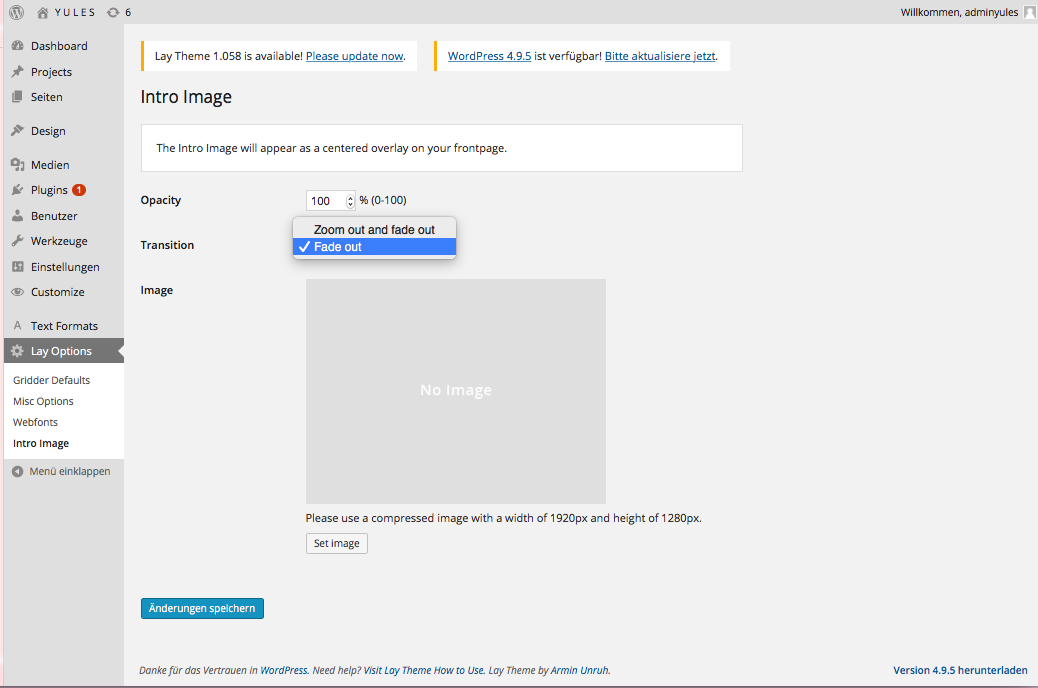
    But, there“re only 2 options in the INTRO IMAGE Category, but both are with FADE OUT. What can I do? (I cannot code) :
    Thxx!

    0_1526303264534_Bildschirmfoto 2018-05-14 um 13.14.40.png

    1 Reply Last reply
    0
    • mariusjopenM Offline
      mariusjopenM Offline
      mariusjopen
      Global Moderator
      wrote on last edited by
      #2

      Dear @YULES
      the INTRO image is not for that.

      You need to use the CUSTOM CSS and an HTML Element.

      Minimum knowledge of coding needed :-)
      Not much.

      Best!

      Marius

      www.mariusjopen.world

      1 Reply Last reply
      0
      Reply
      • Reply as topic
      Log in to reply
      • Oldest to Newest
      • Newest to Oldest
      • Most Votes


      Online Users
      Forgot your key, lost your files, need a previous Lay Theme or Addon version? Go to www.laykeymanager.com
      laytheme.com
      • Login

      • Don't have an account? Register

      • Login or register to search.
      • First post
        Last post
      0
      • Recent
      • Tags
      • Popular
      • Users
      • Search